MEGA Pass: Secure password manager icon

MEGA Pass Chrome Extension Analysis

Privacy, Security & Ad Blockers

Store listing title: MEGA Pass: Secure password manager

Chrome extension ID: deelhmmhejpicaaelihagchjjafjapjc

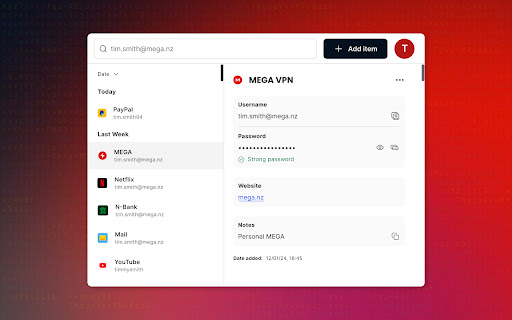
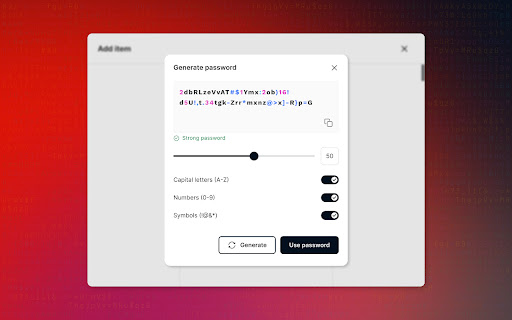
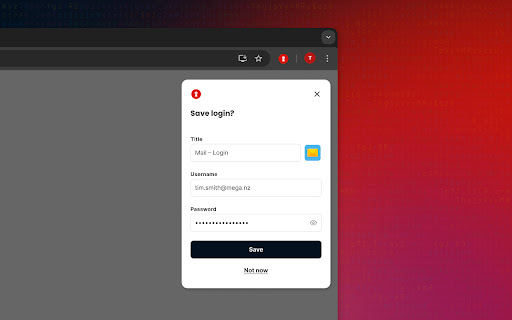
A password management tool that provides secure storage for credentials and credit cards. It includes features such as password generation, autofill, and a built-in 2FA authenticator for one-time passwords.

Developer:MEGA
Version:1.0.8.1
Size:6.25MiB
Last updated:

Overview

Installs

10K+

Rating

4.7

17 reviews

Languages

19 locales

Includes Deutsch, English, Indonesia, Nederlands...

Market analysis

Review-backed positioning, friction, and market signals for this Chrome extension.

Backed by review samples

Macro category

Privacy, Security & Ad Blockers

Pricing friction

Moderate review signal

Complaint intensity

Low review signal

Listing & review signals
Observed signals from store listing text and review samples.

Listing positioning

Positions itself as a highly secure and trustworthy password manager leveraging the established reputation of the MEGA brand. It emphasizes zero-knowledge encryption and seamless accessibility across multiple devices.

Inferred product pattern

Ecosystem expansion tool leveraging an existing secure infrastructure to provide a vertical security utility.

Review-backed pain points

Users have reported that the autofill feature fails to consistently populate usernames and passwords on various websites, sometimes filling only one or neither.

Observed feature gaps

Lack of a four-digit PIN for viewing passwords in the extension; limited integration within the main MEGA app according to user requests.

Tags
Password ManagerZero-Knowledge Encryption2FA AuthenticatorSecure StorageCross-Platform Sync
Target users

- Security-conscious individuals

- Existing MEGA cloud storage users

- Users seeking an alternative to browser-native password managers

Primary use cases

- Managing and syncing passwords across devices

- Generating strong, unique passwords

- Storing 2FA codes to avoid separate authenticator apps

- Securely saving payment card details

Positive themes

- High trust in MEGA's security reputation

- User-friendly implementation

- Preference over browser-integrated managers

Negative themes

- Inconsistent autofill functionality

- Lack of quick-access security like a PIN

Observed friction

- Payment required for meaningful usage

- Performance complaints detected

- No specific pricing complaints in reviews; listing describes a low-cost standalone plan or inclusion in MEGA paid plans.

Evidence boundary: Data extracted from the Chrome Web Store listing and a sample of 9 user reviews. Small review sample size compared to total user base may not capture all edge-case bugs.
Complaint summaries
Review-backed complaint signals grouped by operational area.

Support

No support or account-related complaints found in the provided review samples.

Reliability

Reliability issues specifically concerning the autofill feature's performance across different websites.

Privacy

No privacy complaints; users explicitly mention trusting the brand's security model.

Access & pricing

- Free entry with paid features

- Account required for core usage

- Trial or limited free usage before paid plan

Store listing facts

Listing assets

- Screenshots: 3

- Videos: 0

- Languages: 19

Trust signals

- Privacy policy

- Developer contact

- Support link

Store metadata

- Version: 1.0.8.1

- Size: 6.25MiB

- Last updated:

Store description excerpt
Short excerpt from the public Chrome Web Store listing; full copy is available on the official store page.
Securely and easily manage all of your passwords from your browser. MEGA Pass is available on a low-cost standalone plan. It’s also included with any MEGA paid personal or business plan at no extra cost. Sign up today for a 30-day free trial. * Trusted by millions For more than a decade, people worldwide have trusted MEGA to protect their data. MEGA Pass takes our commitment to privacy a step further by ensuring your passwords are always secure and accessible wherever you are. * Password security made simple We use multiple layers of security, including zero-knowledge encryption, to keep your passwords safe and private. We’ve been a global leader in privacy for over a decade and never had a breach. * Ease and convenience Autofill login details, generate new, ultra-secure passwords, and import passwords from other managers. MEGA Pass makes password management easy. * Manage your password…

Listing SEO keywords

Search intent keywords
Keyword signals for evaluating how users may discover, compare, or search for this extension category.

Core discovery

secure password managerzero-knowledge encryptionbrowser password autofill2FA authenticator extension

Comparison

MEGA Pass vs Proton PassMEGA Pass vs Norton Password ManagerMEGA Pass alternatives

Problem

stop forgetting passwordssecurely store credit cardsmanage 2FA codessync passwords across devices

Alternative

best zero-knowledge password managersecure alternative to chrome passwordstrusted password vault

Similar extensions

Jump to related discovery paths:

FAQ

What is MEGA Pass mainly used for?
A password management tool that provides secure storage for credentials and credit cards. It includes features such as password generation, autofill, and a built-in 2FA authenticator for one-time passwords.
What market signals stand out?
Visible niche traction with limited review base. Last known update: 01/10/2026.
What should builders compare before entering this space?
Compare install concentration, rating quality, update recency, screenshots, developer portfolio, listing claims, and review-backed friction signals.
Is this page review-backed?
Backed by review samples. This page combines store metadata with selected review signals, while raw store metrics remain visible for comparison.

Screenshots

MEGA Pass: Secure password manager screenshot

Links

Privacy policy: https://mega.io/privacy

Support links: https://mega.io/contact

Recommended Chrome extensions

Related listings from the same category, trending peers, and the same publisher portfolio.

Browse workflow