

File Converter Chrome Extension Analysis
Automation & Workflow EfficiencyStore listing title: File Converter - By Online-Convert.com
Chrome extension ID: dicgkflojhbopmagcacdklcpdfdcnhko
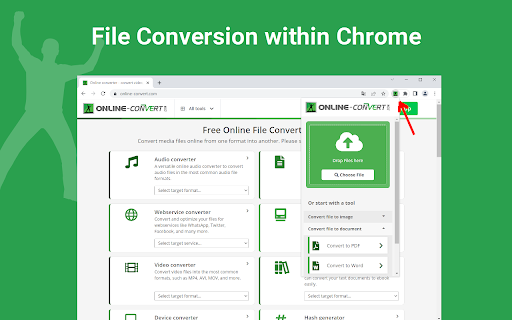
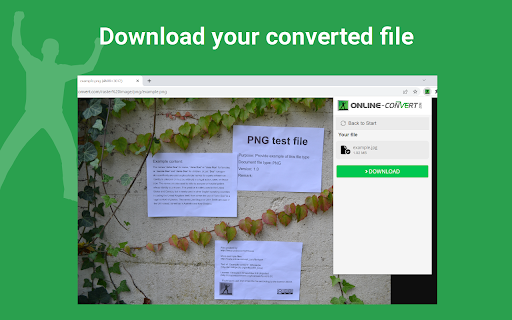
This tool acts as a shortcut to the online-convert.com service, allowing users to perform various file format conversions directly from their Chrome toolbar or within the Gmail compose window. It processes file types ranging from images and documents to complex media files.
Overview
Installs
300K+
Rating
★ 4.5
318 reviews
Languages
12 locales
Includes Deutsch, English, Indonesia, Tiếng Việt...
Market analysis
Review-backed positioning, friction, and market signals for this Chrome extension.
Macro category
Automation & Workflow Efficiency
Pricing friction
Moderate review signal
Complaint intensity
Moderate review signal
Listing positioning
The extension positions itself as an official bridge between the user's browser and the online-convert.com platform. It emphasizes convenience by offering direct conversion tools for images, documents, audio, and video, including integration within Gmail.
Inferred product pattern
Utility portal/web-wrapper extension
Review-backed pain points
Users feel the extension offers little advantage over using website bookmarks, citing slow upload speeds for large files and clunky navigation that requires excessive clicking compared to the direct website experience.
Observed feature gaps
Lack of in-browser processing (redirects to the website), failure to maintain active conversion sessions when switching tabs, and limited conversion options within the context menu compared to the full website capabilities.
- Gmail users
- Casual web users
- Office professionals
- Image conversion
- Document format conversion
- Video/Audio transcoding
- Gmail attachment management
- Appreciates the core utility of the underlying online-convert.com service
- Valued as a supplementary tool for minor tasks
- Redundancy compared to simple browser bookmarks
- Poor performance with large file uploads
- Broken user interface flows
- Requirement to visit the website rather than processing in-browser
- Free-tier complaints detected
- Performance complaints detected
- Users expressed frustration over file size limitations in the free tier, leading to requests for payment to process larger media files.
Support
No specific support or refund complaints identified beyond general frustration with the tool's perceived lack of functionality.
Reliability
Users reported that uploads time out if the browser tab is left inactive and that the extension occasionally fails to provide output after a 'conversion' process is triggered.
Privacy
No direct privacy complaints found, though one user expressed suspicion regarding the handling of information.
- Free entry with paid features
- No account requirement observed
- Limited free usage observed
Store listing facts
- Screenshots: 2
- Videos: 0
- Languages: 12
- Privacy policy
- Developer contact
- Official website
- Support link
- Version: 7.5.1
- Size: 4.03MiB
- Last updated:
Listing SEO keywords
Core discovery
Comparison
Problem
Alternative
Similar extensions
Jump to related discovery paths:
FAQ
Screenshots
Links
Website: online-convert.com
Privacy policy: https://www.online-convert.com/privacy
Support links: https://www.online-convert.com/faq


