PiP Unblocker icon

PiP Unblocker Chrome Extension Analysis

Automation & Workflow Efficiency

Chrome extension ID: djjjomidddlggllpialpgkpnkdaeggfa

PiP Unblocker is a browser extension that bypasses website-imposed restrictions on media playback features. It targets streaming services that disable Picture-in-Picture or fullscreen functionality by manipulating security headers.

Developer:POLYWOCK
Version:0.5
Size:6.24KiB
Last updated:

Overview

Installs

2K+

Rating

4.6

16 reviews

Languages

1 locales

Includes English

Market analysis

Review-backed positioning, friction, and market signals for this Chrome extension.

Backed by review samples

Macro category

Automation & Workflow Efficiency

Pricing friction

Low review signal

Complaint intensity

Low review signal

Listing & review signals
Observed signals from store listing text and review samples.

Listing positioning

The product is positioned as a utility to unblock browser features like Picture-in-Picture and fullscreen mode. It achieves this by clearing Permissions-Policy and Feature-Policy headers on specific websites.

Inferred product pattern

A lightweight header-manipulation utility designed to bypass client-side feature restrictions on media streaming sites.

Review-backed pain points

Users have reported that while PiP is unblocked, they may lose the ability to fast-forward or reverse video, and the extension does not work on all URLs.

Observed feature gaps

Potential interference with native video player controls (seek/fast-forward/reverse) on certain platforms.

Tags
Picture In PictureVideo UnblockerStreaming UtilityBrowser Hack
Target users

- Streaming service viewers

- Multitaskers

- Video content consumers

Primary use cases

- Enabling Picture-in-Picture on restricted streaming platforms

- Restoring fullscreen capabilities on websites

- Enabling borderless video playback

Positive themes

- Successful unblocking of Disney+

- Compatibility with YouTube TV

- Enables borderless viewing on Netflix

Negative themes

- Loss of video playback controls like fast-forward and reverse

- Incompatibility with certain specific websites

Observed friction

- No pricing friction observed; the product appears to be free.

Evidence boundary: Analysis based on store listing details and user reviews confirming success with Disney+ and YouTube TV, alongside reports of broken playback controls. Small sample size of reviews may not capture all website incompatibility issues.
Complaint summaries
Review-backed complaint signals grouped by operational area.

Support

No support complaints observed.

Reliability

Some users experienced functional issues where video controls were disabled or the extension failed to work on specific sites.

Privacy

No privacy complaints observed.

Access & pricing

- Free usage observed

- No account requirement observed

- Free plan or free usage claimed

Store listing facts

Listing assets

- Screenshots: 1

- Videos: 0

- Languages: 1

Trust signals

- Developer contact

Store metadata

- Version: 0.5

- Size: 6.24KiB

- Last updated:

Store description excerpt
Short excerpt from the public Chrome Web Store listing; full copy is available on the official store page.
Unblock features (like PiP, fullscreen, etc) by clearing Permissions-Policy and Feature-Policy headers. Click the extension icon to toggle PiP (and remove the disablePictureInPicture attribute). . Compatible with Youtube TV, Disney Plus, Crunchyroll, and more. Source code: https://github.com/polywock/pipUnblocker Privacy policy: https://github.com/polywock/pipUnblocker/blob/master/PRIVACY_POLICY.md If you're only going to use this extension for a specific website or two. I recommend going to that website, right click the extension icon, and limit the extension's Site Access to only that website.

Listing SEO keywords

Search intent keywords
Keyword signals for evaluating how users may discover, compare, or search for this extension category.

Core discovery

enable picture in pictureunblock PiP streamingbypass Permissions-PolicyDisney Plus PiP unblockerYouTube TV picture in picture

Comparison

Google Picture-in-Picture extension

Problem

cannot use picture in picturePiP disabled on Disney Plusfullscreen blocked on streaming sites

Alternative

video unblocker extensionbrowser feature unblocker

Similar extensions

Jump to related discovery paths:

FAQ

What is PiP Unblocker mainly used for?
PiP Unblocker is a browser extension that bypasses website-imposed restrictions on media playback features. It targets streaming services that disable Picture-in-Picture or fullscreen functionality by manipulating security headers.
What market signals stand out?
Early or small audience with limited review base. Last known update: 07/24/2024.
What should builders compare before entering this space?
Compare install concentration, rating quality, update recency, screenshots, developer portfolio, listing claims, and review-backed friction signals.
Is this page review-backed?
Backed by review samples. This page combines store metadata with selected review signals, while raw store metrics remain visible for comparison.

Screenshots

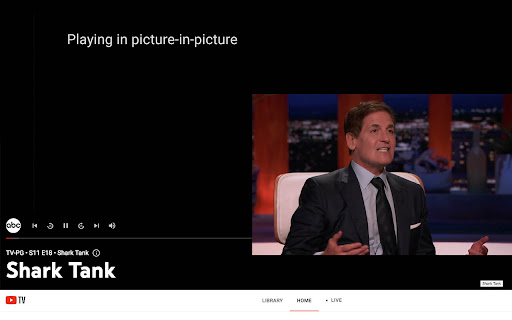
PiP Unblocker screenshot

Recommended Chrome extensions

Related listings from the same category, trending peers, and the same publisher portfolio.

Browse workflow