MightyText - SMS from PC & Text from Computer icon

MightyText Chrome Extension Analysis

Automation & Workflow Efficiency

Store listing title: MightyText - SMS from PC & Text from Computer

Chrome extension ID: dkfhfaphfkopdgpbfkebjfcblcafcmpi

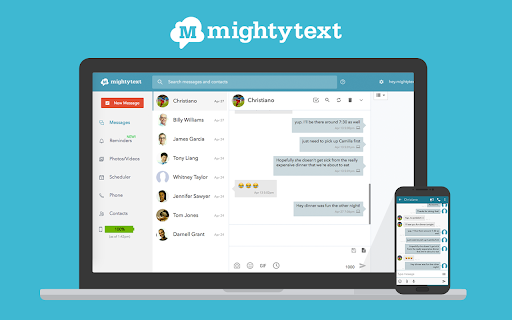
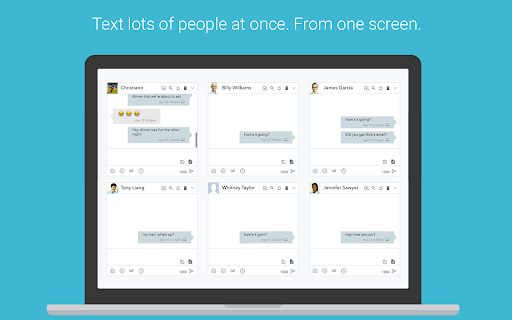
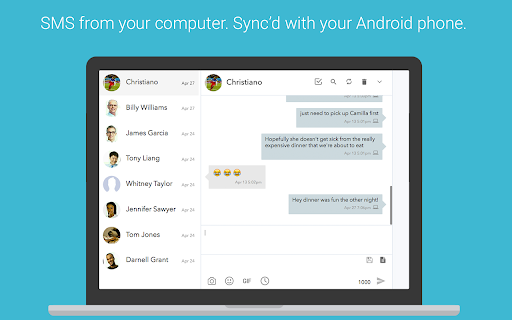
MightyText is a Chrome extension and Android app pairing that syncs text messages, calls, and phone notifications to a web browser. It enables users to send and receive messages from their PC or Mac using their existing Android phone number.

Developer:MightyText
Version:25.9.3
Size:2.68MiB
Last updated:

Overview

Installs

200K+

Rating

4.1

7,276 reviews

Languages

3 locales

Includes English, español, français

Market analysis

Review-backed positioning, friction, and market signals for this Chrome extension.

Backed by review samples

Macro category

Automation & Workflow Efficiency

Pricing friction

Moderate review signal

Complaint intensity

High review signal

Listing & review signals
Observed signals from store listing text and review samples.

Listing positioning

The product is positioned as a seamless bridge between Android devices and desktop computers, allowing users to manage SMS, MMS, and notifications without switching devices. It emphasizes the ability to use the user's current phone number rather than requiring a new virtual number.

Inferred product pattern

Android-to-Desktop SMS synchronization bridge requiring a companion mobile app.

Review-backed pain points

Users report that the extension frequently stops working after Chrome updates, experiences login loops, and has a convoluted subscription cancellation process.

Observed feature gaps

Reports of broken Gmail integration and a perceived lack of updates to the core web application.

Tags
SMS SyncAndroid IntegrationText From ComputerMessaging Tool
Target users

- Android smartphone users

- Desktop professionals

- Multi-device power users

Primary use cases

- Sending and receiving SMS/MMS from a desktop

- Monitoring Android notifications on a computer

- Syncing phone photos and battery status to PC

Positive themes

- Convenience of desktop texting

- Effective use of existing phone number

Negative themes

- Service instability and breakage

- Difficulty canceling paid subscriptions

- Poor customer support responsiveness

- Loss of Gmail integration

Observed friction

- Free-tier complaints detected

- Refund complaints detected

- Performance complaints detected

- High friction regarding the Pro version; users claim the cancellation link is hidden and that payments continue after requests to stop.

Evidence boundary: Analysis based on the official store listing and a set of highly critical user reviews. Review samples provided are predominantly low-rating, which may overrepresent negative sentiment.
Complaint summaries
Review-backed complaint signals grouped by operational area.

Support

Support is described as providing automated, unhelpful responses that fail to resolve technical or billing issues.

Reliability

Severe reliability issues cited, including the app failing to load, not syncing, or becoming completely non-functional in latest browser versions.

Privacy

No specific data privacy breaches reported, though one user labeled the app as 'spamware' due to installation behavior.

Access & pricing

- Free entry with paid features

- Account required for core usage

- Limited free usage observed

Store listing facts

Listing assets

- Screenshots: 4

- Videos: 1

- Languages: 3

Trust signals

- Privacy policy

- Developer contact

- Official website

- Support link

Store metadata

- Version: 25.9.3

- Size: 2.68MiB

- Last updated:

Store description excerpt
Short excerpt from the public Chrome Web Store listing; full copy is available on the official store page.
★ Send & Receive SMS Text Messages on your PC or Mac ★ Uses your CURRENT Android Phone Number ★ 100% Free ★ Get started in less than 60 seconds ★ Sync your phone's photos and videos instantly to MightyText ★ See your Android app notifications on your Computer (from any app - not just your sms app) ★ Sync your phone's MMS Picture Messages to your computer ★ Get low battery alerts on your computer (when your phone has low battery) Installation Instructions: Step #1: Install our Android App on your phone: https://play.google.com/store/apps/details?id=com.texty.sms Step #2: Link your Google Account and Complete Setup on your phone Step #3: Go to https://mightytext.net/app in Chrome on your desktop Step #4: Sign in to MightyText on your desktop browser with the same Google Account used on your phone Step #5: Install this extension Note - This MightyText Chrome Extension will work only AFTER…

Listing SEO keywords

Search intent keywords
Keyword signals for evaluating how users may discover, compare, or search for this extension category.

Core discovery

SMS from PCtext from computerAndroid SMS syncMightyText extension

Comparison

MightyText vs Google VoiceMightyText vs AirDroid

Problem

cannot send text from pcandroid notifications on desktopsync sms to chrome

Alternative

MightyText alternativesAirDroidGoogle Messages for web

Similar extensions

Jump to related discovery paths:

FAQ

What is MightyText mainly used for?
MightyText is a Chrome extension and Android app pairing that syncs text messages, calls, and phone notifications to a web browser. It enables users to send and receive messages from their PC or Mac using their existing Android phone number.
What market signals stand out?
Established adoption with substantial review base. Last known update: 06/20/2026.
What should builders compare before entering this space?
Compare install concentration, rating quality, update recency, screenshots, developer portfolio, listing claims, and review-backed friction signals.
Is this page review-backed?
Backed by review samples. This page combines store metadata with selected review signals, while raw store metrics remain visible for comparison.

Screenshots

MightyText - SMS from PC & Text from Computer screenshot

Links

Recommended Chrome extensions

Related listings from the same category, trending peers, and the same publisher portfolio.

Browse workflow