
Mouse Dictionary Chrome Extension Analysis
Automation & Workflow EfficiencyChrome extension ID: dnclbikcihnpjohihfcmmldgkjnebgnj
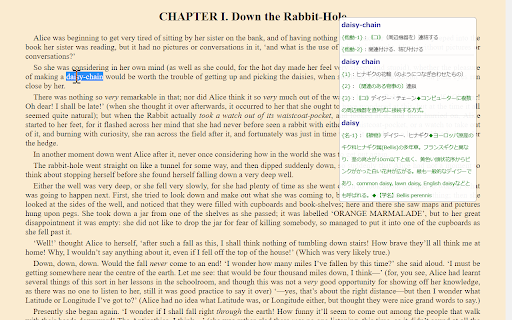
Mouse Dictionary is a browser extension that enables instant word translation via mouse-over actions. It allows users to import custom dictionary files, making it a flexible solution for reading English or Japanese technical documents and specialized literature.
Overview
Installs
100K+
Rating
★ 4.7
116 reviews
Languages
2 locales
Includes English, 日本語
Market analysis
Review-backed positioning, friction, and market signals for this Chrome extension.
Macro category
Automation & Workflow Efficiency
Pricing friction
Low review signal
Complaint intensity
Moderate review signal
Listing positioning
Mouse Dictionary positions itself as a high-speed, local dictionary tool designed for language learners and researchers. It emphasizes its ability to function across various formats, including PDFs and YouTube captions, while offering deep customization through dictionary data imports.
Inferred product pattern
Local-first utility extension focusing on high-speed data lookup with user-provided datasets.
Review-backed pain points
Users have reported that key features like shortcut keys have stopped working over time, and some users experience performance issues or hanging when attempting to delete large dictionary datasets.
Observed feature gaps
Reviewers have requested support for OCR-processed PDFs, a sidebar mode, and better compatibility with pages that utilize frames.
- Language Learners
- Academic Researchers
- Translators
- Professionals reading foreign language documentation
- Instant word lookup during reading
- PDF document translation/annotation
- Vocabulary building via custom dictionary imports
- Cross-referencing technical terminology
- Exceptional speed and instant feedback
- Flexibility to import custom local dictionary data
- Highly useful for academic and professional translation workflows
- Open-source nature and extensibility
- Broken functionality regarding keyboard shortcuts
- Issues with dictionary data deletion processes
- Lack of updates or maintenance for specific features
- Incompatibility with certain website frames
- Performance complaints detected
- The extension is free to use with no apparent monetization or pricing friction identified.
Support
Users expressed frustration regarding the lack of developer maintenance and failure to address broken features like keyboard shortcuts.
Reliability
Some users report intermittent functionality, specifically regarding shortcut keys and dictionary management processes.
Privacy
No privacy or security-related complaints identified.
- Free usage observed
- No account requirement observed
- Free plan or free usage claimed
Store listing facts
- Screenshots: 1
- Videos: 0
- Languages: 2
- Developer contact
- Official website
- Support link
- Version: 1.7.1
- Size: 3.76MiB
- Last updated:
Listing SEO keywords
Core discovery
Comparison
Problem
Alternative
Similar extensions
Jump to related discovery paths:
FAQ
Screenshots
Links
Website: mouse-dictionary.netlify.app
Support links: https://github.com/wtetsu/mouse-dictionary/issues