Okta Browser Plugin icon

Okta Browser Plugin Chrome Extension Analysis

Privacy, Security & Ad Blockers

Chrome extension ID: glnpjglilkicbckjpbgcfkogebgllemb

This extension acts as a browser-based identity and access management (IAM) client. It facilitates automatic SSO logins, manages password storage, and integrates with the user's corporate Okta dashboard to centralize application access.

Developer:Okta, Inc.
Version:6.46.0
Size:3.38MiB
Last updated:

Overview

Installs

4.0M+

Rating

4.4

950 reviews

Languages

1 locales

Includes English

Market analysis

Review-backed positioning, friction, and market signals for this Chrome extension.

Backed by review samples

Macro category

Privacy, Security & Ad Blockers

Pricing friction

Low review signal

Complaint intensity

Moderate review signal

Listing & review signals
Observed signals from store listing text and review samples.

Listing positioning

The Okta Browser Plugin is positioned as an essential enterprise security tool that provides secure, one-click access to business and personal applications. It emphasizes seamless credential management, password generation, and efficient switching between multiple organizational Okta accounts.

Inferred product pattern

Enterprise-mandated browser extension for SSO and credential management.

Review-backed pain points

Users struggle with the extension incorrectly identifying search fields as password inputs, failing to handle complex logins like those with CAPTCHAs, and repetitive bugs regarding installation detection.

Observed feature gaps

Lack of per-site disable functionality for auto-login/fill, difficulty managing multiple phone devices, and inability to customize or hide the 'Recently Used' section in the UI.

Tags
Identity ManagementPassword ManagerSSOEnterprise SecurityAuthentication
Target users

- Enterprise employees

- IT administrators

- Corporate users utilizing SSO

Primary use cases

- SSO authentication

- Automatic form filling

- Password management

- Switching between multiple Okta profiles

Positive themes

- Secure and efficient login workflows

- Convenience for managing multiple work-related applications

- Faster authentication processes

Negative themes

- Conflicts with other web services

- Aggressive form-filling causing incorrect data entry

- Issues with sites requiring CAPTCHAs

- Installation loops and forced usage requirements

Observed friction

- Performance complaints detected

- No direct pricing friction; the tool is a component of an enterprise identity service and is free to use with an existing Okta account.

Evidence boundary: Data is derived from user reviews highlighting common technical bugs, integration conflicts, and UI workflow annoyances alongside official listing details. Reviews represent a subset of the 5 million+ user base; technical complaints may be environment-specific or related to older versions.
Complaint summaries
Review-backed complaint signals grouped by operational area.

Support

Users express frustration over a lack of clear channels for reporting bugs and feedback forms that fail to load.

Reliability

Significant reports of the plugin interfering with site functionality (e.g., conference call tools) and persistent errors where the extension fails to detect its own installation.

Privacy

Minor complaints regarding the use of the plugin interface for product advertising.

Access & pricing

- Free usage observed

- Account required for core usage

- Free plan or free usage claimed

Store listing facts

Listing assets

- Screenshots: 3

- Videos: 0

- Languages: 1

Trust signals

- Privacy policy

- Developer contact

- Official website

Store metadata

- Version: 6.46.0

- Size: 3.38MiB

- Last updated:

Store description excerpt
Short excerpt from the public Chrome Web Store listing; full copy is available on the official store page.
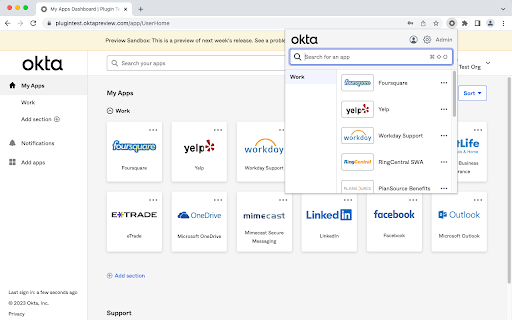
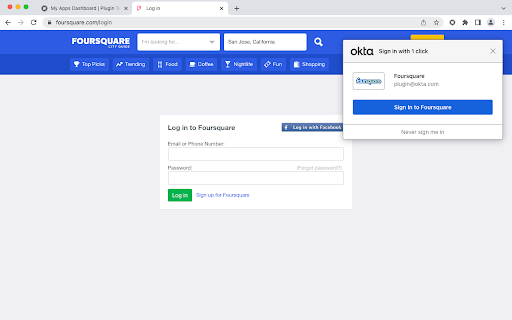
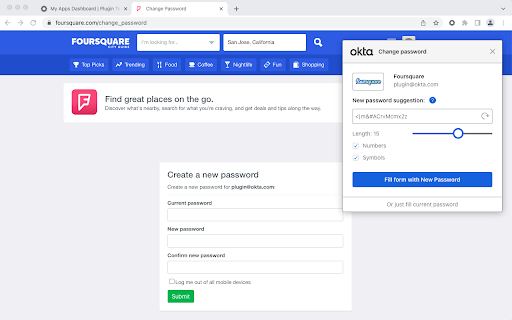
Okta Browser Plugin protects your passwords and securely logs you into all your business and personal apps. The world's largest organizations and over 100 million people rely on Okta to connect to apps inside and outside of their organization knowing that their credentials are protected. With the Okta Browser Plugin you can: *Automatically sign in to your business and personal apps with just one click *Add your own apps into Okta *Quickly generate strong, random passwords on the fly for all your apps *Easily access your Okta dashboard apps and tabs *Seamlessly and securely switch between multiple Okta accounts You need an Okta account to use the Okta Browser Plugin. If you cannot access your Okta account via Okta Browser Plugin, please contact your IT admin. Use the following link to learn about the most recent version changes: https://help.okta.com/en/prod/Content/Topics/Settings/Versi…

Listing SEO keywords

Search intent keywords
Keyword signals for evaluating how users may discover, compare, or search for this extension category.

Core discovery

Okta extensionOkta loginSingle Sign-On browser toolOkta password manager

Comparison

Okta vs other password managersalternative to Okta plugin

Problem

Okta plugin not workingOkta extension bugsOkta form filling issues

Alternative

enterprise password managerSSO browser extension

Similar extensions

Jump to related discovery paths:

FAQ

What is Okta Browser Plugin mainly used for?
This extension acts as a browser-based identity and access management (IAM) client. It facilitates automatic SSO logins, manages password storage, and integrates with the user's corporate Okta dashboard to centralize application access.
What market signals stand out?
Large installed base with moderate review base. Last known update: 05/18/2026.
What should builders compare before entering this space?
Compare install concentration, rating quality, update recency, screenshots, developer portfolio, listing claims, and review-backed friction signals.
Is this page review-backed?
Backed by review samples. This page combines store metadata with selected review signals, while raw store metrics remain visible for comparison.

Screenshots

Okta Browser Plugin screenshot

Links

Recommended Chrome extensions

Related listings from the same category, trending peers, and the same publisher portfolio.

Browse workflow