LingQ Importer icon

LingQ Importer Chrome Extension Analysis

Automation & Workflow Efficiency

Chrome extension ID: eaanhanppiifopiabnfmhjbikjmeeale

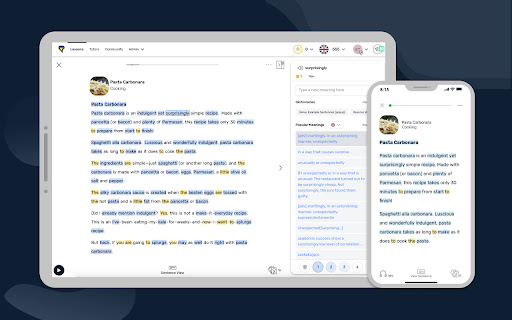
This extension functions as a bridge between web content and the LingQ ecosystem. It automatically extracts text, titles, and media metadata from websites, allowing users to organize these inputs into specific courses for language study.

Version:2.3.47
Size:261KiB
Last updated:

Overview

Installs

80K+

Rating

3.1

55 reviews

Languages

1 locales

Includes English

Market analysis

Review-backed positioning, friction, and market signals for this Chrome extension.

Backed by review samples

Macro category

Automation & Workflow Efficiency

Pricing friction

High review signal

Complaint intensity

High review signal

Listing & review signals
Observed signals from store listing text and review samples.

Listing positioning

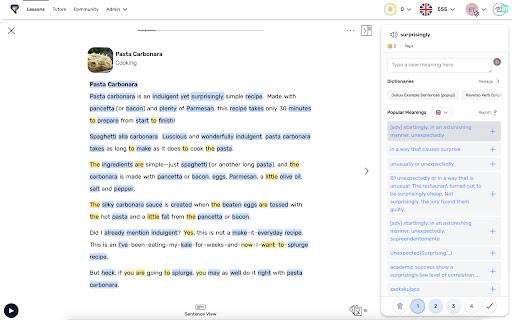
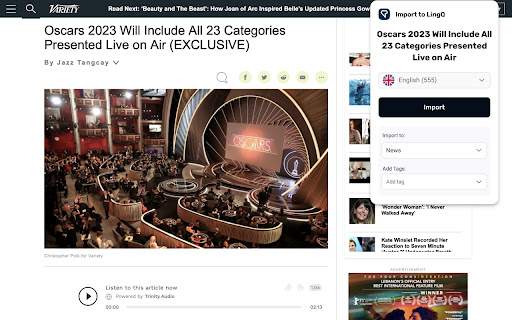
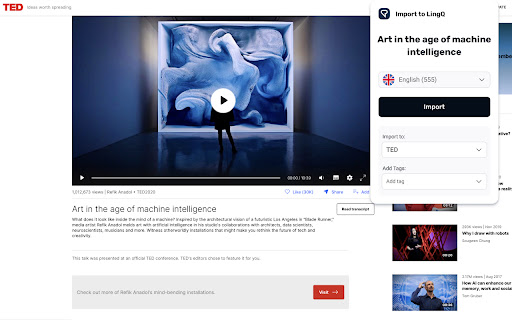
The LingQ Importer is positioned as a companion tool to the LingQ language learning platform, designed to convert web-based content into studyable lessons. It enables users to capture articles, web pages, and video captions from major platforms directly into their LingQ account for vocabulary tracking and analysis.

Inferred product pattern

Utility extension tightly coupled to a proprietary SaaS platform.

Review-backed pain points

Users report chronic technical failure for YouTube and Netflix imports, incomplete content scraping, and recurring 'no captions found' errors. Paid users expressed significant frustration that a core premium feature is often non-functional.

Observed feature gaps

Lack of reliable multi-platform support, issues with dual-subtitle handling compared to competitors, and inconsistent text parsing for long-form web content.

Tags
Language LearningContent ImporterEducationStudy ToolYouTube Captions
Target users

- Language learners

- LingQ platform users

- Polyglots

Primary use cases

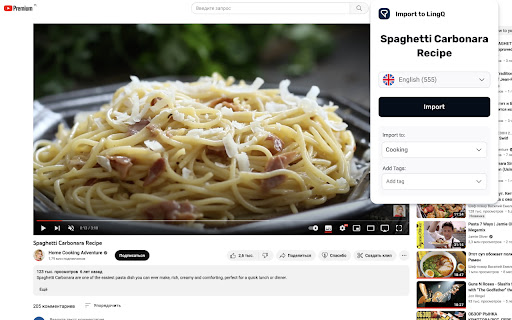
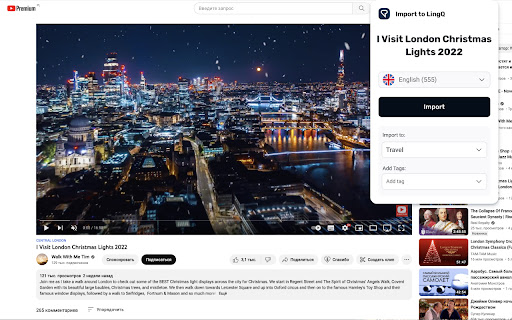
- Importing YouTube video captions

- Converting web articles to lessons

- Creating custom language study content

Positive themes

- Appreciated core utility when functional

- Useful for importing various web sources

Negative themes

- Frequent failure of YouTube/Netflix caption imports

- Incomplete text extraction/truncation

- Perceived lack of developer maintenance

- High frustration regarding paid subscription value vs. tool reliability

Observed friction

- Payment required for meaningful usage

- Free-tier complaints detected

- Performance complaints detected

- Users expressed dissatisfaction with the limited functionality available on the free tier and frustration over paying for a premium subscription when the core import tool experiences frequent outages.

Evidence boundary: The data is based on multiple user reviews highlighting persistent technical failures in content scraping from popular video platforms and websites. The review sample is heavily skewed toward users experiencing technical issues, which is common for support-seeking behavior in public stores.
Complaint summaries
Review-backed complaint signals grouped by operational area.

Support

Reviews indicate a perception that development is too slow and that the extension lacks adequate maintenance or bug-fixing responsiveness.

Reliability

High incidence of reports regarding broken imports, specific errors with YouTube/Netflix caption scraping, and truncated data, with some users stating it works less than 20% of the time.

Privacy

No privacy-specific complaints noted in the sample.

Access & pricing

- Free entry with paid features

- Account required for core usage

- Limited free usage observed

Store listing facts

Listing assets

- Screenshots: 6

- Videos: 0

- Languages: 1

Trust signals

- Privacy policy

- Developer contact

- Official website

Store metadata

- Version: 2.3.47

- Size: 261KiB

- Last updated:

Store description excerpt
Short excerpt from the public Chrome Web Store listing; full copy is available on the official store page.
The LingQ Importer extension allows you to automatically import web pages, articles, and video captions from sites like YouTube and Netflix into LingQ for studying using LingQ's web and mobile language learning tools. The Importer will automatically grab the title, text, image, captions and original url and display them in the LingQ Reader so you can look up and track all word data using LingQ's lookup, review and tracking functionality. The LingQ Importer will: * Import the text, captions and title of whatever page you are on * Import the article image and original url * Allow you to specify your LingQ account and language for import * Allow you to specify the course to import to and create a course if necessary * Allow you to add tags to help categorize the lesson in your account The LingQ Importer lets you learn languages from any content you find on the web. Get LingQing today!

Listing SEO keywords

Search intent keywords
Keyword signals for evaluating how users may discover, compare, or search for this extension category.

Core discovery

LingQ importerimport web content to LingQlanguage learning chrome extensionYouTube caption scraper

Comparison

LingQ alternativelanguage learning tools

Problem

LingQ importer not workingLingQ YouTube import errorLingQ extension broken

Alternative

language study toolstext extraction for language learning

Similar extensions

Jump to related discovery paths:

FAQ

What is LingQ Importer mainly used for?
This extension functions as a bridge between web content and the LingQ ecosystem. It automatically extracts text, titles, and media metadata from websites, allowing users to organize these inputs into specific courses for language study.
What market signals stand out?
Visible niche traction with limited review base. Last known update: 06/04/2026.
What should builders compare before entering this space?
Compare install concentration, rating quality, update recency, screenshots, developer portfolio, listing claims, and review-backed friction signals.
Is this page review-backed?
Backed by review samples. This page combines store metadata with selected review signals, while raw store metrics remain visible for comparison.

Screenshots

LingQ Importer screenshot

Links

Recommended Chrome extensions

Related listings from the same category, trending peers, and the same publisher portfolio.

Browse education
Rememberry - Translate and Memorize with Flashcards icon

Rememberry - Translate and Memorize with Flashcards

rememberry

Translate words while browsing and turn them into spaced repetition flashcards to build foreign language vocabulary.

Installs

100K+

Rating

4.6

Transcript - AI Homework Helper icon

Transcript - AI Homework Helper

Transcript

Streamline your study experience with AI: Instant answers, deep insights, and personalized learning across subjects.

Installs

100K+

Rating

3.4

Revision History: Writing Process Visibility for Google Docs & Slides icon

Revision History: Writing Process Visibility for Google Docs & Slides

Revision History

Built for teachers: See how students write, not just what they wrote. View the writing process in Google Docs & Slides.

Installs

100K+

Rating

3.7

Passei Direto – Ferramentas de Estudo icon

Passei Direto – Ferramentas de Estudo

pd.services

A extensão que te ajuda a achar as respostas para suas perguntas, utilizando a maior rede de estudantes do Brasil.

Installs

100K+

Rating

3.7

SolvelyAI - AI Homework Tutor &  Study Helper icon

SolvelyAI - AI Homework Tutor & Study Helper

cws-test-group-1

SolvelyAI is your AI Homework Helper—instant screenshot solving, step-by-step AI Answers, AI Summary, and Study Helper tools.

Installs

100K+

Rating

4.6

Readlang Web Reader icon

Readlang Web Reader

readlang

Read websites in the language you're learning, translate words you don't know, and we'll create flashcards to help you remember.

Installs

100K+

Rating

4.3

Talk & Comment - Voice notes anywhere icon

Talk & Comment - Voice notes anywhere

TalkandComment.com

Voice notes for classrooms and teams. Give feedback students actually hear.

Installs

100K+

Rating

4.1

You Shall Not Pass by TeacherMagic.org icon

You Shall Not Pass by TeacherMagic.org

JamesTyler

Blocks proxy sites, filter evasion exploits, tab spam, and Google Sites abuse on student Chromebooks. Free forever.

Installs

100K+

Rating

1.7

Dualsub - YouTube Subtitle Translator icon

Dualsub - YouTube Subtitle Translator

Dualsub Studio

Translate and display dual subtitles on YouTube and other video websites.

Installs

100K+

Rating

3.6

Education Pro Browser Extension MV3 icon

Education Pro Browser Extension MV3

Ativion

Education Pro Browser Extension MV3 for use on Windows and Mac with EdPro client installed

Installs

100K+

Rating

1.0