Web Paint for Google Chrome™ icon

Web Paint for Google Chrome™ Chrome Extension Analysis

Automation & Workflow Efficiency

Chrome extension ID: efifccmcdofkcjcleapkaeedlhcejcmd

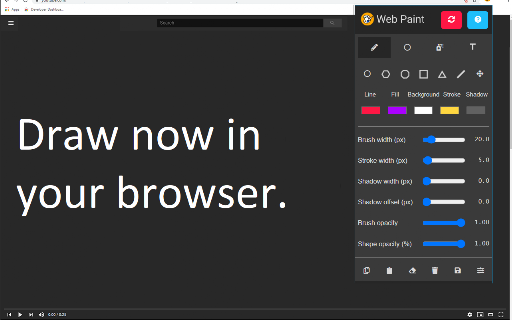
Web Paint is a Chrome extension that provides a suite of drawing tools, including pencils, shapes, and text boxes, to annotate live websites. It allows users to customize line thickness and colors, then capture the annotated view as a screenshot.

Developer:Free Apps
Version:3.0.0
Size:441KiB
Last updated:

Overview

Installs

40K+

Rating

3.9

48 reviews

Languages

41 locales

Includes Deutsch, English, English (United States), Filipino...

Market analysis

Review-backed positioning, friction, and market signals for this Chrome extension.

Backed by review samples

Macro category

Automation & Workflow Efficiency

Pricing friction

Low review signal

Complaint intensity

Moderate review signal

Listing & review signals
Observed signals from store listing text and review samples.

Listing positioning

The product is positioned as a simple utility for drawing and adding text to web pages to highlight important information. It emphasizes a streamlined workflow of marking up a page and then saving the result as a screenshot for communication via email.

Inferred product pattern

A basic visual overlay utility designed to facilitate the creation of annotated screenshots.

Review-backed pain points

Users are strongly frustrated by the inability to create hollow shapes (boxes with no fill), which defeats the purpose of drawing attention to elements. Additionally, markups do not remain anchored to the webpage content when scrolling.

Observed feature gaps

Missing hollow/outline-only shape options, lack of stable coordinate anchoring for scrolling pages, and inconsistent undo functionality.

Tags
Web AnnotationScreenshot ToolWeb DrawingPage MarkupVisual Feedback
Target users

- QA testers

- Technical support agents

- Students

- Content creators

Primary use cases

- Highlighting specific UI elements for bug reports

- Adding instructional notes to a webpage for tutorials

- Creating visual feedback for web design

Positive themes

- Ability to resize and move annotations

- Useful for quick documentation

- Integrated screen capture functionality

Negative themes

- Mandatory shape fills that hide content

- Annotations not following page scroll

- General bugginess and stability issues

- Lack of intuitive undo/redo controls

Observed friction

- Performance complaints detected

- No pricing friction observed; the tool appears to be free.

Evidence boundary: Data extracted from the official Chrome Web Store listing and 10 user review samples. The review sample size is small and contains contradictory reports regarding the presence of undo/redo features.
Complaint summaries
Review-backed complaint signals grouped by operational area.

Support

No direct support interaction complaints, though some users noted a lack of documentation for shortcut keys.

Reliability

Users report the extension hanging, the eraser tool failing, and instability when changing colors mid-session.

Privacy

No privacy or security complaints observed in the provided samples.

Access & pricing

- Free usage observed

- No account requirement observed

- Free plan or free usage claimed

Store listing facts

Listing assets

- Screenshots: 2

- Videos: 0

- Languages: 41

Trust signals

- Developer contact

- Official website

Store metadata

- Version: 3.0.0

- Size: 441KiB

- Last updated:

Store description excerpt
Short excerpt from the public Chrome Web Store listing; full copy is available on the official store page.
Need to highlight/add some text to a screenshot before sending out the screenshot in an email? You can do so today by using this software Web Paint for Google Chrome. Pencil - Use the paint brush/pencil to draw on the web page. Choose the thickness of the brush to use, and the color of the paint brush/pencil. Use this feature to highlight important parts of the webpage. Text - Add in text and use text bubbles to point out the important parts of the screenshot. Lines - Add in straight lines, modify the thickness of the lines Shapes - You can choose from plenty of shapes, such as rectangles, triangles and also circles/squares. Eraser - Made a mistake? Simply use the eraser feature to remove any errors/issues Screenshot - Once you have finished adding in the text/shapes to the web page, take a screenshot of the webpage and save this screenshot to your computer. Its extremely easy to use. D…

Listing SEO keywords

Search intent keywords
Keyword signals for evaluating how users may discover, compare, or search for this extension category.

Core discovery

draw on websitechrome web paintwebpage annotation toolscreenshot with drawings

Comparison

Web Paint vs Awesome Screenshotbest web annotation extensions

Problem

how to highlight website for screenshotdraw boxes on webpage chrome

Alternative

web page markup alternativefree web drawing extension

Similar extensions

Jump to related discovery paths:

FAQ

What is Web Paint for Google Chrome™ mainly used for?
Web Paint is a Chrome extension that provides a suite of drawing tools, including pencils, shapes, and text boxes, to annotate live websites. It allows users to customize line thickness and colors, then capture the annotated view as a screenshot.
What market signals stand out?
Visible niche traction with limited review base. Last known update: 03/20/2022.
What should builders compare before entering this space?
Compare install concentration, rating quality, update recency, screenshots, developer portfolio, listing claims, and review-backed friction signals.
Is this page review-backed?
Backed by review samples. This page combines store metadata with selected review signals, while raw store metrics remain visible for comparison.

Screenshots

Web Paint for Google Chrome™ screenshot

Links

Recommended Chrome extensions

Related listings from the same category, trending peers, and the same publisher portfolio.

Browse art