MemoInjo icon

MemoInjo Chrome Extension Analysis

Tab & Bookmark Productivity

Chrome extension ID: fbcdcliemdonkopdkpejdfmajlbaibac

A productivity extension that allows users to attach editable memos to specific websites. These memos are synced via Joplin, enabling cross-browser and cross-device access to context-specific notes.

Developer:Ben Lau
Version:0.1.3
Size:1.98MiB
Last updated:

Overview

Installs

280

Rating

5.0

4 reviews

Languages

1 locales

Includes English (United Kingdom)

Market analysis

Review-backed positioning, friction, and market signals for this Chrome extension.

Backed by review samples

Macro category

Tab & Bookmark Productivity

Pricing friction

Low review signal

Complaint intensity

Low review signal

Listing & review signals
Observed signals from store listing text and review samples.

Listing positioning

MemoInjo positions itself as a persistent note-taking tool that integrates directly with Joplin. It emphasizes bidirectional synchronization, allowing users to edit notes in both the browser and the Joplin app seamlessly.

Inferred product pattern

A niche productivity utility designed specifically to extend the ecosystem of the Joplin note-taking application via browser-based sticky notes.

Review-backed pain points

Users have reported an inability to deposit memos into newly created notebooks within Joplin.

Observed feature gaps

Limited functionality regarding integration with newly created Joplin notebooks.

Tags
Sticky NotesJoplin SyncWeb MemoNote Taking
Target users

- Joplin users

- Knowledge workers

- Researchers

- Note-takers

Primary use cases

- Attaching tasks or summaries to specific URLs

- Maintaining persistent context while browsing

- Syncing web-based notes with a central knowledge base

Positive themes

- Seamless bidirectional synchronization

- Effective cross-browser and cross-device sync

Negative themes

- Bugs related to notebook integration

Observed friction

- No pricing information is provided in the store listing.

Evidence boundary: Data extracted from the product description and two high-rating user reviews. The total number of reviews is very low (4 total), which may not represent the full user experience.
Complaint summaries
Review-backed complaint signals grouped by operational area.

Support

No support-related complaints were observed.

Reliability

A user reported a bug preventing the use of newly created notebooks for memo storage.

Privacy

No privacy or security complaints were observed.

Access & pricing

- No clear monetization signal

- Login needed for core features

- No clear pricing signal

Store listing facts

Listing assets

- Screenshots: 2

- Videos: 0

- Languages: 1

Trust signals

- Developer contact

Store metadata

- Version: 0.1.3

- Size: 1.98MiB

- Last updated:

Store description excerpt
Short excerpt from the public Chrome Web Store listing; full copy is available on the official store page.
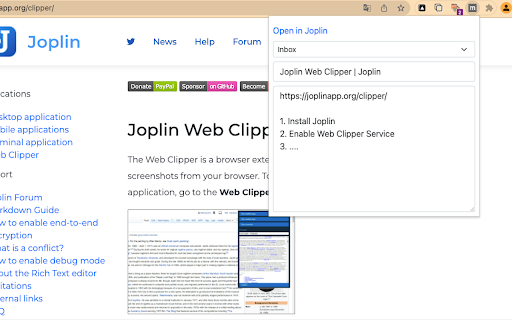
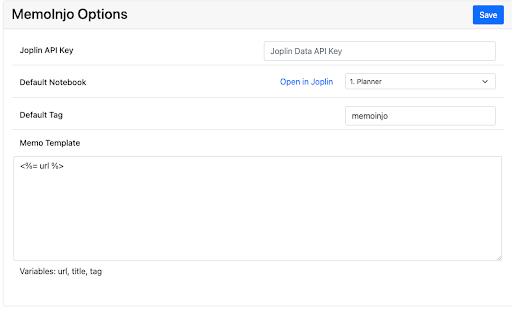
MemoInjo is a Chrome extension that sticks a memo on any website and stores/sync via Joplin. Simply press the icon of MemoInjo at the extension toolbar (top-right corner) in Chrome. It will show a memo editor for the browsing website. You may create a summary or a task list associated with a website easily. MemoInjo is not a web clipper that could capture only once. You could reopen the same memo for the same URL. And thank to the sync feature of Joplin, you may access the memo across different computer. Setup 1. Install the extension 2. Open Joplin 3. Go to Web Clipper Options and follow the instruction. 4. In the toolbar of the browser, press the button of MemoInjo 5. It will ask you to grant permission in Joplin. 6. Switch back to Joplin and grant the permission. Then it is ready to use.

Listing SEO keywords

Search intent keywords
Keyword signals for evaluating how users may discover, compare, or search for this extension category.

Core discovery

Joplin web clippersticky notes for chromesync notes with joplinwebsite memo extension

Comparison

Joplin Web ClipperEvernote Web ClipperNotion Web Clipper

Problem

syncing notes to browserattach notes to website

Alternative

Sticky NotesWeb ClipperJoplin extension

Similar extensions

Jump to related discovery paths:

FAQ

What is MemoInjo mainly used for?
A productivity extension that allows users to attach editable memos to specific websites. These memos are synced via Joplin, enabling cross-browser and cross-device access to context-specific notes.
What market signals stand out?
Early or small audience with limited review base. Last known update: 04/23/2022.
What should builders compare before entering this space?
Compare install concentration, rating quality, update recency, screenshots, developer portfolio, listing claims, and review-backed friction signals.
Is this page review-backed?
Backed by review samples. This page combines store metadata with selected review signals, while raw store metrics remain visible for comparison.

Screenshots

MemoInjo screenshot
MemoInjo screenshot

Recommended Chrome extensions

Related listings from the same category, trending peers, and the same publisher portfolio.

Browse workflow