NetSupport School Student icon

NetSupport School Student Chrome Extension Analysis

Automation & Workflow Efficiency

Chrome extension ID: gcjpefhffmcgplgklffgbebganmhffje

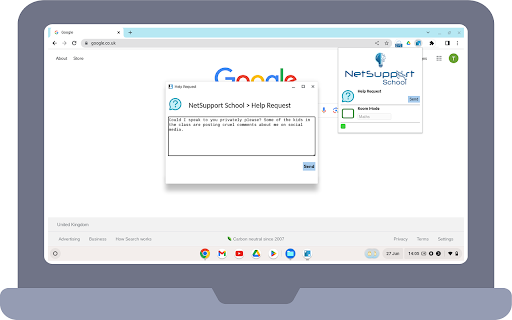
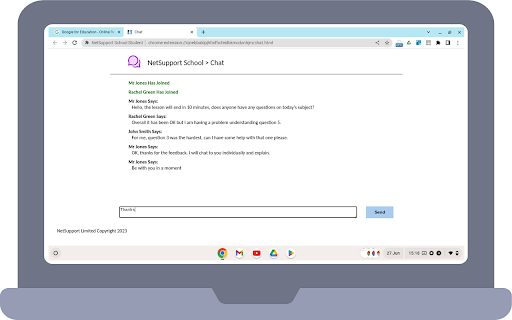
A classroom management extension designed for students using Chrome OS. It allows instructors to view student screens, manage web access, and facilitate real-time classroom interaction and engagement.

Developer:NetSupport Ltd
Version:15.0.3.0
Size:3.5MiB
Last updated:

Overview

Installs

60K+

Rating

3.4

112 reviews

Languages

24 locales

Includes Deutsch, English, Melayu, Nederlands...

Market analysis

Review-backed positioning, friction, and market signals for this Chrome extension.

Backed by review samples

Macro category

Automation & Workflow Efficiency

Pricing friction

Moderate review signal

Complaint intensity

High review signal

Listing & review signals
Observed signals from store listing text and review samples.

Listing positioning

NetSupport School positions itself as the leading choice for IT educators to maximize computer-led teaching effectiveness. It provides tools for teachers to monitor, interact with, and control student Chromebooks within a Google Chrome environment.

Inferred product pattern

An enterprise-grade educational management tool that requires centralized server infrastructure and administrative deployment.

Review-backed pain points

Students report significant privacy concerns, alleging the software acts as spyware that monitors them even outside school hours. Some users also reported file corruption and an inability to use the device for personal or college work.

Observed feature gaps

Users have reported that the extension can be bypassed by logging into personal Google accounts on Chromebooks.

Tags
Classroom ManagementStudent MonitoringEducational ToolsIT Educator Software
Target users

- IT Educators

- School Administrators

- Teachers

- K-12 Students

Primary use cases

- Real-time student screen monitoring

- Web filtering and site blocking

- Classroom broadcasting

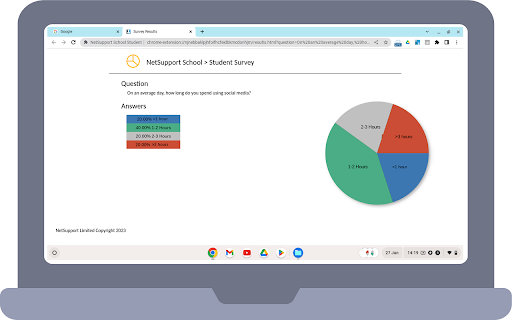
- Student engagement via surveys

Positive themes

- No high-rating review themes found in the provided sample.

Negative themes

- Perceived invasion of privacy

- Spyware concerns

- System performance issues

- Restrictive usage

Observed friction

- Payment required for meaningful usage

- Performance complaints detected

- Privacy complaints detected

- The extension requires existing NetSupport School enterprise licenses and a Windows-based Name & Connectivity Server.

Evidence boundary: Data extracted from the Chrome Web Store listing and a sample of 10 low-rating reviews. The review sample provided contains only 1-star ratings, which may not represent the full sentiment distribution of the 100,000+ users.
Complaint summaries
Review-backed complaint signals grouped by operational area.

Support

No support-specific complaints were identified in the provided sample.

Reliability

Users reported severe reliability issues, including file corruption and the inability to open certain applications or software.

Privacy

Extreme privacy complaints exist, with users labeling the tool as spyware and expressing fear regarding monitoring outside of school environments.

Access & pricing

- Enterprise pricing observed

- Account required for core usage

- Paid-only usage observed

Store listing facts

Listing assets

- Screenshots: 5

- Videos: 1

- Languages: 24

Trust signals

- Privacy policy

- Developer contact

- Official website

- Support link

Store metadata

- Version: 15.0.3.0

- Size: 3.5MiB

- Last updated:

Store description excerpt
Short excerpt from the public Chrome Web Store listing; full copy is available on the official store page.
The #1 choice for IT educators worldwide, NetSupport School delivers the tools you need to help maximize the effectiveness of computer-led teaching and now you can utilize the power of NetSupport School in a Google Chrome environment. For use in your existing NetSupport-managed classroom, the NetSupport School Student extension can be installed on each student machine running the Google Chrome OS. From the teacher's machine (Chrome OS or Windows) you can then connect to each system enabling you to monitor and interact with each student quickly and efficiently. KEY FEATURES: - View a crystal clear thumbnail of each student device in a single view and zoom in to view a larger thumbnail of any selected student Chromebook. - Open a separate view session to discreetly monitor a selected student’s screen and take a closer look at activity – perfect for ensuring students are on task with their…

Listing SEO keywords

Search intent keywords
Keyword signals for evaluating how users may discover, compare, or search for this extension category.

Core discovery

classroom management extensionstudent monitoring softwareChrome OS teaching toolsNetSupport School Student

Comparison

NetSupport School alternativesstudent monitoring tools

Problem

student privacy invasionschool spywarechromebook monitoring concernsclassroom management file corruption

Alternative

classroom management softwareeducational control tools

Similar extensions

Jump to related discovery paths:

FAQ

What is NetSupport School Student mainly used for?
A classroom management extension designed for students using Chrome OS. It allows instructors to view student screens, manage web access, and facilitate real-time classroom interaction and engagement.
What market signals stand out?
Visible niche traction with moderate review base. Last known update: 03/30/2026.
What should builders compare before entering this space?
Compare install concentration, rating quality, update recency, screenshots, developer portfolio, listing claims, and review-backed friction signals.
Is this page review-backed?
Backed by review samples. This page combines store metadata with selected review signals, while raw store metrics remain visible for comparison.

Screenshots

NetSupport School Student screenshot

Links

Recommended Chrome extensions

Related listings from the same category, trending peers, and the same publisher portfolio.

Browse workflow
classroom.cloud Student icon

classroom.cloud Student

NetSupport Ltd

classroom.cloud delivers a set of stress-free, simple yet effective cloud-based teaching, online safety/safeguarding and technician…

Installs

100K+

Rating

1.5

TeraBox Download Assistant icon

TeraBox Download Assistant

terabox-developers

Supports screenshots, uploads, and other TeraBox features

Installs

3.0M+

Rating

2.4

ClassLink OneClick Extension icon

ClassLink OneClick Extension

ClassLink

ClassLink OneClick Extension

Installs

3.0M+

Rating

1.7

Awesome Screen Recorder & Screenshot icon

Awesome Screen Recorder & Screenshot

Screen Recorder

The best screen recorder and screen capture & screenshot tool to record screen.

Installs

3.0M+

Rating

4.7

Free Download Manager icon

Free Download Manager

Free Download Manager.ORG

Free Download Manager integration with browser

Installs

3.0M+

Rating

4.2

夸克网盘-网页嗅探 icon

夸克网盘-网页嗅探

广州市动悦信息技术有限公司

识别到网页资源时,可一键存夸克网盘

Installs

3.0M+

Rating

1.7

Mendeley Web Importer icon

Mendeley Web Importer

Mendeley

Fast, convenient import of references and PDFs to your Mendeley Reference Manager library.

Installs

3.0M+

Rating

2.3

Enable local file links icon

Enable local file links

Takashi Sugimoto (tksugimoto)

Make it possible to open by click a link to a local file that is disabled by Chrome.

Installs

3.0M+

Rating

3.9

Pop up blocker for Chrome™ - Poper Blocker icon

Pop up blocker for Chrome™ - Poper Blocker

dingosolutions

Block popups, ads, cookie requests, trackers, notifications, ads on social media & more. A clean browsing experience starts today.

Installs

2.0M+

Rating

4.8

Momentum icon

Momentum

Momentum

Transform your browser into a beautifully designed tab that helps you feel calm, keep focus, and stay energized.

Installs

2.0M+

Rating

4.5