
Download with FlashGet™ Chrome Extension Analysis
Video & Image DownloadersChrome extension ID: gecfhmlaldelfoeahjahajoooenmnlnd
This extension functions as a bridge between the Google Chrome browser and the legacy desktop download manager, FlashGet. It allows users to route download jobs directly to FlashGet instead of using the browser's built-in download tool. It requires manual setup of external local files and native client scripts to establish communication with the desktop software.
Overview
Installs
9K+
Rating
★ 3.5
27 reviews
Languages
1 locales
Includes English
Market analysis
Review-backed positioning, friction, and market signals for this Chrome extension.
Macro category
Video & Image Downloaders
Pricing friction
Low review signal
Complaint intensity
High review signal
Listing positioning
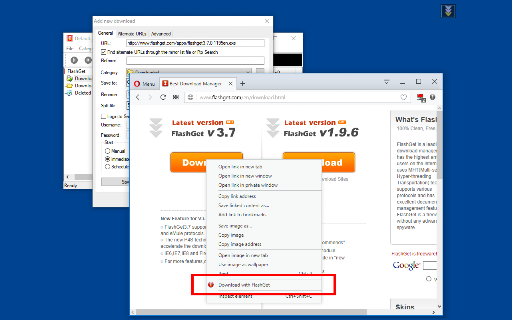
The store listing positions this extension as a seamless integration tool for the well-known FlashGet download manager. It highlights two main modes of operation: a right-click context menu to send specific media or links to FlashGet, and an automatic interruption mode that intercepts the browser's default download manager. It clearly states that users must have specific older versions of FlashGet installed, along with a separate open-source native client for communication.
Inferred product pattern
A local native-messaging bridge linking browser events to an external legacy desktop executable.
Review-backed pain points
The most significant user pain points center on the complex installation process, which requires downloading and running external native client scripts. Users frequently encounter errors like 'spawn undefined' or get flagged by antivirus software when attempting to run the required batch files.
Observed feature gaps
Reviews indicate a strong desire for a 'download all' or batch downloading capability to send multiple links to FlashGet at once. Additionally, the extension lacks native support for modern 3.x versions of FlashGet due to command-line limitations.
- Users of legacy desktop download managers
- Power users looking for advanced download acceleration tools
- Sending video, image, and document links to FlashGet via right-click
- Intercepting default browser downloads to handle them in an external desktop application
- Works reliably when setup instructions are followed correctly
- Saves time when downloading individual media links
- Technical errors such as spawn command failures
- Security alerts and Trojan flags on the required external batch files
- Lack of a 'download all' feature for multiple links simultaneously
- High setup complexity requiring external software installation
- Performance complaints detected
- Privacy complaints detected
- No pricing friction was observed in the listing or reviews, as the extension is offered completely free.
Support
There are no formal support channels highlighted, but users express frustration that the required external setup instructions are not fully automated by the developer.
Reliability
Users report technical errors including process spawn failures and absolute silence (does nothing) when the native client or correct downloader path is misconfigured.
Privacy
A review highlights that Kaspersky flagged the required external native client batch files as 'HEUR:Trojan-PSW.BAT.Stealer.gen', raising security concerns for some installers.
- Free usage observed
- No account requirement observed
- Free plan or free usage claimed
Store listing facts
- Screenshots: 1
- Videos: 0
- Languages: 1
- Developer contact
- Official website
- Version: 0.2.3
- Size: 82.52KiB
- Last updated:
Listing SEO keywords
Core discovery
Comparison
Problem
Alternative
Similar extensions
Jump to related discovery paths:
FAQ
Screenshots
Links
Website: webextension.org