Youtube Playback Speed Control icon

Youtube Playback Speed Control Chrome Extension Analysis

Niche Lifestyle & Gaming Hacks

Chrome extension ID: hdannnflhlmdablckfkjpleikpphncik

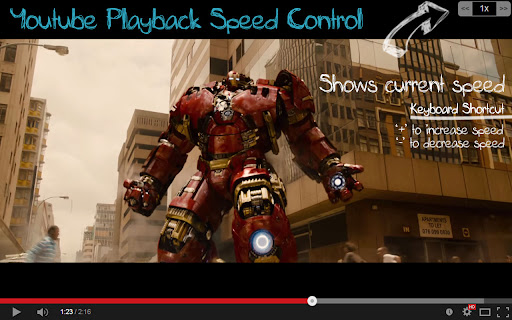
This extension allows users to adjust the playback speed of YouTube and other HTML5 videos beyond the native limitations. It provides custom keyboard hotkeys and an adjustable overlay for speed management, replacing the need for multiple mouse clicks.

Developer:shrestha.pujan
Version:0.0.15
Size:723KiB
Last updated:

Overview

Installs

300K+

Rating

4.5

4,124 reviews

Languages

1 locales

Includes English (United States)

Market analysis

Review-backed positioning, friction, and market signals for this Chrome extension.

Backed by review samples

Macro category

Niche Lifestyle & Gaming Hacks

Pricing friction

Low review signal

Complaint intensity

Moderate review signal

Listing & review signals
Observed signals from store listing text and review samples.

Listing positioning

The extension positions itself as a productivity utility for YouTube users who want granular control over video playback speed via keyboard shortcuts or an on-screen overlay. It emphasizes ease of use, configurability, and compatibility with HTML5 players embedded on other websites.

Inferred product pattern

Utility overlay for media player control via DOM injection.

Review-backed pain points

Users struggle with keyboard conflicts where hotkeys override native YouTube actions or browser functions (e.g., searching), as well as occasional failures of the extension to load or function after Chrome updates.

Observed feature gaps

Lack of intelligent key-binding awareness (i.e., not disabling hotkeys while typing in input fields), limited key-binding customization, and UI visibility issues on bright backgrounds.

Tags
Video PlayerPlayback ControlKeyboard ShortcutsYouTube Tools
Target users

- YouTube power users

- Students or professionals watching long-form tutorials

- Video content consumers

Primary use cases

- Speeding up or slowing down educational video content

- Quickly resetting playback speed to 1x

- Controlling video speed via custom keyboard shortcuts

Positive themes

- Efficient for combing through long-form tutorials

- Useful for exceeding YouTube's native speed limits

- Customizable hotkeys and speed increment settings

Negative themes

- Keyboard conflicts with browser search bars or YouTube native controls

- Intermittent functionality and stability issues post-updates

- Poor UX due to hotkeys triggering while typing comments

Observed friction

- Performance complaints detected

- No payment required; the product appears free, but users report frustration with update-related bugs.

Evidence boundary: Data gathered from Chrome Web Store listing, developer release notes, and user reviews indicating common technical pain points and utility value. Review sentiment is mixed between high praise for utility and frustration regarding keyboard conflicts and update-related bugs.
Complaint summaries
Review-backed complaint signals grouped by operational area.

Support

Some users report the extension stops working periodically after browser updates, leading to confusion.

Reliability

Users note intermittent issues with the extension not loading or conflicting with other page elements.

Privacy

No specific privacy complaints found.

Access & pricing

- Free usage observed

- No account requirement observed

- Free plan or free usage claimed

Store listing facts

Listing assets

- Screenshots: 2

- Videos: 0

- Languages: 1

Trust signals

- Developer contact

- Official website

Store metadata

- Version: 0.0.15

- Size: 723KiB

- Last updated:

Store description excerpt
Short excerpt from the public Chrome Web Store listing; full copy is available on the official store page.
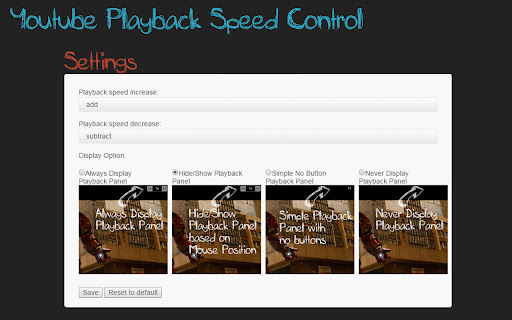
[ Added functionality for the extension to work with all html5 videos. If you are having issue with videos other than youtube, feel free to disable it from settings] ***Note: The extension auto loads for html5 videos. So please don't confuse that you have to click the extension button to load it. Lots of people were confused about how to use this extension.*** Youtube playback speed increase or decrease is just a mouse click or keyboard button away. Get more out of Youtube and control speed of youtube video easily either by clicking the speed overlay button on the top right hand corner or just keyboard button '+' and '-'. Keyboard button are configurable and if you want to use different key, you can change this default keys from settings tab. With HTML5 Video playback on YouTube, you can speed up and slow down the currently watching videos. I loved this feature. But still it was too man…

Listing SEO keywords

Search intent keywords
Keyword signals for evaluating how users may discover, compare, or search for this extension category.

Core discovery

YouTube speed controllerHTML5 video speed controlchange video playback speed extensionYouTube keyboard shortcuts

Comparison

TubeLens alternativebest youtube speed controller extension

Problem

YouTube speed limit fixcannot change youtube speedyoutube playback speed issues

Alternative

video speed controller chrome extension

Similar extensions

Jump to related discovery paths:

FAQ

What is Youtube Playback Speed Control mainly used for?
This extension allows users to adjust the playback speed of YouTube and other HTML5 videos beyond the native limitations. It provides custom keyboard hotkeys and an adjustable overlay for speed management, replacing the need for multiple mouse clicks.
What market signals stand out?
Established adoption with substantial review base. Last known update: 02/25/2026.
What should builders compare before entering this space?
Compare install concentration, rating quality, update recency, screenshots, developer portfolio, listing claims, and review-backed friction signals.
Is this page review-backed?
Backed by review samples. This page combines store metadata with selected review signals, while raw store metrics remain visible for comparison.

Screenshots

Youtube Playback Speed Control screenshot

Links

Recommended Chrome extensions

Related listings from the same category, trending peers, and the same publisher portfolio.

Browse workflow