Just Youtube Playback Speed Control icon

Just Youtube Playback Speed Control Chrome Extension Analysis

Automation & Workflow Efficiency

Chrome extension ID: enpjajdkniaannpknleodppblefgpcnf

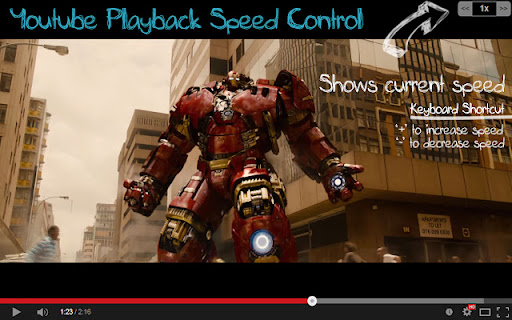
A lightweight Chrome extension that allows users to adjust YouTube playback speed using keyboard shortcuts (+ and -) or an on-screen overlay. It supports custom playback rate increments and works on both the main YouTube site and embedded HTML5 YouTube players.

Developer:shrestha.pujan
Version:0.0.12
Size:456KiB
Last updated:

Overview

Installs

3K+

Rating

4.8

19 reviews

Languages

1 locales

Includes English (United States)

Market analysis

Review-backed positioning, friction, and market signals for this Chrome extension.

Backed by review samples

Macro category

Automation & Workflow Efficiency

Pricing friction

Low review signal

Complaint intensity

Low review signal

Listing & review signals
Observed signals from store listing text and review samples.

Listing positioning

The product is positioned as a privacy-centric alternative to broader speed control extensions. It emphasizes that it only requires permissions for YouTube, avoiding the 'read and change all your data on all websites' requirement.

Inferred product pattern

A privacy-focused utility spin-off that strips broad permissions to provide a single-site specialized experience.

Review-backed pain points

Users have reported the GUI disappearing and needing a specific version update to fix, and one instance of videos stopping after a few seconds of playback.

Observed feature gaps

Lack of separate speed control for YouTube Shorts and the absence of a dedicated one-click toggle to return to 1.0x speed.

Tags
YouTubePlayback SpeedKeyboard ShortcutsProductivityPrivacy Focused
Target users

- YouTube power users

- Privacy-conscious users

- Students and researchers

Primary use cases

- Increasing video speed for faster content consumption

- Fine-tuning playback speed via keyboard without using the mouse

- Controlling playback speed of embedded YouTube videos on third-party sites

Positive themes

- Appreciation for limited permission scope

- Time-saving utility

- Developer responsiveness to user feedback

Negative themes

- GUI disappearance bugs

- Intermittent video playback interruptions

Observed friction

- Performance complaints detected

- No pricing friction observed; the extension appears to be free.

Evidence boundary: Analysis based on the store listing, detailed version history, and 10 sampled reviews. Small total review sample size (19 reviews).
Complaint summaries
Review-backed complaint signals grouped by operational area.

Support

No direct support complaints, though one user is awaiting a developer fix for the GUI.

Reliability

Occasional reports of GUI failure and rare playback stability issues.

Privacy

No privacy complaints; the product is specifically praised for its restricted permission set.

Access & pricing

- Free usage observed

- No account requirement observed

- Free plan or free usage claimed

Store listing facts

Listing assets

- Screenshots: 2

- Videos: 0

- Languages: 1

Trust signals

- Developer contact

- Official website

Store metadata

- Version: 0.0.12

- Size: 456KiB

- Last updated:

Store description excerpt
Short excerpt from the public Chrome Web Store listing; full copy is available on the official store page.
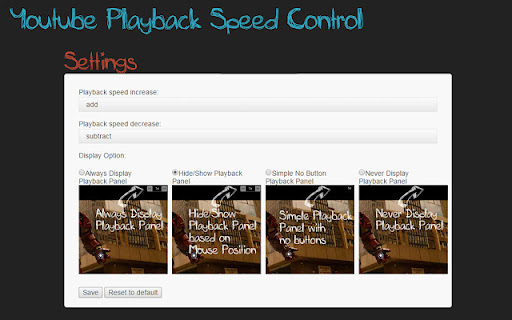
Sister extension to Youtube Playback Speed Control which only works for Youtube and doesn't require "Read and change all your data on all websites". Just Youtube playback speed increase or decrease is just a mouse click or keyboard button away. Get more out of Youtube and control speed of youtube video easily either by clicking the speed overlay button on the top right hand corner or just keyboard button '+' and '-'. Keyboard button are configurable and if you want to use different key, you can change this default keys from settings tab. With HTML5 Video playback on YouTube, you can speed up and slow down the currently watching videos. I loved this feature. But still it was too many mouse clicks for me. So, this extension was created to control the playback speed using keyboard. Press '+' to increase the playback speed and '-' to decrease the playback speed. If '+' and '-' keys are alre…

Listing SEO keywords

Search intent keywords
Keyword signals for evaluating how users may discover, compare, or search for this extension category.

Core discovery

YouTube speed controlplayback speed extensionYouTube keyboard shortcuts

Comparison

Youtube Playback Speed Control vs Just Youtube Playback Speed Control

Problem

too many clicks to change speedinvasive extension permissions

Alternative

YouTube playback speed alternativeminimalist YouTube speed controller

Similar extensions

Jump to related discovery paths:

FAQ

What is Just Youtube Playback Speed Control mainly used for?
A lightweight Chrome extension that allows users to adjust YouTube playback speed using keyboard shortcuts (+ and -) or an on-screen overlay. It supports custom playback rate increments and works on both the main YouTube site and embedded HTML5 YouTube players.
What market signals stand out?
Early or small audience with limited review base. Last known update: 01/18/2023.
What should builders compare before entering this space?
Compare install concentration, rating quality, update recency, screenshots, developer portfolio, listing claims, and review-backed friction signals.
Is this page review-backed?
Backed by review samples. This page combines store metadata with selected review signals, while raw store metrics remain visible for comparison.

Screenshots

Just Youtube Playback Speed Control screenshot

Links

Recommended Chrome extensions

Related listings from the same category, trending peers, and the same publisher portfolio.

Browse workflow