Browser Redirection Extension icon

Browser Redirection Extension Chrome Extension Analysis

Automation & Workflow Efficiency

Chrome extension ID: hdppkjifljbdpckfajcmlblbchhledln

The Browser Redirection Extension is designed to optimize web browsing within Citrix Virtual Apps and Desktops environments. It redirects browser content to the user's local machine, improving performance for high-demand websites and applications. The extension also supports bidirectional redirection, allowing for better interaction with local peripherals and enhanced security for external sites.

Version:26.05.14.1820
Size:726KiB
Last updated:

Overview

Installs

1.0M+

Rating

3.2

13 reviews

Languages

1 locales

Includes English

Market analysis

Review-backed positioning, friction, and market signals for this Chrome extension.

Backed by review samples

Macro category

Automation & Workflow Efficiency

Pricing friction

Low review signal

Complaint intensity

Moderate review signal

Listing & review signals
Observed signals from store listing text and review samples.

Listing positioning

This extension is positioned as a crucial component for enhancing Citrix Virtual Apps and Desktops (CVAD) sessions. It aims to improve performance and user experience by offloading resource-intensive web pages to the user's local device, ensuring smoother browsing and reduced server strain while maintaining security. The extension offers bidirectional content redirection for seamless integration with local resources.

Inferred product pattern

Client-side browser extension integrated with a VDI solution for offloading browser rendering and resource-intensive tasks to the local endpoint, enhancing performance and user experience within the virtualized environment.

Review-backed pain points

Users express frustration with the lack of a configuration interface for adding URLs, leading some to label the extension as useless or a scam. There are also specific complaints about the inability to maintain page zoom levels.

Observed feature gaps

Reviews suggest a lack of user-facing controls for managing redirection rules or adding specific URLs, implying that configuration is solely managed by administrators.

Tags
Browser RedirectionCitrix ExtensionVirtual AppsWorkflow Efficiency
Target users

- Citrix administrators

- IT professionals managing virtual desktops

- Users of Citrix Virtual Apps and Desktops

Primary use cases

- Improving performance of web browsing in virtual desktop environments

- Offloading resource-intensive web content from servers

- Enabling seamless use of local resources (printers, scanners) within virtual sessions

- Enhancing security for external web access

Positive themes

- Extremely helpful for multimedia applications like YouTube and Google Meet within Citrix environments

- Provides a native-like experience by offloading processing to the client

- Enables streaming of high-resolution videos (4k, 1080p at 60 fps) within virtual sessions

- Works seamlessly and is a 'godsend' for users needing better performance

Negative themes

- Lack of a user interface for adding URLs

- Reported as useless or doing nothing

- Concerns about copyright and depreciation

- Inability to maintain page zoom levels, resetting to 100%

Observed friction

- The listing and reviews do not indicate any direct pricing friction for the extension itself; however, its functionality is tied to the Citrix Virtual Apps and Desktops environment, which is a paid product.

Evidence boundary: Positive reviews highlight significant performance improvements for multimedia applications within Citrix environments, enabling high-resolution streaming. Negative reviews cite a lack of user interface for URL management and suggest the extension is non-functional. The number of reviews is relatively small, and a significant portion are highly positive or highly negative, potentially not reflecting a broad sentiment distribution. The primary functionality is dependent on a specific Citrix environment, limiting generalizability.
Complaint summaries
Review-backed complaint signals grouped by operational area.

Support

No specific complaints regarding support were identified in the provided reviews.

Reliability

While some users report the extension 'does nothing,' others praise its reliability for specific use cases. There are no widespread complaints about general unreliability or performance issues for its intended function.

Privacy

No privacy or security concerns were raised in the reviews.

Access & pricing

- No clear monetization signal

- No clear access signal

- No clear pricing signal

Store listing facts

Listing assets

- Screenshots: 3

- Videos: 0

- Languages: 1

Trust signals

- Developer contact

- Support link

Store metadata

- Version: 26.05.14.1820

- Size: 726KiB

- Last updated:

Store description excerpt
Short excerpt from the public Chrome Web Store listing; full copy is available on the official store page.
Citrix Browser Redirection Extension Overview Enhance your web browsing experience within Citrix Virtual Apps and Desktops (CVAD) sessions. The Browser Redirection Extension creates a smoother workflow between your local browsing and virtual sessions. This extension offers two main features: Browser Content Redirection: Browser Content Redirection offloads resource-intensive web pages to the user's local device, boosting performance and enhancing the user experience. This means smoother browsing and reduced strain on your servers, all while maintaining a secure virtual environment. Bidirectional Content Redirection: Bidirectional Content Redirection intelligently routes web traffic between your virtual environment and local devices for the best possible experience. This means internal sites can leverage local resources like printers and scanners, while external sites benefit from the se…

Listing SEO keywords

Search intent keywords
Keyword signals for evaluating how users may discover, compare, or search for this extension category.

Core discovery

Citrix browser redirectionvirtual desktop browser performanceCVAD web offloadingCitrix browser extensionvirtual apps web content redirection

Comparison

Citrix Browser Content RedirectionCitrix Bidirectional Content RedirectionCitrix Virtual Apps and Desktops browser optimization

Problem

slow web browsing virtual desktophigh server load web contentvirtual desktop multimedia performancepoor video streaming VDI

Alternative

VDI browser optimization toolsvirtual desktop web performance solutions

Similar extensions

Jump to related discovery paths:

FAQ

What is Browser Redirection Extension mainly used for?
The Browser Redirection Extension is designed to optimize web browsing within Citrix Virtual Apps and Desktops environments. It redirects browser content to the user's local machine, improving performance for high-demand websites and applications. The extension also supports bidirectional redirection, allowing for better interaction with local peripherals and enhanced security for external sites.
What market signals stand out?
Large installed base with limited review base. Last known update: 06/20/2026.
What should builders compare before entering this space?
Compare install concentration, rating quality, update recency, screenshots, developer portfolio, listing claims, and review-backed friction signals.
Is this page review-backed?
Backed by review samples. This page combines store metadata with selected review signals, while raw store metrics remain visible for comparison.

Screenshots

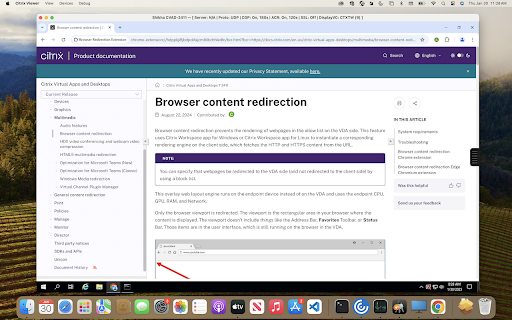
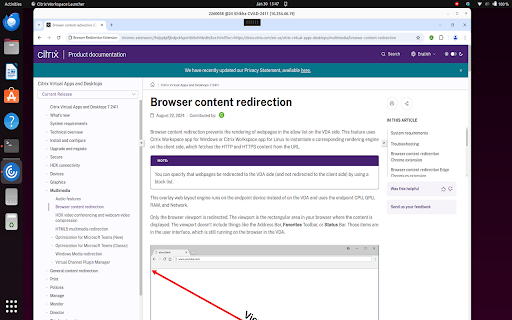
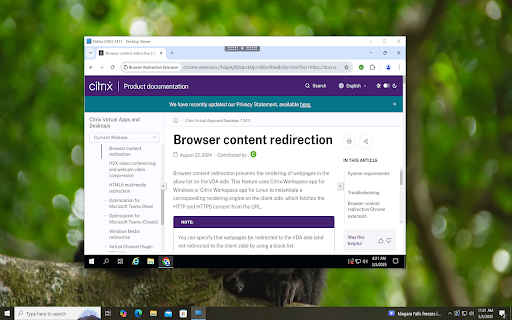
Browser Redirection Extension screenshot

Links

Recommended Chrome extensions

Related listings from the same category, trending peers, and the same publisher portfolio.

Browse workflow
uberAgent icon

uberAgent

Cloud Software Group, Inc.

Enables uberAgent to collect web app usage and performance data (e.g., foreground tab, page load duration) from Chrome.

Installs

1.0M+

Rating

5.0

Sound Booster - increase volume up icon

Sound Booster - increase volume up

Sound-ultimate.com

Volume Booster helps boost sound video or music on any tab! Increase volume and bass booster, equalizer. Volume control.

Installs

2.0M+

Rating

4.5

Evernote Web Clipper icon

Evernote Web Clipper

Evernote

Use the Evernote extension to save things you see on the web into your Evernote account.

Installs

2.0M+

Rating

4.7

Microsoft Defender Browser Protection icon

Microsoft Defender Browser Protection

Microsoft Corporation

Protect yourself against online threats, like phishing and malicious websites, with real-time protection from Microsoft.

Installs

2.0M+

Rating

4.1

Визуальные закладки icon

Визуальные закладки

Yandex

Визуальные закладки – это страница, на которой собраны ваши любимые сайты

Installs

2.0M+

Rating

3.4

Web Signer icon

Web Signer

Softplan Websigner Developers

Extensão para assinatura digital no browser

Installs

2.0M+

Rating

2.9

Screen Recorder icon

Screen Recorder

Erich Behrens

Record a video from the camera or capture it from the screen (desktop, specific application window or browser tab)

Installs

2.0M+

Rating

3.8

Адаптер Рутокен Плагин icon

Адаптер Рутокен Плагин

АО "Актив-Софт"

Позволяет использовать Рутокен Плагин

Installs

2.0M+

Rating

2.5

Content Server Browser Web Extension icon

Content Server Browser Web Extension

OpenText Corporation

Content Server Browser Web Extension for Chrome

Installs

2.0M+

Rating

2.7

Avaya Browser Extension icon

Avaya Browser Extension

Avaya

Avaya Browser Extension lets you click-to-dial phone numbers from a web page, and have the call be created on your Avaya UC Client

Installs

1.0M+

Rating

5.0