

Auto Refresh Plus Chrome Extension Analysis
Automation & Workflow EfficiencyStore listing title: Auto Refresh Plus | Page Monitor
Chrome extension ID: hgeljhfekpckiiplhkigfehkdpldcggm
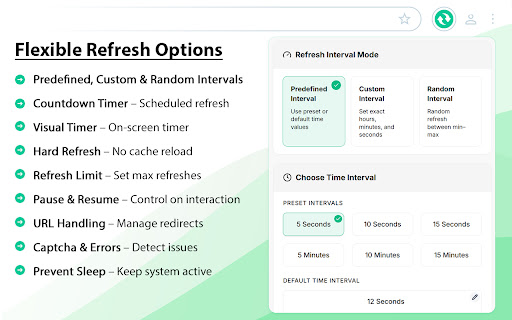
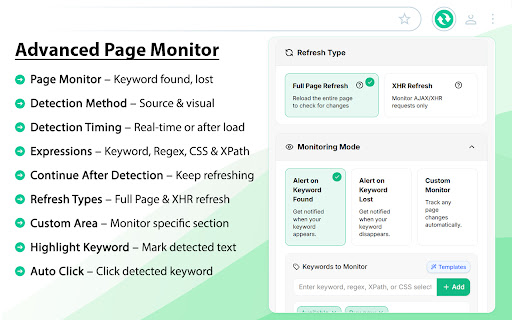
This extension automates browser tab refreshing based on custom intervals, schedules, or specific page changes. It includes advanced capabilities like captcha detection, error page handling, and AI-driven script generation for complex workflow automation.
Overview
Installs
1.0M+
Rating
★ 4.9
21,773 reviews
Languages
19 locales
Includes Deutsch, English, Indonesia, Nederlands...
Market analysis
Review-backed positioning, friction, and market signals for this Chrome extension.
Macro category
Automation & Workflow Efficiency
Pricing friction
High review signal
Complaint intensity
High review signal
Listing positioning
Auto Refresh Plus positions itself as a comprehensive web automation suite for page refreshing and content monitoring. It targets users who require advanced features like hard refresh, custom interval scheduling, and automated detection of page changes or keywords.
Inferred product pattern
Utility-to-SaaS pivot using a high-authority browser extension as a funnel for subscription conversion.
Review-backed pain points
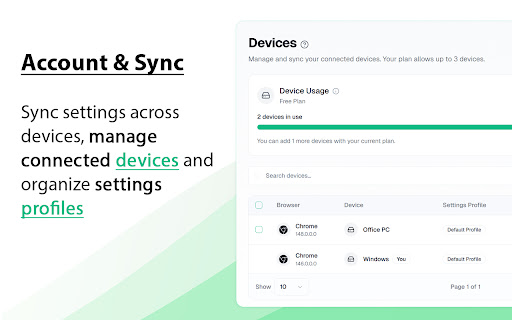
Users are primarily frustrated by the sudden migration of previously free core features behind a subscription paywall, the loss of existing local settings after updates, and the new requirement to create an account for basic functionality.
Observed feature gaps
Users reported that the recent UI update increased complexity, requiring more scrolling to access basic controls, and that formerly free features (such as hard refresh and hotkeys) are now restricted to paid tiers.
- Data researchers
- Web scrapers
- E-commerce shoppers
- Quality assurance testers
- Real-time page monitoring
- Automated stock/ticket checking
- Simulating natural browsing behavior
- Dynamic content tracking
- Formerly intuitive interface
- Superior functionality compared to competitors
- Effective for long-term automated refreshing
- Forced account creation for basic features
- Transition to a subscription-based paywall
- User interface degradation
- Loss of previous settings and data after updates
- Payment required for meaningful usage
- Free-tier complaints detected
- Account blocking complaints detected
- Performance complaints detected
- Privacy complaints detected
- Users expressed strong negative sentiment regarding the shift from a free utility to a mandatory subscription model, characterizing it as a bait-and-switch.
Support
Significant complaints regarding forced account registration and the perceived enshittification of a previously reliable free tool.
Reliability
Users report that recent updates caused loss of existing configurations, broken workflows after system standby, and concerns regarding external script injections.
Privacy
Reports of connections to external domains (e.g., scriptcdn.net) and ad-related scripts, raising concerns about browser privacy and potentially malicious activity.
- Free entry with paid features
- Account required for core usage
- Trial or limited free usage before paid plan
Store listing facts
- Screenshots: 4
- Videos: 0
- Languages: 19
- Privacy policy
- Developer contact
- Official website
- Support link
- Version: 9.1.3
- Size: 2.66MiB
- Last updated:
Listing SEO keywords
Core discovery
Comparison
Problem
Alternative
Similar extensions
Jump to related discovery paths:
FAQ
Screenshots

Links
Website: autorefresh.io
Privacy policy: https://autorefresh.io/privacy/
Support links: https://autorefresh.io/support/





