Refined GitHub icon

Refined GitHub Chrome Extension Analysis

Developer & Designer Tools

Chrome extension ID: hlepfoohegkhhmjieoechaddaejaokhf

This extension is a browser-based utility that modifies the GitHub web interface to add missing functionality, such as enhanced linkification, merge conflict tools, and UI customization. It is designed to act as a productivity layer for heavy GitHub users.

Developer:Sindre Sorhus
Version:26.6.7
Size:609KiB
Last updated:

Overview

Installs

100K+

Rating

4.8

266 reviews

Languages

1 locales

Includes English

Market analysis

Review-backed positioning, friction, and market signals for this Chrome extension.

Backed by review samples

Macro category

Developer & Designer Tools

Pricing friction

Low review signal

Complaint intensity

Moderate review signal

Listing & review signals
Observed signals from store listing text and review samples.

Listing positioning

Refined GitHub positions itself as an all-encompassing suite of 200+ features designed to optimize the GitHub user interface and developer workflow. It aims to streamline navigation, improve readability, and provide essential shortcuts for issue and pull request management.

Inferred product pattern

Open-source browser extension acting as a massive feature-patch for a specific web platform (GitHub).

Review-backed pain points

Users frequently express frustration with performance overhead (sluggishness) when opening many GitHub tabs or viewing large pull requests, alongside a 'bloat' feeling caused by too many features enabled by default.

Observed feature gaps

Reviewers note a lack of advanced bulk-processing capabilities for GitHub notifications and inconsistencies in specific UI elements like 'last updated' timestamps or release shortcuts.

Tags
GitHubDeveloper ProductivityUI EnhancementWorkflow Automation
Target users

- Software Developers

- Open Source Maintainers

- GitHub Power Users

Primary use cases

- Managing pull requests

- Navigating GitHub issues

- Improving code review readability

- Managing repository metadata

Positive themes

- Significant UI improvements

- High volume of features

- Strong community support

- Frequent updates and active maintenance

Negative themes

- Browser performance degradation

- Excessive features enabled by default

- Occasional bugs with specific tools

- Intrusive UI modifications

Observed friction

- Performance complaints detected

- None; the extension is free and open-source.

Evidence boundary: Evidence based on a mix of positive high-rating reviews praising utility and lower-rating reviews detailing performance issues and configuration frustrations. Review sample size is relatively small compared to the total user base; some feedback reflects dated versions of the extension.
Complaint summaries
Review-backed complaint signals grouped by operational area.

Support

No formal support complaints found; users generally appreciate the frequent updates and bug fixes provided by the developer.

Reliability

Primary reliability concerns involve performance degradation (slowness) rather than crashes or complete outages.

Privacy

No privacy or security complaints observed in the sample data.

Access & pricing

- Free usage observed

- No account requirement observed

- Free plan or free usage claimed

Store listing facts

Listing assets

- Screenshots: 2

- Videos: 0

- Languages: 1

Trust signals

- Privacy policy

- Developer contact

- Official website

- Support link

Store metadata

- Version: 26.6.7

- Size: 609KiB

- Last updated:

Store description excerpt
Short excerpt from the public Chrome Web Store listing; full copy is available on the official store page.
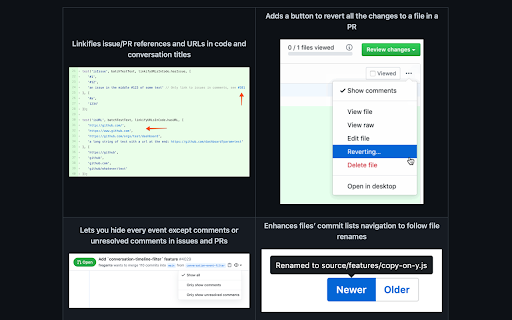
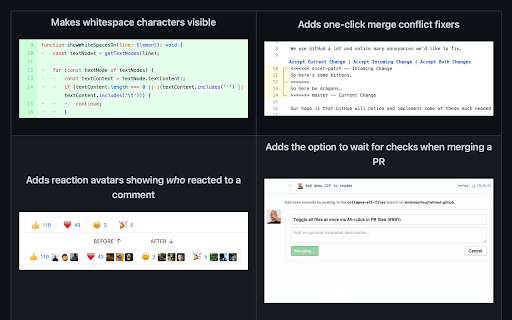
Highlights: - Linkifies issue/PR references and URLs in code. - Makes whitespace characters visible. - Reduces tabs’ size to 4 spaces instead of 8. - Adds one-click merge conflict fixers. - Adds reaction avatars showing who reacted to a comment. - Adds a button to revert all the changes to a file in a PR. - Adds a build/CI status icon next to the repo’s name. - Adds a button to view the source of Markdown files. - Shows PRs that touch the current file. - Highlights the most useful comment in conversations. - Shows the first Git tag a merged PR was included in. - Adds a link to an automatic changelog for each tag/release. - Adds possible related pages and alternatives on 404 pages. - Displays the age of the repository in the sidebar. And so much more! 200+ features. See the website for a full list of features. The GITHUB and REFINED GITHUB trademarks are owned by GitHub, Inc. and used un…

Listing SEO keywords

Search intent keywords
Keyword signals for evaluating how users may discover, compare, or search for this extension category.

Core discovery

GitHub extensionimprove GitHub UIGitHub productivity toolGitHub pull request helper

Comparison

Refined GitHub alternativesGitHub Chrome extensions

Problem

GitHub slowimprove GitHub navigationGitHub PR workflow

Alternative

GitHub interface enhancement

Similar extensions

Jump to related discovery paths:

FAQ

What is Refined GitHub mainly used for?
This extension is a browser-based utility that modifies the GitHub web interface to add missing functionality, such as enhanced linkification, merge conflict tools, and UI customization. It is designed to act as a productivity layer for heavy GitHub users.
What market signals stand out?
Established adoption with moderate review base. Last known update: 06/07/2026.
What should builders compare before entering this space?
Compare install concentration, rating quality, update recency, screenshots, developer portfolio, listing claims, and review-backed friction signals.
Is this page review-backed?
Backed by review samples. This page combines store metadata with selected review signals, while raw store metrics remain visible for comparison.

Screenshots

Refined GitHub screenshot

Links

Recommended Chrome extensions

Related listings from the same category, trending peers, and the same publisher portfolio.

Browse developer
Notifier for GitHub icon

Notifier for GitHub

Sindre Sorhus

Displays your GitHub notifications unread count

Installs

10K+

Rating

4.7

Cookie-Editor icon

Cookie-Editor

cgagnier

Simple yet powerful Cookie Editor that allow you to quickly create, edit and delete cookies without leaving your tab.

Installs

2.0M+

Rating

4.4

Chromebook Recovery Utility icon

Chromebook Recovery Utility

google.com

Create recovery media for your Chromebook.

Installs

2.0M+

Rating

2.6

Lighthouse icon

Lighthouse

lighthouse-extension-owners

Lighthouse is an open-source, automated tool for improving the performance, quality, and correctness of your web apps.

Installs

1.0M+

Rating

4.4

Eye Dropper icon

Eye Dropper

Eye Dropper

Pick colors from any website.

Installs

1.0M+

Rating

4.3

Stylus icon

Stylus

stylus.openstyles

Redesign the web with Stylus, a user styles manager. Stylus allows you to easily install themes and skins for many popular sites.

Installs

1.0M+

Rating

4.5

Clear Cache icon

Clear Cache

Little Void LLC (Ben Bojko)

Powerful, user-friendly browser data management, right from your toolbar.

Installs

1.0M+

Rating

4.5

SEOquake icon

SEOquake

SEOquake

SEOquake is a free plugin that provides you with key SEO metrics, along with other useful tools such as SEO Audit and many others

Installs

1.0M+

Rating

4.5

Similarweb - Website Traffic, AI Traffic & SEO Checker icon

Similarweb - Website Traffic, AI Traffic & SEO Checker

Similarweb

Instant website analysis, AI traffic insights, and SEO metrics at your fingertips.

Installs

1.0M+

Rating

4.6

Контур.Плагин icon

Контур.Плагин

kontur.extension

Расширение браузера, выполняющее криптографические операции в сервисах СКБ Контур

Installs

1.0M+

Rating

3.1