Notifier for GitHub icon

Notifier for GitHub Chrome Extension Analysis

Developer & Designer Tools

Chrome extension ID: lmjdlojahmbbcodnpecnjnmlddbkjhnn

A developer productivity tool that monitors the GitHub Notifications API every minute to show unread counts. It requires a GitHub token to function and offers optional desktop notifications.

Developer:Sindre Sorhus
Version:25.6.25
Size:75.21KiB
Last updated:

Overview

Installs

10K+

Rating

4.7

55 reviews

Languages

1 locales

Includes English

Market analysis

Review-backed positioning, friction, and market signals for this Chrome extension.

Backed by review samples

Macro category

Developer & Designer Tools

Pricing friction

Low review signal

Complaint intensity

Moderate review signal

Listing & review signals
Observed signals from store listing text and review samples.

Listing positioning

The extension positions itself as a lightweight utility to display unread GitHub notification counts. It highlights support for GitHub Enterprise and the ability to filter counts to only include issues where the user is actively participating.

Inferred product pattern

A utility-driven developer tool that uses API token integration to provide real-time notification telemetry in the browser.

Review-backed pain points

Users reported recurring permission prompts for browser history and instances where the extension status shows 'OFF' until a GitHub page is visited. Some users also reported the extension failing to display notifications entirely.

Observed feature gaps

Users expressed desire for advanced notification filtering (e.g., author:me), support for multiple GitHub accounts (e.g., combining Public and Enterprise), and compatibility with fine-grained personal access tokens.

Tags
GitHub NotifierDeveloper ProductivityNotification MonitorGitHub API
Target users

- Software Developers

- GitHub Enterprise Users

- Open Source Contributors

Primary use cases

- Monitoring unread GitHub notifications

- Tracking issue participation

- GitHub Enterprise notification tracking

Positive themes

- Simple and direct functionality

- Privacy-conscious permission handling

- Effective token-based integration

Negative themes

- Permission request loops

- Syncing and status reliability

- Notification display failures

Observed friction

- Performance complaints detected

- Privacy complaints detected

- No pricing friction observed as no cost was mentioned in the listing or reviews.

Evidence boundary: Data extracted from store listing description and user reviews regarding functionality, permissions, and feature requests. The review count is relatively low (55 reviews), which may not represent the entire user base.
Complaint summaries
Review-backed complaint signals grouped by operational area.

Support

No support or account-related complaints were identified.

Reliability

Users reported the extension displaying an 'OFF' status incorrectly and occasional failures to fetch/display notifications.

Privacy

One user reported frustration with a recurring prompt to allow access to browser history.

Access & pricing

- No clear monetization signal

- Login needed for core features

- No clear pricing signal

Store listing facts

Listing assets

- Screenshots: 2

- Videos: 0

- Languages: 1

Trust signals

- Privacy policy

- Developer contact

- Official website

- Support link

Store metadata

- Version: 25.6.25

- Size: 75.21KiB

- Last updated:

Store description excerpt
Short excerpt from the public Chrome Web Store listing; full copy is available on the official store page.
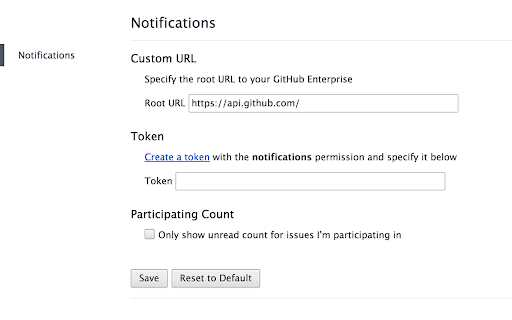
It checks the GitHub Notifications API every minute. Supports GitHub Enterprise and an option to only show unread count for issues you're participating in. Make sure to add a token in the Options page. ## Permissions Both requested permissions are optional, so you can just decline if you don't want it. ### Tabs permission The first time you click on the extension icon, it will ask you for access to browser tabs. We need this to know if there is already an opened GitHub notifications page and switch to it if so. ### Notifications permission If you want to receive desktop notifications, you can enable them on extension options page. You will then be asked for the notifications permission.

Listing SEO keywords

Search intent keywords
Keyword signals for evaluating how users may discover, compare, or search for this extension category.

Core discovery

GitHub notification counterGitHub unread count extensionGitHub Enterprise notifier

Comparison

GitHub notification monitorGitHub alert extension

Problem

GitHub notification sync errorGitHub notification permission prompt

Alternative

GitHub desktop notificationsGitHub notification manager

Similar extensions

Jump to related discovery paths:

FAQ

What is Notifier for GitHub mainly used for?
A developer productivity tool that monitors the GitHub Notifications API every minute to show unread counts. It requires a GitHub token to function and offers optional desktop notifications.
What market signals stand out?
Visible niche traction with limited review base. Last known update: 06/26/2025.
What should builders compare before entering this space?
Compare install concentration, rating quality, update recency, screenshots, developer portfolio, listing claims, and review-backed friction signals.
Is this page review-backed?
Backed by review samples. This page combines store metadata with selected review signals, while raw store metrics remain visible for comparison.

Screenshots

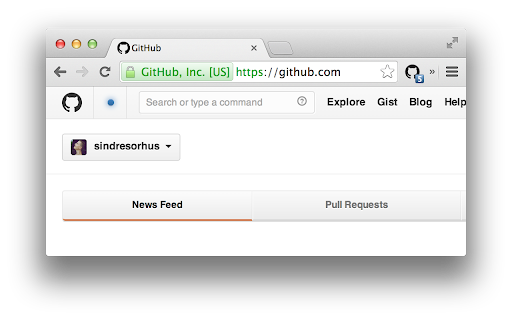
Notifier for GitHub screenshot

Links

Recommended Chrome extensions

Related listings from the same category, trending peers, and the same publisher portfolio.

Browse developer
Refined GitHub icon

Refined GitHub

Sindre Sorhus

Simplifies the GitHub interface and adds useful features

Installs

100K+

Rating

4.8

Talend API Tester - Free Edition icon

Talend API Tester - Free Edition

Qlik

Visually interact with REST, SOAP and HTTP APIs.

Installs

600K+

Rating

4.8

TikTok Pixel Helper icon

TikTok Pixel Helper

TikTok For Business

The TikTok Pixel Helper is a plug-in that monitors whether your TikTok Pixel is functioning properly.

Installs

600K+

Rating

2.6

Assinatura Digital no Navegador icon

Assinatura Digital no Navegador

bry-suporte-apps

Esta extensão é projetada para ser utilizada em conjunto com outras soluções e não funciona de forma isolada para a assinatura.

Installs

600K+

Rating

2.4

Google Analytics Debugger icon

Google Analytics Debugger

Google Analytics

Prints useful information to the JavaScript console by enabling the debug version of the Google Analytics Javascript.

Installs

600K+

Rating

4.2

Detailed SEO Extension icon

Detailed SEO Extension

ahrefsseotoolbar

Get SEO insights at the click of a button to any website you're currently on. Built by full-time SEO's for daily analysis.

Installs

500K+

Rating

4.9

CSS Peeper icon

CSS Peeper

CSS Peeper

Inspect website styles in seconds. Supercharge your workflow, and save hours of work.

Installs

500K+

Rating

4.1

Salesforce Inspector Reloaded icon

Salesforce Inspector Reloaded

Thomas Prouvot

Productivity tools for Salesforce administrators and developers to inspect data and metadata directly from the Salesforce UI.

Installs

500K+

Rating

4.8

Axure RP Extension for Chrome icon

Axure RP Extension for Chrome

Axure Software Solutions, Inc.

An extension that allows viewing of locally published Axure RP prototypes (HTML files) from Google Chrome.

Installs

500K+

Rating

3.3

SelectorsHub icon

SelectorsHub

Sanjay Kumar | SelectorsHub Founder

Locators Plugin to Auto Generate and Verify Playwright Locators, XPath & CSS Selectors.

Installs

400K+

Rating

4.8