Voice Typing icon

Voice Typing Chrome Extension Analysis

Automation & Workflow Efficiency

Chrome extension ID: hmpihaioaacpehkghnkmnmgmihalkmdf

Voice Typing is a Chrome extension designed to convert spoken words into text and emojis directly on any website. It supports over 100 languages and includes features like text-to-speech, command recognition for punctuation and actions, word expansion, and speech translation. The extension aims to simplify text input across diverse online platforms.

Developer:chromium-devs
Version:7.0.2
Size:60.29KiB
Last updated:

Overview

Installs

40K+

Rating

3.2

71 reviews

Languages

47 locales

Includes Deutsch, English, Filipino, Indonesia...

Market analysis

Review-backed positioning, friction, and market signals for this Chrome extension.

Backed by review samples

Macro category

Automation & Workflow Efficiency

Pricing friction

Moderate review signal

Complaint intensity

High review signal

Listing & review signals
Observed signals from store listing text and review samples.

Listing positioning

This Chrome extension positions itself as a powerful voice typing tool that allows users to input text and emojis on any website using their voice. It highlights broad compatibility across various platforms and applications, emphasizing ease of use and enhanced productivity for tasks like writing emails, assignments, and messages.

Inferred product pattern

A voice-to-text Chrome extension that offers basic dictation on any website, with advanced features like commands, TTS, and translations purportedly available through a premium subscription. The product appears to rely on a freemium model with a very restricted free tier.

Review-backed pain points

Users express significant frustration with the extension's deceptive trial limitations, mandatory account sign-ins that reveal restricted usage, and the requirement to keep the developer's website open. Many report that punctuation and command features do not work as advertised, leading to inaccurate transcriptions. Dissatisfaction also stems from poor performance degradation over time, unexpected charges for premium services not activated, and a lack of developer responsiveness to support requests.

Observed feature gaps

Despite claims of extensive features, reviews indicate that core functionalities such as accurate punctuation and command recognition are unreliable. Users also report missing features like an easy way to display full commands or access emoji settings directly within the extension interface. The necessity of copy-pasting for direct input into web forms is also noted as a gap compared to more integrated solutions.

Tags
Voice TypingVoice To TextDictationAccessibilityProductivity
Target users

- Students

- Professionals

- Bloggers

- Users with accessibility needs

- Multilingual users

Primary use cases

- Writing emails

- Answering assignments

- Responding to customer tickets

- Replying to chats

- Writing blog posts

- Sending messages

Positive themes

- Potential for hands-free text input on any website

- Support for a wide range of languages and emoji input

Negative themes

- Limited free usage and mandatory account sign-in

- Technical issues with dictation accuracy and command recognition

- Frustration with the transition to paid versions and lack of support

- Poor user interface and confusing workflow

- Unexpected charges and lack of service activation

Observed friction

- Free-tier complaints detected

- Account blocking complaints detected

- Refund complaints detected

- Performance complaints detected

- Users report being misled about free usage, encountering mandatory account sign-ins that reveal very limited trial periods, and then facing 'nags' to upgrade. Some users report being double-charged and not having premium services activated, leading to accusations of scams. The requirement to keep the developer's website open for the extension to function also adds friction.

Evidence boundary: Review data indicates significant user dissatisfaction regarding deceptive pricing models, limited free usage, mandatory account creation, and a lack of functional features like accurate punctuation and command recognition. Users report poor performance, unreliability, and a lack of support. Some reviews also mention unexpected charges. The provided reviews, while numerous for a low-rating score, represent a specific subset of user experiences. The positive aspects are less detailed in the provided samples. The exact distribution of free vs. paid users and their respective satisfaction levels is not quantifiable from this data.
Complaint summaries
Review-backed complaint signals grouped by operational area.

Support

Several users report being ignored or receiving no response to their emails when seeking support, particularly after paying for premium versions that do not function correctly. This lack of developer responsiveness exacerbates the frustration caused by malfunctioning features and billing issues.

Reliability

Multiple reviews highlight significant reliability issues. The speed of dictation has reportedly decreased substantially. Automatic capitalization is described as repetitive and unwanted. Commands for punctuation and actions often fail or require awkward interruptions in speech. Inaccurate transcriptions, including unwanted characters like 'u' after sentences, are also frequently mentioned. The extension is described as becoming 'useless' or 'not working at all' by some.

Privacy

No direct privacy complaints were observed in the provided reviews. The extension requests microphone permission to function.

Access & pricing

- Free entry with paid features

- Login needed for core features

- Limited free usage observed

Store listing facts

Listing assets

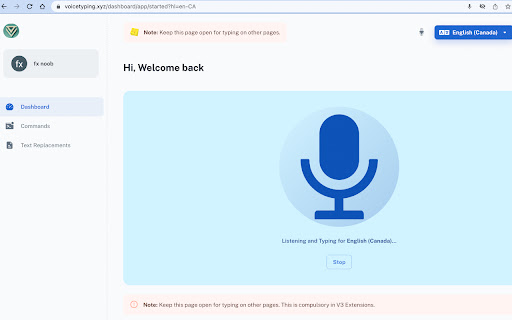
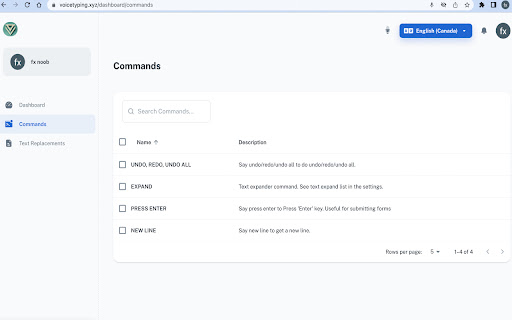
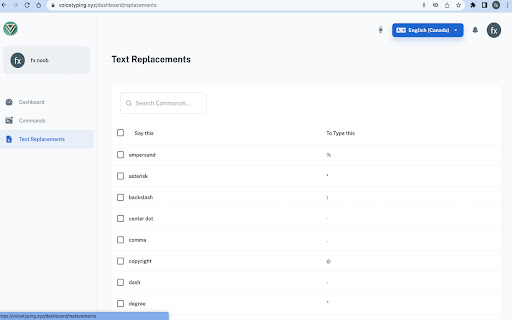
- Screenshots: 3

- Videos: 1

- Languages: 47

Trust signals

- Privacy policy

- Developer contact

- Official website

Store metadata

- Version: 7.0.2

- Size: 60.29KiB

- Last updated:

Store description excerpt
Short excerpt from the public Chrome Web Store listing; full copy is available on the official store page.
voice typing --- it makes it easy to type text and emoji in the browser using voice-to-text. Whether it is writing emails in Gmail, answering assignments in Classroom, responding to customer tickets, replying to chats or learning pronunciations, Voice Typing - Voice-To-Text capability lets you do them all using your voice. Works on google docs, google spreadsheets, fb messenger, instagram chats, Gmail or write blog posts on Wordpress or send messages in Slack and in any site that contains a text box. It can recognize a wide variety of languages. In order to work with this extension, simply open the addon's UI and then press on the big microphone icon to start converting your voice to text. Please note that, when the add-on is first started, it asks for microphone permission. Please accept the permission to start working with the add-on. Works on google docs, google spreadsheets, fb mess…

Listing SEO keywords

Search intent keywords
Keyword signals for evaluating how users may discover, compare, or search for this extension category.

Core discovery

voice typing extensionvoice to text chromedictation softwarespeak to typechrome accessibility tools

Comparison

google voice typingwindows voice typingmac dictation

Problem

typing too slowhands-free typingdifficult to typespeech to text issues

Alternative

dragon naturally speakingvoice narratortalk to text app

Similar extensions

Jump to related discovery paths:

FAQ

What is Voice Typing mainly used for?
Voice Typing is a Chrome extension designed to convert spoken words into text and emojis directly on any website. It supports over 100 languages and includes features like text-to-speech, command recognition for punctuation and actions, word expansion, and speech translation. The extension aims to simplify text input across diverse online platforms.
What market signals stand out?
Visible niche traction with limited review base. Last known update: 10/14/2023.
What should builders compare before entering this space?
Compare install concentration, rating quality, update recency, screenshots, developer portfolio, listing claims, and review-backed friction signals.
Is this page review-backed?
Backed by review samples. This page combines store metadata with selected review signals, while raw store metrics remain visible for comparison.

Screenshots

Voice Typing screenshot

Links

Recommended Chrome extensions

Related listings from the same category, trending peers, and the same publisher portfolio.

Browse workflow
Image to Text (OCR) icon

Image to Text (OCR)

chromium-devs

A Fast and simple document scanner app with high quality text output.

Installs

100K+

Rating

2.3

Awesome Screen Recorder & Screenshot icon

Awesome Screen Recorder & Screenshot

Screen Recorder

The best screen recorder and screen capture & screenshot tool to record screen.

Installs

3.0M+

Rating

4.7

Free Download Manager icon

Free Download Manager

Free Download Manager.ORG

Free Download Manager integration with browser

Installs

3.0M+

Rating

4.2

夸克网盘-网页嗅探 icon

夸克网盘-网页嗅探

广州市动悦信息技术有限公司

识别到网页资源时,可一键存夸克网盘

Installs

3.0M+

Rating

1.7

Mendeley Web Importer icon

Mendeley Web Importer

Mendeley

Fast, convenient import of references and PDFs to your Mendeley Reference Manager library.

Installs

3.0M+

Rating

2.3

Enable local file links icon

Enable local file links

Takashi Sugimoto (tksugimoto)

Make it possible to open by click a link to a local file that is disabled by Chrome.

Installs

3.0M+

Rating

3.9

Pop up blocker for Chrome™ - Poper Blocker icon

Pop up blocker for Chrome™ - Poper Blocker

dingosolutions

Block popups, ads, cookie requests, trackers, notifications, ads on social media & more. A clean browsing experience starts today.

Installs

2.0M+

Rating

4.8

Momentum icon

Momentum

Momentum

Transform your browser into a beautifully designed tab that helps you feel calm, keep focus, and stay energized.

Installs

2.0M+

Rating

4.5

Google Scholar PDF Reader icon

Google Scholar PDF Reader

scholar-chrome-extensions

Supercharge your paper reading: follow references, skim outline, jump to figures, cite and save.

Installs

2.0M+

Rating

4.1

Keeper® Password Manager & Digital Vault icon

Keeper® Password Manager & Digital Vault

Keeper Security

Generate strong passwords, autofill and protect your confidential info with zero-knowledge encryption.

Installs

2.0M+

Rating

4.8