Clipboard History icon

Clipboard History Chrome Extension Analysis

Automation & Workflow Efficiency

Chrome extension ID: hocnnmhgcikjadmcgimjfabidalgejio

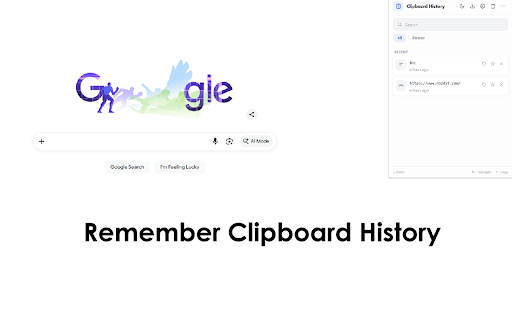
Clipboard History allows users to maintain a log of all text copied and pasted during their browsing sessions. It records timestamps for each entry and provides a management interface to view or delete specific history items.

Version:3.1.0
Size:266KiB
Last updated:

Overview

Installs

3K+

Rating

4.0

53 reviews

Languages

41 locales

Includes Deutsch, English, English (United States), Filipino...

Market analysis

Review-backed positioning, friction, and market signals for this Chrome extension.

Backed by review samples

Macro category

Automation & Workflow Efficiency

Pricing friction

Low review signal

Complaint intensity

Moderate review signal

Listing & review signals
Observed signals from store listing text and review samples.

Listing positioning

The extension is positioned as a simple, privacy-focused tool for tracking text history within Chrome. It emphasizes that all data is stored locally on the user's computer and is not uploaded to external servers.

Inferred product pattern

A lightweight local utility for text history management focusing on privacy through local storage.

Review-backed pain points

Users report that the extension frequently stops working without warning, fails to display the history, and occasionally results in accidental text deletion.

Observed feature gaps

Users have noted difficulties with the interface's obviousness and potential issues with how certain text formats are captured.

Tags
Clipboard ManagerText HistoryProductivity ToolCopy Paste Tracker
Target users

- Office workers

- Researchers

- Data entry professionals

Primary use cases

- Retrieving previously copied text snippets

- Tracking copy-paste activity with timestamps

- Managing multiple text entries locally

Positive themes

- Lightweight and convenient for office work

- Practical utility for text management

Negative themes

- Instability and sudden loss of functionality

- Unintuitive user interface

- Inconsistent history visibility

Observed friction

- Performance complaints detected

- No pricing friction observed as no payment details are provided in the listing or reviews.

Evidence boundary: Extraction based on Chrome Web Store description and user reviews highlighting reliability and privacy. The dataset is limited to 53 reviews, which may not represent the full user base.
Complaint summaries
Review-backed complaint signals grouped by operational area.

Support

No support-related complaints were identified.

Reliability

Users have reported significant reliability issues, including the extension failing to function, history not appearing, and instability.

Privacy

No privacy complaints identified; the listing explicitly highlights local storage as a privacy feature.

Access & pricing

- No clear monetization signal

- No account requirement observed

- No clear pricing signal

Store listing facts

Listing assets

- Screenshots: 1

- Videos: 0

- Languages: 41

Trust signals

- Privacy policy

- Developer contact

- Official website

Store metadata

- Version: 3.1.0

- Size: 266KiB

- Last updated:

Store description excerpt
Short excerpt from the public Chrome Web Store listing; full copy is available on the official store page.
Clipboard History — Never Lose a Copy Again Clipboard History is the fast, private, and beautifully simple way to remember everything you copy. Every link, snippet, address, code block, and image you copy is saved automatically, so the thing you needed five minutes — or five days — ago is always one click away. No more re-copying the same text, no more “where did that go?”, no more lost work. This is the clipboard your browser should have shipped with. Rebuilt for rock-solid reliability We rebuilt Clipboard History from the ground up to be dependable. Your history is stored safely on your own device and is engineered so it never silently drops a copy — even long articles, large code snippets, and rapid back-to-back copies are captured faithfully and stay put. Copy from virtually anywhere: web pages, search boxes, text fields, comment forms, and online code editors are all supported, and…

Listing SEO keywords

Search intent keywords
Keyword signals for evaluating how users may discover, compare, or search for this extension category.

Core discovery

clipboard historycopy paste managertext history trackerchrome clipboard tool

Comparison

CopyClipclipboard manager

Problem

clipboard not workinglost copied textclipboard history not showing

Alternative

clipboard manager extensiontext log utility

Similar extensions

Jump to related discovery paths:

FAQ

What is Clipboard History mainly used for?
Clipboard History allows users to maintain a log of all text copied and pasted during their browsing sessions. It records timestamps for each entry and provides a management interface to view or delete specific history items.
What market signals stand out?
Early or small audience with limited review base. Last known update: 06/27/2026.
What should builders compare before entering this space?
Compare install concentration, rating quality, update recency, screenshots, developer portfolio, listing claims, and review-backed friction signals.
Is this page review-backed?
Backed by review samples. This page combines store metadata with selected review signals, while raw store metrics remain visible for comparison.

Screenshots

Clipboard History screenshot

Links

Recommended Chrome extensions

Related listings from the same category, trending peers, and the same publisher portfolio.

Browse workflow