Reactions for Google Meet icon

Reactions for Google Meet Chrome Extension Analysis

Automation & Workflow Efficiency

Chrome extension ID: hicfolagolebmjahkldfohbmphcoddoh

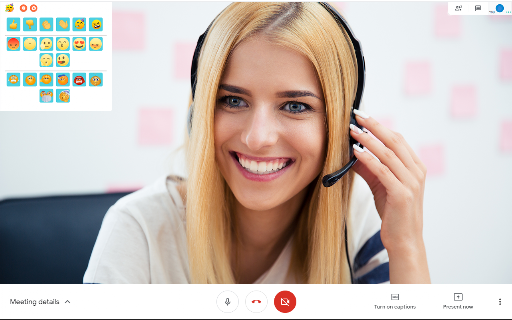
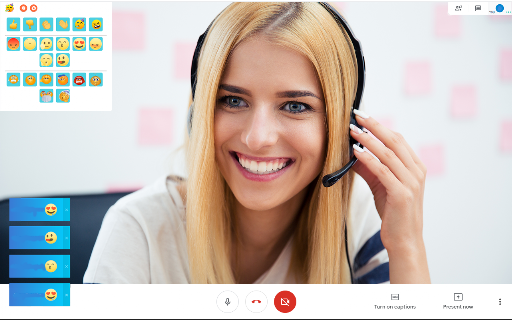
A Chrome extension that enables users to send emoji reactions during Google Meet sessions. It is designed to solve the problem of presenters being unable to see participant faces or judge the effectiveness of their presentations.

Version:3.0.0
Size:1.54MiB
Last updated:

Overview

Installs

30K+

Rating

4.0

413 reviews

Languages

41 locales

Includes Deutsch, English, English (United States), Filipino...

Market analysis

Review-backed positioning, friction, and market signals for this Chrome extension.

Backed by review samples

Macro category

Automation & Workflow Efficiency

Pricing friction

Low review signal

Complaint intensity

High review signal

Listing & review signals
Observed signals from store listing text and review samples.

Listing positioning

The product is positioned as a feedback tool for virtual presenters to gauge attendee engagement in real-time. It emphasizes that both the presenter and attendees must have the extension installed for the emoji reactions to be visible.

Inferred product pattern

Third-party feature addition to supplement native Google Meet limitations.

Review-backed pain points

Users repeatedly report a bug where the extension displays a 'You need to join a meeting first' error despite being active in a call. Other users find the requirement to manually click the extension icon disruptive, especially when using full-screen mode.

Observed feature gaps

Lack of automatic meeting detection and poor integration with full-screen viewing modes.

Tags
Google MeetMeeting FeedbackEmoji ReactionsVirtual Presentation
Target users

- Virtual presenters

- Online educators

- Remote meeting hosts

- Students

Primary use cases

- Gathering real-time feedback during a presentation

- Expressing reactions without interrupting the speaker in a Google Meet

Positive themes

No positive theme data.

Negative themes

- Functional failure

- Meeting detection errors

- UI obstruction

- Outdated performance

Observed friction

- Performance complaints detected

- No pricing friction observed as the tool appears to be free.

Evidence boundary: Analysis based on the store listing and a sample of 10 low-rating reviews. Positive review samples were not provided, although the aggregate store score is 4.0.
Complaint summaries
Review-backed complaint signals grouped by operational area.

Support

Users have expressed frustration over the lack of updates to fix persistent bugs.

Reliability

Severe reliability issues; multiple reports of the extension failing to function regardless of reloading, clearing cache, or restarting the browser.

Privacy

No privacy complaints observed.

Access & pricing

- Free usage observed

- No account requirement observed

- Free plan or free usage claimed

Store listing facts

Listing assets

- Screenshots: 3

- Videos: 0

- Languages: 41

Trust signals

- Developer contact

- Official website

Store metadata

- Version: 3.0.0

- Size: 1.54MiB

- Last updated:

Store description excerpt
Short excerpt from the public Chrome Web Store listing; full copy is available on the official store page.
One of the problems people face with online meetings is its hard to get feedback during your online presentations. When you begin your virtual presentation, the presenter is unable to see the faces of the attendees and unable to judge the effectiveness of their presentations. By installing this extension, the presenter has a real-time method to gain feedback on their presentations and will know whether they need to slow down. For this extension to be useful, both the presenter and the attendees need to have this extension installed so that the emoji reactions are visible to the presenter. Try using this extension today and upgrade your Google Meet experience. To begin using this extension, you need to do the following. 1) Install our extension 2) Go to the Google Meet meeting 3) Click on the extension icon so our extension can begin to run. Our extension code does NOT run until you clic…

Listing SEO keywords

Search intent keywords
Keyword signals for evaluating how users may discover, compare, or search for this extension category.

Core discovery

Google Meet reactionsemoji for Google Meetreal-time meeting feedbackGoogle Meet feedback tool

Comparison

Google Meet Reactions alternative

Problem

google meet no reactionsget feedback during google meetgoogle meet presenter feedback

Alternative

Google Meet emoji extensionsvirtual presentation feedback tools

Similar extensions

Jump to related discovery paths:

FAQ

What is Reactions for Google Meet mainly used for?
A Chrome extension that enables users to send emoji reactions during Google Meet sessions. It is designed to solve the problem of presenters being unable to see participant faces or judge the effectiveness of their presentations.
What market signals stand out?
Visible niche traction with moderate review base. Last known update: 10/28/2023.
What should builders compare before entering this space?
Compare install concentration, rating quality, update recency, screenshots, developer portfolio, listing claims, and review-backed friction signals.
Is this page review-backed?
Backed by review samples. This page combines store metadata with selected review signals, while raw store metrics remain visible for comparison.

Screenshots

Reactions for Google Meet screenshot

Links

Recommended Chrome extensions

Related listings from the same category, trending peers, and the same publisher portfolio.

Browse workflow