FocusGuard - Free Site Blocker icon

FocusGuard Chrome Extension Analysis

Automation & Workflow Efficiency

Store listing title: FocusGuard - Free Site Blocker

Chrome extension ID: ifdepgnnjpnbkcgempionjablajancjc

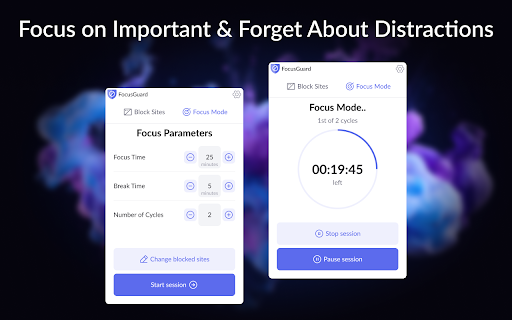
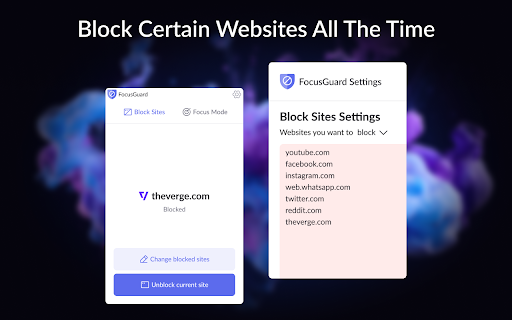
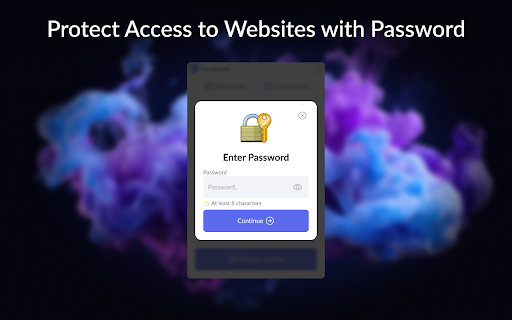
FocusGuard is a Chrome extension that blocks distracting websites to help users stay on task. It offers a combination of blocklists, allowlists, a Pomodoro-based focus timer, and strict password-protected modes to prevent users from bypassing restrictions.

Developer:Block Site
Version:1.0.8
Size:54.05MiB
Last updated:

Overview

Installs

100K+

Rating

4.6

4,091 reviews

Languages

16 locales

Includes Deutsch, English, English (United Kingdom), English (United States)...

Market analysis

Review-backed positioning, friction, and market signals for this Chrome extension.

Backed by review samples

Macro category

Automation & Workflow Efficiency

Pricing friction

Low review signal

Complaint intensity

Moderate review signal

Listing & review signals
Observed signals from store listing text and review samples.

Listing positioning

The product is positioned as a free tool to prevent 'internet spirals' and enhance productivity. It emphasizes self-control through custom blocklists, password protection, and the Pomodoro technique for structured work and study sessions.

Inferred product pattern

A productivity utility utilizing a blacklist/whitelist mechanism with restrictive lock-in features to enforce user discipline.

Review-backed pain points

Users report frustration with frequent 'rate this extension' prompts and a critical bug where empty lines in the blocklist cause all websites to be blocked without warning. Some users also noted the absence of daily or weekly scheduling.

Observed feature gaps

Lack of calendar-based or time-of-day scheduling (e.g., blocking sites only from 9 AM to 5 PM) and a desire for break periods that do not require password entry.

Tags
Site BlockerProductivity ToolPomodoro TimerFocus ModeWebsite Filter
Target users

- Students

- Remote workers

- Parents

- Individuals struggling with procrastination

Primary use cases

- Blocking social media during study sessions

- Using Pomodoro intervals for work

- Parental control for limiting child's web access

- Enforcing strict focus periods via password locks

Positive themes

- Appreciation for being free and unlimited

- Ease of use

- Effectiveness of basic site blocking

Negative themes

- Intrusive rating request popups

- Lack of scheduling capabilities

- Technical bugs regarding blocklist formatting

- Issues with URL handling affecting browser history

Observed friction

- Performance complaints detected

- No pricing friction observed; users explicitly praise the tool for being free and unlimited.

Evidence boundary: Analysis based on the store listing and 11 sampled reviews including high-rating and low-rating feedback. The review sample size is small relative to the total review count, potentially highlighting edge-case technical bugs.
Complaint summaries
Review-backed complaint signals grouped by operational area.

Support

No direct support complaints, but users expressed annoyance at the developer's implementation of rating popups.

Reliability

Reliability issues reported regarding input validation (empty lines in blocklists) and technical implementation of URL blocking that may interfere with Chrome's tab history.

Privacy

No privacy or security complaints observed in the provided data.

Access & pricing

- Free usage observed

- No account requirement observed

- Free plan or free usage claimed

Store listing facts

Listing assets

- Screenshots: 3

- Videos: 0

- Languages: 16

Trust signals

- Privacy policy

- Developer contact

Store metadata

- Version: 1.0.8

- Size: 54.05MiB

- Last updated:

Store description excerpt
Short excerpt from the public Chrome Web Store listing; full copy is available on the official store page.
If you want some time to browse online but hope to avoid a full-blown internet spiral, a site blocker might be perfect for you. Set a time limit for distracting sites. When you reach the limit, a block goes into place. That means you still get to check your feed now and then, just not for too long or too often. Site blocker is designed to help you stay focused on studying, learning, and working. Blocks all time-westing websites to keep you productive and away from all the distractions the internet offers. To use a site blocker, set a password, decide which websites you want access to, and let the site blocker block the rest. If you want to visit a site you have blocked, enter your password, and decide how long you want to be on the blocked site. If you’re a parent, you can set the password for your child. Or, if you’d like to use it yourself, have a friend or partner put it for you to h…

Listing SEO keywords

Search intent keywords
Keyword signals for evaluating how users may discover, compare, or search for this extension category.

Core discovery

free site blockerwebsite blocker chromeblock distracting sitesproductivity extensionpomodoro website blocker

Comparison

best free site blockerFocusGuard vs StayFocusdsite blocker with password protection

Problem

stop procrastinatingblock youtube chromeinternet addiction toolstay focused while studying

Alternative

site blocker alternativeswebsite blocklist extensionfocus mode chrome

Similar extensions

Jump to related discovery paths:

FAQ

What is FocusGuard mainly used for?
FocusGuard is a Chrome extension that blocks distracting websites to help users stay on task. It offers a combination of blocklists, allowlists, a Pomodoro-based focus timer, and strict password-protected modes to prevent users from bypassing restrictions.
What market signals stand out?
Established adoption with substantial review base. Last known update: 04/12/2026.
What should builders compare before entering this space?
Compare install concentration, rating quality, update recency, screenshots, developer portfolio, listing claims, and review-backed friction signals.
Is this page review-backed?
Backed by review samples. This page combines store metadata with selected review signals, while raw store metrics remain visible for comparison.

Screenshots

FocusGuard - Free Site Blocker screenshot

Links

Recommended Chrome extensions

Related listings from the same category, trending peers, and the same publisher portfolio.

Browse workflow