
Easy Screenshot Chrome Extension Analysis
Automation & Workflow EfficiencyStore listing title: Easy Screenshot - a Web Clipper
Chrome extension ID: ilihnlnookgcpkpnjafigbkdniceonip
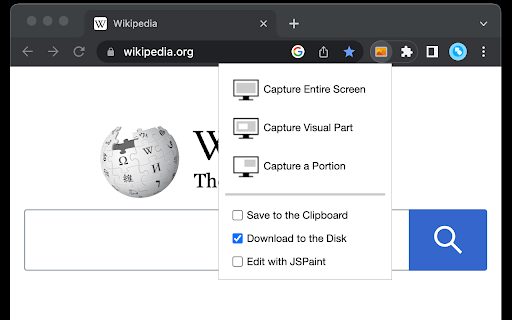
This extension provides browser-based screenshot functionality including auto-scrolling for long pages and various capture modes. It allows users to save files in multiple formats or open them in an integrated web-based paint application.
Overview
Installs
10K+
Rating
★ 4.2
74 reviews
Languages
12 locales
Includes Deutsch, English, Nederlands, español...
Market analysis
Review-backed positioning, friction, and market signals for this Chrome extension.
Macro category
Automation & Workflow Efficiency
Pricing friction
Low review signal
Complaint intensity
Moderate review signal
Listing positioning
Easy Screenshot positions itself as an all-in-one web clipping tool capable of capturing visual portions, viewports, or full-page scrolling screenshots. It emphasizes ease of use, integrated image editing via JSPaint, and multi-format support without watermarks.
Inferred product pattern
Free utility browser extension for media capturing.
Review-backed pain points
Users frequently report difficulty with the 'Capture Portion' tool, specifically regarding scrolling during selection and lack of responsiveness in the UI.
Observed feature gaps
Reviewers note a lack of intuitive selection visualization and poor UX parity between the Chrome and Firefox versions of the extension.
- Web developers
- Content creators
- General productivity users
- Full-page documentation
- Selective area capturing
- Quick image editing
- Functional selective area capture
- Good image quality
- Useful alternative to native OS screen capturing for specific browser needs
- Broken selection tool functionality
- Issues with full-page scrolling capture
- Increased permission requirements in updates
- Lack of undo/redo functionality in the editor
- Performance complaints detected
- Privacy complaints detected
- No pricing friction reported; the extension is free to use.
Support
Users report frustration with bug reporting processes and broken communication channels.
Reliability
Significant complaints regarding capture functionality failing on modern Chrome versions and issues with the selection tool not scrolling correctly.
Privacy
Users have expressed concern over increasing permission requests in recent updates.
- Free usage observed
- No account requirement observed
- Free plan or free usage claimed
Store listing facts
- Screenshots: 2
- Videos: 1
- Languages: 12
- Developer contact
- Official website
- Version: 0.5.2
- Size: 50.85KiB
- Last updated:
Listing SEO keywords
Core discovery
Comparison
Problem
Alternative
Similar extensions
Jump to related discovery paths:
FAQ
Screenshots

Links
Website: webextension.org
Videos: Watch