Keep Computer Awake (for a While) icon

Keep Computer Awake (for a While) Chrome Extension Analysis

Automation & Workflow Efficiency

Chrome extension ID: imbpigcghoambmanjekibelfjemnnool

Keep Computer Awake is a browser extension designed to prevent computers from entering sleep mode or turning off the screen. It features a countdown timer that can automatically revert power settings or close active tabs after a specified duration.

Version:1.0.7
Size:13.97KiB
Last updated:

Overview

Installs

9K+

Rating

4.3

12 reviews

Languages

2 locales

Includes English, 中文(中国)

Market analysis

Review-backed positioning, friction, and market signals for this Chrome extension.

Backed by review samples

Macro category

Automation & Workflow Efficiency

Pricing friction

Low review signal

Complaint intensity

Moderate review signal

Listing & review signals
Observed signals from store listing text and review samples.

Listing positioning

The extension is positioned as a utility to override system energy-saving settings to prevent sleep or screen turn-off. It emphasizes user control through three specific modes and a countdown timer to automate the return to default power states.

Inferred product pattern

A lightweight system utility extension focused on power management and automated task duration control.

Review-backed pain points

Users reported that the timer occasionally fails to trigger, the extension sometimes fails to prevent sleep, and functionality is inconsistent between Windows 10 and Windows 11.

Observed feature gaps

Users requested the ability to save the last used timer settings and expressed interest in native integration within tools like Google Slides.

Tags
System AwakeTimer UtilityScreen ControlProductivity Tool
Target users

- Presenters

- Remote Workers

- Users with restrictive corporate power policies

- Media consumers

Primary use cases

- Preventing sleep during presentations

- Maintaining system activity during long file uploads or downloads

- Automating media shutdown via timers

- Bypassing corporate energy-saving restrictions

Positive themes

- Effective timer functionality

- Ease of use

- Helpful for bypassing corporate restrictions

Negative themes

- Inconsistent reliability

- Operating system compatibility issues

- Timer failure

Observed friction

- Performance complaints detected

- No pricing friction observed in reviews.

Evidence boundary: Evidence derived from the Chrome Web Store product description and a sample of user reviews. The review sample size is small (12 reviews), which may not represent the full breadth of user experience or technical bugs.
Complaint summaries
Review-backed complaint signals grouped by operational area.

Support

No support or account-related complaints observed.

Reliability

Users experienced reliability issues where the timer did not execute or the computer entered sleep mode despite the extension being active.

Privacy

No privacy or security complaints observed.

Access & pricing

- No clear monetization signal

- No account requirement observed

- No clear pricing signal

Store listing facts

Listing assets

- Screenshots: 1

- Videos: 0

- Languages: 2

Trust signals

- Privacy policy

- Developer contact

- Official website

Store metadata

- Version: 1.0.7

- Size: 13.97KiB

- Last updated:

Store description excerpt
Short excerpt from the public Chrome Web Store listing; full copy is available on the official store page.
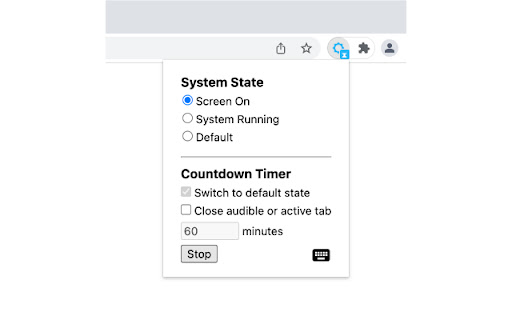
Similar to other "Keep Awake" extensions, the basic function of this extension is to override current system energy-saving setting, and prevent your computer from sleeping or turning off the screen. In addition, this extension provides a countdown timer that can switch to default state and (optionally) close the active tab. For example you can keep your computer running for a while, then let it go to sleep. It also supports keyboard shortcuts to change the state. Click the extension icon, you can switch between three states: ● Keep screen on: The computer does not go to sleep, and the screen keeps on. For example, when you do a presentation. ● Keep system running: The computer does not go to sleep, but the screen can be turned off. For example, when you upload or download files, the screen can be turned off, but need to keep the system running. ● System default state: Cancel the above t…

Listing SEO keywords

Search intent keywords
Keyword signals for evaluating how users may discover, compare, or search for this extension category.

Core discovery

keep computer awakeprevent sleep extensionkeep screen onsystem awake timer

Comparison

CaffeineKeep Awake

Problem

computer sleeping during downloadscreen turning off during presentationprevent system sleep

Alternative

system power management toolsbrowser sleep preventer

Similar extensions

Jump to related discovery paths:

FAQ

What is Keep Computer Awake (for a While) mainly used for?
Keep Computer Awake is a browser extension designed to prevent computers from entering sleep mode or turning off the screen. It features a countdown timer that can automatically revert power settings or close active tabs after a specified duration.
What market signals stand out?
Early or small audience with limited review base. Last known update: 02/22/2023.
What should builders compare before entering this space?
Compare install concentration, rating quality, update recency, screenshots, developer portfolio, listing claims, and review-backed friction signals.
Is this page review-backed?
Backed by review samples. This page combines store metadata with selected review signals, while raw store metrics remain visible for comparison.

Screenshots

Keep Computer Awake (for a While) screenshot

Links

Website: guokai.dev

Privacy policy: https://guokai.dev/privacy/

Recommended Chrome extensions

Related listings from the same category, trending peers, and the same publisher portfolio.

Browse workflow
Tab Groups Extension icon

Tab Groups Extension

Jackie(Guokai) Han

Automatically group tabs, save tabs/groups, and provide shortcuts for tabs/groups.

Installs

100K+

Rating

4.4

QR Code icon

QR Code

Jackie(Guokai) Han

Generate and Scan QR Code.

Installs

80K+

Rating

4.7

Sound Booster - increase volume up icon

Sound Booster - increase volume up

Sound-ultimate.com

Volume Booster helps boost sound video or music on any tab! Increase volume and bass booster, equalizer. Volume control.

Installs

2.0M+

Rating

4.5

Evernote Web Clipper icon

Evernote Web Clipper

Evernote

Use the Evernote extension to save things you see on the web into your Evernote account.

Installs

2.0M+

Rating

4.7

Microsoft Defender Browser Protection icon

Microsoft Defender Browser Protection

Microsoft Corporation

Protect yourself against online threats, like phishing and malicious websites, with real-time protection from Microsoft.

Installs

2.0M+

Rating

4.1

Визуальные закладки icon

Визуальные закладки

Yandex

Визуальные закладки – это страница, на которой собраны ваши любимые сайты

Installs

2.0M+

Rating

3.4

Web Signer icon

Web Signer

Softplan Websigner Developers

Extensão para assinatura digital no browser

Installs

2.0M+

Rating

2.9

Screen Recorder icon

Screen Recorder

Erich Behrens

Record a video from the camera or capture it from the screen (desktop, specific application window or browser tab)

Installs

2.0M+

Rating

3.8

Адаптер Рутокен Плагин icon

Адаптер Рутокен Плагин

АО "Актив-Софт"

Позволяет использовать Рутокен Плагин

Installs

2.0M+

Rating

2.5

Content Server Browser Web Extension icon

Content Server Browser Web Extension

OpenText Corporation

Content Server Browser Web Extension for Chrome

Installs

2.0M+

Rating

2.7