Backup and Sync Google Drive to other clouds icon

Backup and Sync Google Drive to other clouds Chrome Extension Analysis

Automation & Workflow Efficiency

Chrome extension ID: iobcbdgacfkninlcbphihhdlkobkehia

This browser extension acts as an interface for the cloudHQ cloud synchronization platform. It enables users to trigger file transfers and set up automated backup routines between their Google Drive account and other enterprise cloud storage providers.

Developer:cloudHQ
Version:1.4.2.12
Size:352KiB
Last updated:

Overview

Installs

50K+

Rating

4.2

562 reviews

Languages

1 locales

Includes English

Market analysis

Review-backed positioning, friction, and market signals for this Chrome extension.

Backed by review samples

Macro category

Automation & Workflow Efficiency

Pricing friction

High review signal

Complaint intensity

High review signal

Listing & review signals
Observed signals from store listing text and review samples.

Listing positioning

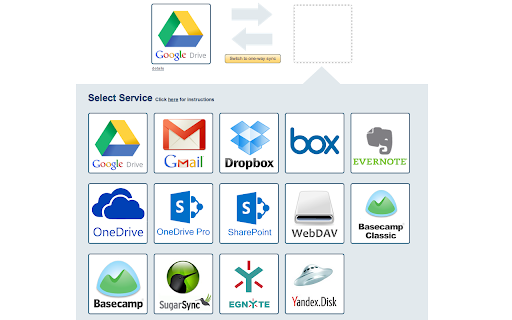
The store listing positions this product as a seamless utility for exporting Google Docs and Sheets to various cloud storage services. It emphasizes real-time synchronization and backup capabilities for Google Drive folders with platforms like Amazon S3, Dropbox, and SharePoint.

Inferred product pattern

Extension acting as a thin client/bridge for a centralized SaaS backend platform.

Review-backed pain points

Users express frustration over the requirement of full account access (email, contacts), hidden subscription costs after a short trial, and perceived misleading descriptions regarding functionality limits.

Observed feature gaps

Reviews indicate gaps in functionality regarding bidirectional sync between specific cloud services not natively supported by the Google Drive interface, and limitations on free usage tiers.

Tags
Cloud SyncData MigrationFile BackupIntegrationGoogle Drive
Target users

- Google Workspace Users

- Cloud Storage Power Users

- Business Professionals

Primary use cases

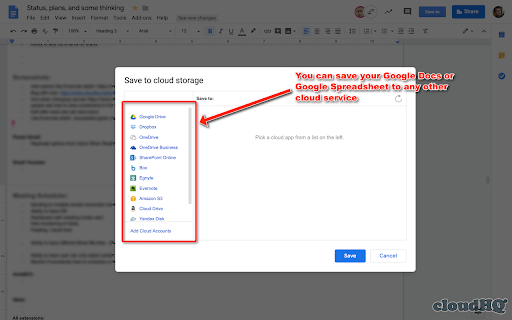
- Exporting Google Docs/Sheets to external clouds

- Backing up Google Drive folders

- Migrating files between cloud platforms

Positive themes

- Utility for file synchronization

- Connectivity with multiple cloud providers

Negative themes

- Aggressive permission requirements

- Hidden costs/subscription wall

- Lack of transparency regarding limitations

- Difficult uninstallation process

Observed friction

- Payment required for meaningful usage

- Free-tier complaints detected

- Refund complaints detected

- Privacy complaints detected

- High friction due to hidden subscription models, limited trial periods (14 days), and aggressive paywalls for premium cloud features.

Evidence boundary: Based on a collection of user reviews focusing on privacy, pricing transparency, and functional limitations during trials. Review data spans several years and may reflect historical UI/UX versions or pricing policies that have evolved since the original feedback.
Complaint summaries
Review-backed complaint signals grouped by operational area.

Support

Users report difficulty unsubscribing from mailing lists and complex, opaque processes for account removal.

Reliability

Reports of synchronization failures due to undisclosed account-type restrictions in the premium tiers.

Privacy

Significant concern regarding the scope of permissions requested, specifically access to email, contacts, and deletion/editing privileges across cloud assets.

Access & pricing

- Free entry with paid features

- Account required for core usage

- Trial or limited free usage before paid plan

Store listing facts

Listing assets

- Screenshots: 5

- Videos: 0

- Languages: 1

Trust signals

- Privacy policy

- Developer contact

- Official website

- Support link

Store metadata

- Version: 1.4.2.12

- Size: 352KiB

- Last updated:

Store description excerpt
Short excerpt from the public Chrome Web Store listing; full copy is available on the official store page.
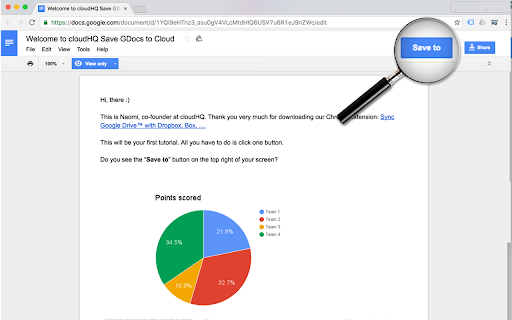
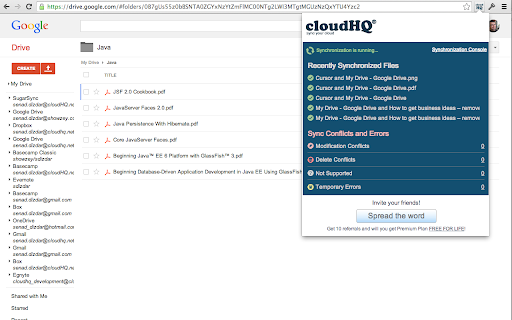
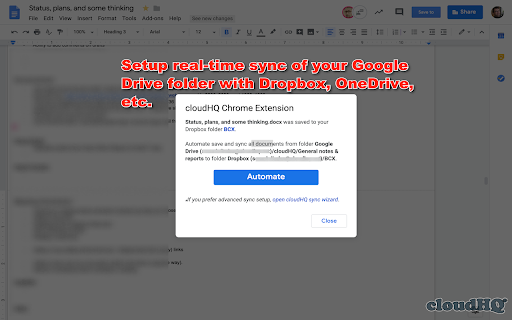
With this browser extension you can save your Google Docs or Google Sheets directly to other cloud account. Just click on on "Save to" button in upper right corner of your Google Docs or Google Spreadsheet documents and you will promoted to select destination cloud service. And after save, you can setup you can setup real-time sync, backup or migration of your Google Drive™ folder with some other cloud services: with no complicated downloads. You can also synchronize any folder in your Google Drive with other cloud storage solutions such as Amazon S3, Dropbox, Egnyte, SharePoint, etc. To do this, open the folder in your Google Drive and click on "Sync this folder" to initiate the synchronization wizard. You can learn more about cloudHQ solutions here: cloudHQ website: https://www.cloudhq.net/ Pricing: https://www.cloudhq.net/pricing Support page: https://support.cloudhq.net/ Blog: https…

Listing SEO keywords

Search intent keywords
Keyword signals for evaluating how users may discover, compare, or search for this extension category.

Core discovery

Google Drive to Dropbox syncCloud storage backupSync Google Sheets to other cloudFile migration extension

Comparison

cloudHQ alternativesGoogle Drive sync tools

Problem

transfer Google Drive filessync issues

Alternative

cloud migration softwareautomated file backup

Similar extensions

Jump to related discovery paths:

FAQ

What is Backup and Sync Google Drive to other clouds mainly used for?
This browser extension acts as an interface for the cloudHQ cloud synchronization platform. It enables users to trigger file transfers and set up automated backup routines between their Google Drive account and other enterprise cloud storage providers.
What market signals stand out?
Visible niche traction with moderate review base. Last known update: 11/27/2025.
What should builders compare before entering this space?
Compare install concentration, rating quality, update recency, screenshots, developer portfolio, listing claims, and review-backed friction signals.
Is this page review-backed?
Backed by review samples. This page combines store metadata with selected review signals, while raw store metrics remain visible for comparison.

Screenshots

Backup and Sync Google Drive to other clouds screenshot

Links

Recommended Chrome extensions

Related listings from the same category, trending peers, and the same publisher portfolio.

Browse workflow
Save Emails as PDF by cloudHQ icon

Save Emails as PDF by cloudHQ

cloudHQ

Export, convert and save Gmail™ emails as a PDF document

Installs

100K+

Rating

4.3

Gmail™ Email Templates by cloudHQ icon

Gmail™ Email Templates by cloudHQ

cloudHQ

Beautiful email templates for Gmail. Design your templates or import templates from Mailchimp. With team sharing!

Installs

100K+

Rating

4.2

Awesome Screen Recorder & Screenshot icon

Awesome Screen Recorder & Screenshot

Screen Recorder

The best screen recorder and screen capture & screenshot tool to record screen.

Installs

3.0M+

Rating

4.7

Free Download Manager icon

Free Download Manager

Free Download Manager.ORG

Free Download Manager integration with browser

Installs

3.0M+

Rating

4.2

夸克网盘-网页嗅探 icon

夸克网盘-网页嗅探

广州市动悦信息技术有限公司

识别到网页资源时,可一键存夸克网盘

Installs

3.0M+

Rating

1.7

Mendeley Web Importer icon

Mendeley Web Importer

Mendeley

Fast, convenient import of references and PDFs to your Mendeley Reference Manager library.

Installs

3.0M+

Rating

2.3

Enable local file links icon

Enable local file links

Takashi Sugimoto (tksugimoto)

Make it possible to open by click a link to a local file that is disabled by Chrome.

Installs

3.0M+

Rating

3.9

Pop up blocker for Chrome™ - Poper Blocker icon

Pop up blocker for Chrome™ - Poper Blocker

dingosolutions

Block popups, ads, cookie requests, trackers, notifications, ads on social media & more. A clean browsing experience starts today.

Installs

2.0M+

Rating

4.8

Momentum icon

Momentum

Momentum

Transform your browser into a beautifully designed tab that helps you feel calm, keep focus, and stay energized.

Installs

2.0M+

Rating

4.5

Google Scholar PDF Reader icon

Google Scholar PDF Reader

scholar-chrome-extensions

Supercharge your paper reading: follow references, skim outline, jump to figures, cite and save.

Installs

2.0M+

Rating

4.1