
Cookie Editor Chrome Extension Analysis
Developer & Designer ToolsChrome extension ID: iphcomljdfghbkdcfndaijbokpgddeno
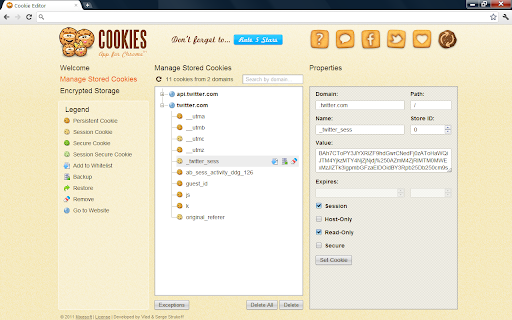
This extension provides a browser-based interface to inspect, modify, add, and remove cookies for specific websites or globally. It is designed to assist users and developers in managing web session data and browser-stored cookies.
Overview
Installs
100K+
Rating
★ 4.6
4,205 reviews
Languages
1 locales
Includes English
Market analysis
Review-backed positioning, friction, and market signals for this Chrome extension.
Macro category
Developer & Designer Tools
Pricing friction
Moderate review signal
Complaint intensity
High review signal
Listing positioning
Cookie Editor is positioned as a comprehensive, visual tool for managing browser cookies, supporting both standard operations like adding/editing/deleting and advanced tasks like bulk import/export. The listing highlights a clean interface and specialized features such as partitioned cookie support and password-protected encrypted storage.
Inferred product pattern
Utility-focused browser extension with a legacy user base currently suffering from reported maintenance and UX regression issues.
Review-backed pain points
Users report that 'Delete' buttons are ambiguous, often resulting in global cookie erasure rather than site-specific deletion. There are significant complaints about non-functional export features and perceived 'pay-to-use' walls that contradict the extension's free positioning.
Observed feature gaps
Lack of intuitive UI for adding new cookies, unreliable synchronization with Chrome's native cookie storage, and non-functional context menu site-specific filtering.
- Web Developers
- QA Testers
- Privacy-conscious power users
- Managing session cookies
- Debugging web authentication
- Importing and exporting cookies for backup or site migration
- Visual organization of cookie data
- Ease of access to session management
- Confusing UI/UX for bulk delete actions
- Inconsistent performance in cookie removal
- Concerns regarding forced payment prompts
- Historical claims of potential spamware transitions
- Free-tier complaints detected
- Performance complaints detected
- Privacy complaints detected
- Users report encountering unexpected payment/contribution prompts immediately after installation, leading to accusations of deceptive practices.
Support
Users feel the developer's support and product direction have degraded over time, with reports of broken core functionality and redirects to external sites.
Reliability
High frequency of reports stating that cookies remain on the system after being marked for deletion, indicating poor integration with browser APIs.
Privacy
Historical reviews express distrust due to ownership changes and the perception that the developer distributes spamware via associated products.
- Free entry with paid features
- No account requirement observed
- Limited free usage observed
Store listing facts
- Screenshots: 1
- Videos: 0
- Languages: 1
- Privacy policy
- Developer contact
- Official website
- Version: 2.2.0.0
- Size: 339KiB
- Last updated:
Listing SEO keywords
Core discovery
Comparison
Problem
Alternative
Similar extensions
Jump to related discovery paths:
FAQ
Screenshots
Links
Website: hotcleaner.com
Privacy policy: https://www.mixesoft.com/privacy.html