

Audio editor online X-Audacity Chrome Extension Analysis
Automation & Workflow EfficiencyChrome extension ID: jaembmdeobjibglbnnefpalabeohjpnj
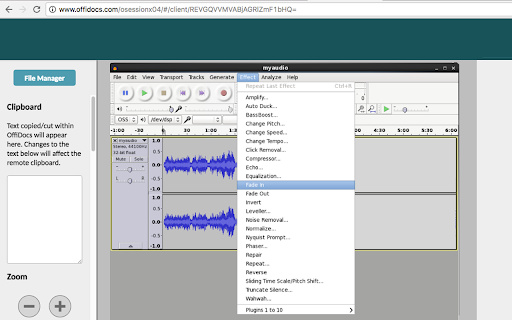
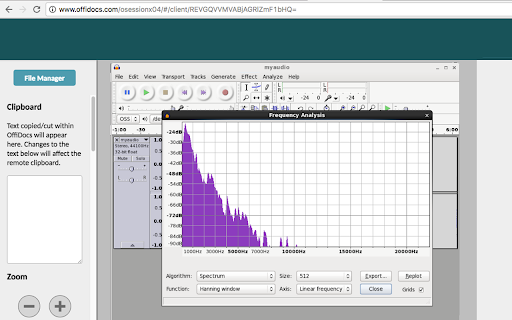
X-Audacity is a Chrome extension that offers access to the Audacity audio editor through a remote server. It allows users to import, edit, and export various audio formats like WAV, MP3, and FLAC directly within the web browser. Key features include track mixing, volume adjustment, and frequency analysis.
Overview
Installs
400K+
Rating
★ 2.8
193 reviews
Languages
18 locales
Includes Deutsch, English, Nederlands, Türkçe...
Market analysis
Review-backed positioning, friction, and market signals for this Chrome extension.
Macro category
Automation & Workflow Efficiency
Pricing friction
Moderate review signal
Complaint intensity
High review signal
Listing positioning
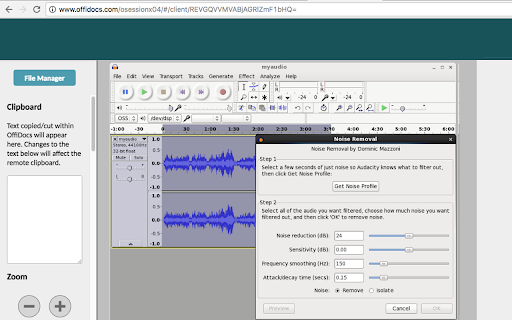
The product positions itself as a browser-based, remotely hosted instance of Audacity. It claims to provide professional-quality audio editing capabilities, including noise reduction and effect application, without requiring a local installation. The service is integrated with a file manager to facilitate audio project management.
Inferred product pattern
A remote-hosted software wrapper that attempts to bring desktop-grade audio tools to the browser but struggles with hardware permissions and UX quality due to an ad-supported model.
Review-backed pain points
Users report significant technical barriers, including the inability to record audio via USB/microphones, errors finding temporary storage locations, and a highly intrusive advertising presence that obscures the editor.
Observed feature gaps
Lack of functional hardware integration (microphones/USB) in the browser environment and unreliable file management systems.
- Podcasters
- Musicians
- Audiobook Creators
- Chromebook Users
- Removing background noise from audio
- Cutting and merging audio clips
- Applying audio effects like pitch and tempo changes
- Visualizing audio via spectrograms
- No positive review themes observed in the provided sample.
- Excessive advertisement interference
- Inability to recognize hardware input devices like microphones
- File import and export failures
- System crashes and loading errors
- Difficulty accessing the editing interface due to small screen scaling
- Free-tier complaints detected
- Performance complaints detected
- Privacy complaints detected
- While the tool is claimed to be free, users report that the experience is heavily degraded by excessive advertisements.
Support
No specific support or refund complaints were identified in the provided reviews.
Reliability
The extension suffers from frequent crashes, failure to load, and errors regarding the inability to save temporary files.
Privacy
Users have expressed concern regarding the extension's stated practice of scanning browsed URLs and reporting them to the developer's servers.
- Free entry with paid features
- Login needed for core features
- Limited free usage observed
Store listing facts
- Screenshots: 3
- Videos: 1
- Languages: 18
- Privacy policy
- Developer contact
- Official website
- Version: 2.15.5
- Size: 416KiB
- Last updated:
Listing SEO keywords
Core discovery
Comparison
Problem
Alternative
Similar extensions
Jump to related discovery paths:
FAQ
Screenshots
Links
Website: offidocs.com
Privacy policy: http://www.offidocs.com/index.php/desktop-apps-policy
Videos: Watch




