Impero Backdrop MV3 icon

Impero Backdrop MV3 Chrome Extension Analysis

Automation & Workflow Efficiency

Chrome extension ID: jjpmjccpemllnmgiaojaocgnakpmfgjg

Impero Backdrop MV3 is a Chrome extension designed for educational institutions to manage and monitor ChromeOS devices within a classroom setting. It allows teachers to view device activity in real-time, send messages, launch websites, lock screens, and manage internet access and browsing restrictions.

Developer:Ativion
Version:4.0.286
Size:7.15MiB
Last updated:

Overview

Installs

20K+

Rating

1.2

76 reviews

Languages

4 locales

Includes Deutsch, English, Nederlands, 日本語

Market analysis

Review-backed positioning, friction, and market signals for this Chrome extension.

Backed by review samples

Macro category

Automation & Workflow Efficiency

Pricing friction

Low review signal

Complaint intensity

High review signal

Listing & review signals
Observed signals from store listing text and review samples.

Listing positioning

The store listing positions Impero Backdrop MV3 as a solution for ChromeOS devices to connect to a cloud-based classroom management system. It emphasizes features that enable teachers to monitor student activity, send messages, launch websites, and control devices in a digital learning environment.

Inferred product pattern

Classroom monitoring and control software deployed via Chrome extension.

Review-backed pain points

Users express significant frustration with the extension, citing it as an invasion of privacy and feeling constantly monitored. Common complaints include restrictions on website access, even at home, and the general feeling of being untrustworthy. Some users report technical issues, with the extension being unusable or having broken functionality.

Observed feature gaps

While the listing details many monitoring and control features, user reviews suggest potential gaps in usability and user experience, with complaints about broken buttons, unusable functionality, and the intrusive nature of the monitoring which causes anxiety. There is also a mention of a missing notification feature.

Tags
Classroom ManagementDevice MonitoringRemote ControlStudent Monitoring
Target users

- K-12 educators

- School IT administrators

- Educational institutions

Primary use cases

- Remote student monitoring

- Classroom device management

- Digital learning environment control

- Website and internet restriction enforcement

Positive themes

- App potentially saved user from an attack (though this review is highly satirical and likely not genuine).

Negative themes

- Invasion of privacy

- Unwanted monitoring and control

- Frustration with restricted access to websites (including YouTube)

- Technical issues and unusability

- Feeling of being treated as untrustworthy

- Anxiety due to constant surveillance

Observed friction

- Performance complaints detected

- Privacy complaints detected

- No explicit pricing friction is mentioned in the reviews or listing, suggesting it's likely part of a larger school-purchased solution.

Evidence boundary: Data is derived from user reviews on the Chrome Web Store, specifically focusing on helpful and low-rating samples. The listing details were also analyzed. The review data is limited to the samples provided, and the overall sentiment distribution may not be fully represented. Information on pricing, monetization, and specific access models is not explicitly detailed in the provided data.
Complaint summaries
Review-backed complaint signals grouped by operational area.

Support

No specific complaints about customer support were found in the provided reviews.

Reliability

Multiple reviews indicate the extension is unusable, doesn't work, or has broken functionality, suggesting significant reliability issues.

Privacy

Users consistently describe the extension as an invasion of privacy, reporting that it spies on them, monitors their screen, and controls their applications without consent. This is the most prominent negative theme.

Access & pricing

- No clear monetization signal

- No clear access signal

- No clear pricing signal

Store listing facts

Listing assets

- Screenshots: 4

- Videos: 0

- Languages: 4

Trust signals

- Privacy policy

- Developer contact

Store metadata

- Version: 4.0.286

- Size: 7.15MiB

- Last updated:

Store description excerpt
Short excerpt from the public Chrome Web Store listing; full copy is available on the official store page.
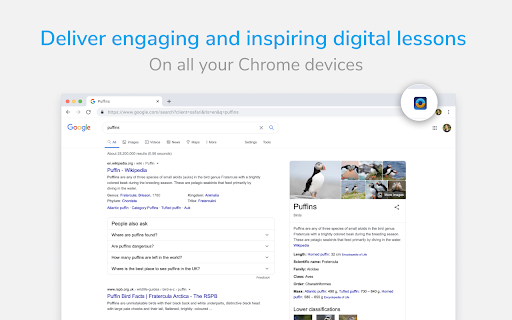
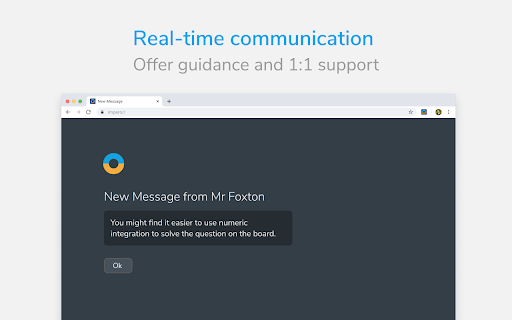
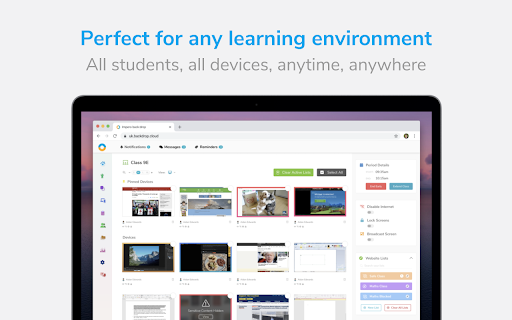
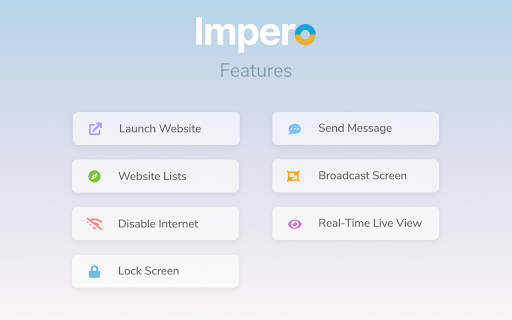
Allows ChromeOS devices to connect to Impero’s cloud-based classroom management solution supporting all major operating systems. Enable teachers to deliver digital learning anywhere, on any device. Supported features: Real-time monitoring - see device activity in real time Send message - send a direct one way message to the device Launch website - open a web site on the device automatically Lock screen - lock the screen of the app Disable internet - disable internet access inside the app Restrict browsing - enforce allow and block website lists Tab management - view open browser tabs lists and close open tabs Broadcast Screen - Broadcast teacher and student screens to the class Key monitoring - Monitors typed words and sends captures to Backdrop if keywords are found Viewed words - Monitors viewed words in the Impero browser and sends captures to Backdrop if keywords are found This appl…

Listing SEO keywords

Search intent keywords
Keyword signals for evaluating how users may discover, compare, or search for this extension category.

Core discovery

ChromeOS classroom managementStudent device monitoringRemote learning controlTeacher monitoring toolDigital classroom security

Comparison

alternative to Imperostudent tracking softwareclassroom monitoring software

Problem

student privacy invasionunusable Chrome extensionwebsite blocking issuesclassroom surveillance anxiety

Alternative

classroom management toolsstudent accountability software

Similar extensions

Jump to related discovery paths:

FAQ

What is Impero Backdrop MV3 mainly used for?
Impero Backdrop MV3 is a Chrome extension designed for educational institutions to manage and monitor ChromeOS devices within a classroom setting. It allows teachers to view device activity in real-time, send messages, launch websites, lock screens, and manage internet access and browsing restrictions.
What market signals stand out?
Visible niche traction with limited review base. Last known update: 12/01/2025.
What should builders compare before entering this space?
Compare install concentration, rating quality, update recency, screenshots, developer portfolio, listing claims, and review-backed friction signals.
Is this page review-backed?
Backed by review samples. This page combines store metadata with selected review signals, while raw store metrics remain visible for comparison.

Screenshots

Impero Backdrop MV3 screenshot

Links

Recommended Chrome extensions

Related listings from the same category, trending peers, and the same publisher portfolio.

Browse education
Education Pro Browser Extension MV3 icon

Education Pro Browser Extension MV3

Ativion

Education Pro Browser Extension MV3 for use on Windows and Mac with EdPro client installed

Installs

100K+

Rating

1.0

Education Pro Chromebook Extension MV3 icon

Education Pro Chromebook Extension MV3

Ativion

The Impero Education Pro Chromebook Extension enables you to manage and monitor Google ChromeOS devices on your network helping to…

Installs

60K+

Rating

1.0

Kami for Google Chrome™ icon

Kami for Google Chrome™

Kami

Kami is an interactive learning platform empowering students and enhancing the way teachers teach, feedback, and assess.

Installs

5.0M+

Rating

4.6

EndNote Click icon

EndNote Click

EndNote Click

Fast, one-click access to millions of research papers.

Installs

5.0M+

Rating

4.1

Equatio - Math made digital icon

Equatio - Math made digital

Texthelp

Easily create mathematical equations, formulas and quizzes. Intuitively type or handwrite, with no tricky math code to learn.

Installs

2.0M+

Rating

3.9

Language Reactor icon

Language Reactor

Dioco

Learn languages effectively by watching films and series in your target language.

Installs

2.0M+

Rating

4.2

Brisk Teaching - AI that Works Where Teachers Work icon

Brisk Teaching - AI that Works Where Teachers Work

Brisk Teaching

Brisk works inside Google Docs, Slides, and YouTube, saving teachers 10+ hours weekly on planning, feedback, and resource creation.

Installs

1.0M+

Rating

4.7

BetterCampus (prev. BetterCanvas) icon

BetterCampus (prev. BetterCanvas)

BetterCampus

Feature packed extension for Canvas.

Installs

1.0M+

Rating

4.7

LibKey Nomad icon

LibKey Nomad

Third Iron LLC

One-click access to millions of scholarly articles.

Installs

1.0M+

Rating

4.5

MyBib: Free Citation Generator icon

MyBib: Free Citation Generator

MyBib

Automatically create APA style, MLA format, and Harvard referencing style citations with our citation generator add-on for Chrome.

Installs

1.0M+

Rating

4.8