Full Screen for Google Slides™ icon

Full Screen for Google Slides™ Chrome Extension Analysis

Automation & Workflow Efficiency

Chrome extension ID: kepghmionbgdajcmmckifnfcdcgpbjah

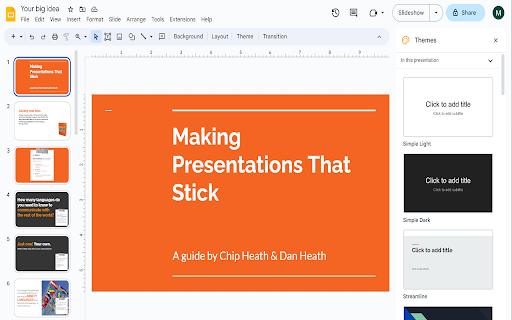
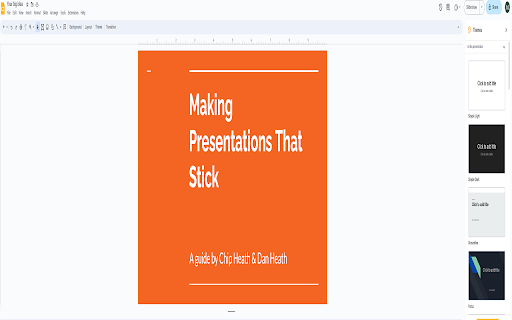
This browser extension modifies the standard Google Slides interface to allow for a full-screen editing experience. It is designed to help users on smaller screens or those sharing their screen during video conferences to present content more clearly.

Developer:Free Apps
Version:3.0.0
Size:118KiB
Last updated:

Overview

Installs

6K+

Rating

4.2

5 reviews

Languages

40 locales

Includes Deutsch, English, Filipino, Indonesia...

Market analysis

Review-backed positioning, friction, and market signals for this Chrome extension.

Backed by review samples

Macro category

Automation & Workflow Efficiency

Pricing friction

Low review signal

Complaint intensity

Moderate review signal

Listing & review signals
Observed signals from store listing text and review samples.

Listing positioning

The extension is positioned as a productivity utility that enables users to edit Google Slides in a full-screen mode. It emphasizes the benefit of improved visibility during virtual presentations and collaborative meetings.

Inferred product pattern

Single-function UI-enhancement utility for Google Workspace.

Review-backed pain points

Some users report that the extension does not function as expected.

Observed feature gaps

No major feature gaps identified, though reliability concerns were noted in a minority of reviews.

Tags
Google SlidesPresentation ToolProductivityWorkflow Enhancement
Target users

- Educators

- Remote Workers

- Presenters

Primary use cases

- Screen sharing in video calls

- Working on smaller laptops

- Virtual collaborative brainstorming

Positive themes

- Improved workspace visibility

- Enhanced clarity for students/participants

- Valued replacement for deprecated tools

Negative themes

- Functionality failure

Observed friction

- None observed; the extension is marketed as free software.

Evidence boundary: Evidence is derived from public store listing data and five user reviews confirming usability for specific professional and educational use cases. The sample size of reviews is small, which may not represent the experience of the entire user base.
Complaint summaries
Review-backed complaint signals grouped by operational area.

Support

No support-related complaints identified.

Reliability

One user reported the extension is non-functional.

Privacy

No privacy complaints identified.

Access & pricing

- Free usage observed

- No account requirement observed

- Free plan or free usage claimed

Store listing facts

Listing assets

- Screenshots: 2

- Videos: 0

- Languages: 40

Trust signals

- Privacy policy

- Developer contact

- Official website

Store metadata

- Version: 3.0.0

- Size: 118KiB

- Last updated:

Store description excerpt
Short excerpt from the public Chrome Web Store listing; full copy is available on the official store page.
Want to make your Google Slides full screen while you're in edit mode? You can do so today when you use our extension. Here are the steps needed to allow Google Slides to turn into full screen mode while you can still edit the slides. 1) Install our software extension 2) Go to your Google Slide presentation 3) Click on the extension icon and choose full screen mode. The main benefits of being able to edit Google Slides while you're in full screen are - If you are in a Zoom call/Google Meet call, the other particpants in the call are able to view the slides more clearly in full screen mode. - Makes brainstorming in virtual group meetings a lot easier Try this free software today.

Listing SEO keywords

Search intent keywords
Keyword signals for evaluating how users may discover, compare, or search for this extension category.

Core discovery

Google Slides full screen editedit slides full screen chrome extension

Comparison

Google Slides presentation toolsalternative presentation view extensions

Problem

cannot edit slides full screenGoogle Slides screen space issues

Alternative

Google Slides interface tweaks

Similar extensions

Jump to related discovery paths:

FAQ

What is Full Screen for Google Slides™ mainly used for?
This browser extension modifies the standard Google Slides interface to allow for a full-screen editing experience. It is designed to help users on smaller screens or those sharing their screen during video conferences to present content more clearly.
What market signals stand out?
Early or small audience with limited review base. Last known update: 06/20/2023.
What should builders compare before entering this space?
Compare install concentration, rating quality, update recency, screenshots, developer portfolio, listing claims, and review-backed friction signals.
Is this page review-backed?
Backed by review samples. This page combines store metadata with selected review signals, while raw store metrics remain visible for comparison.

Screenshots

Full Screen for Google Slides™ screenshot

Links

Recommended Chrome extensions

Related listings from the same category, trending peers, and the same publisher portfolio.

Browse workflow