Adobe Experience Cloud Visual Editing Helper icon

Adobe Experience Cloud Visual Editing Helper Chrome Extension Analysis

Developer & Designer Tools

Chrome extension ID: kgmjjkfjacffaebgpkpcllakjifppnca

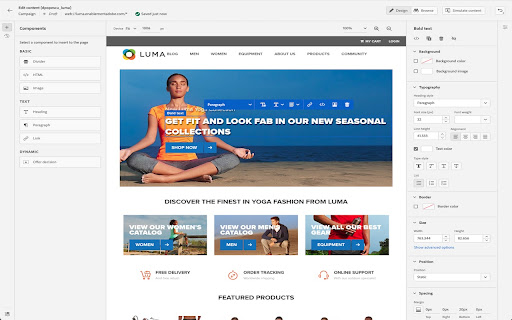
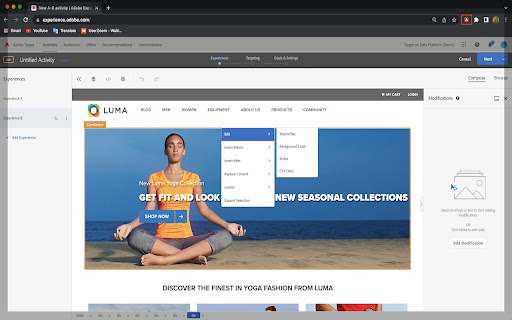
This Chrome extension facilitates the use of visual WYSIWYG editors within Adobe Target and Adobe Journey Optimizer. It addresses technical hurdles by removing iframe busting headers and adjusting cookie attributes to enable seamless website loading and editing for personalization tasks. The extension is designed to simplify the process of personalizing web content for users of Adobe's Experience Cloud.

Developer:Adobe Inc.
Version:1.5.7
Size:201KiB
Last updated:

Overview

Installs

20K+

Rating

2.9

19 reviews

Languages

1 locales

Includes English

Market analysis

Review-backed positioning, friction, and market signals for this Chrome extension.

Backed by review samples

Macro category

Developer & Designer Tools

Pricing friction

Low review signal

Complaint intensity

High review signal

Listing & review signals
Observed signals from store listing text and review samples.

Listing positioning

The Visual Editing Helper extension is positioned as a solution for Adobe Experience Cloud users to load their websites into Adobe Target or Adobe Journey Optimizer for visual personalization. It aims to resolve site-loading issues and enable authoring even for users whose IT developers have not yet implemented the necessary Adobe products.

Inferred product pattern

A helper utility extension designed to enable specific features of a larger SaaS platform by overcoming technical browser limitations.

Review-backed pain points

Multiple users report that the extension is not working, fails to load pages, or is incompatible with current browser versions and Adobe's latest UIs. This leads to significant frustration and a reliance on older, unsupported tools.

Observed feature gaps

The primary gap is the observed unreliability and failure to function as advertised for a significant portion of users. Users also express a desire for such functionality to be built directly into the core product rather than requiring a separate extension.

Tags
Visual EditorWeb PersonalizationAdobe Experience CloudDeveloper ToolWeb Authoring
Target users

- Adobe Experience Cloud users

- Digital marketers

- Web developers

- Content editors

Primary use cases

- Website personalization

- Visual content editing

- Adobe Target integration

- Adobe Journey Optimizer integration

Positive themes

- Works correctly with the new Adobe Target UI layout for some users.

Negative themes

- The extension frequently does not work as expected, requiring workarounds.

- Incompatibility issues with current Chromium versions and Adobe's frontend.

- Users are forced to rely on older, deprecated extensions due to this one's failure.

- Lack of clear official documentation and support for the extension.

Observed friction

- Performance complaints detected

- The extension itself is free to use. Pricing friction would relate to the underlying Adobe Experience Cloud products.

Evidence boundary: Reviews indicate both positive and negative experiences. Some users find the extension works with newer Adobe UI versions, while a substantial number report it is not working, incompatible with browser updates, or requires workarounds, leading them to use older extensions. The review count is relatively low (19), and the average score is below 3. A single positive review exists, but is heavily outweighed by negative feedback, suggesting potential widespread issues.
Complaint summaries
Review-backed complaint signals grouped by operational area.

Support

Reviews suggest a lack of clear official documentation and reliance on workarounds for this extension.

Reliability

A significant number of users report the extension is not working, fails to load pages, or is incompatible with recent browser updates, indicating critical reliability issues.

Privacy

No privacy-related complaints were observed in the provided reviews.

Access & pricing

- No clear monetization signal

- No clear access signal

- Free plan or free usage claimed

Store listing facts

Listing assets

- Screenshots: 2

- Videos: 0

- Languages: 1

Trust signals

- Privacy policy

- Developer contact

Store metadata

- Version: 1.5.7

- Size: 201KiB

- Last updated:

Store description excerpt
Short excerpt from the public Chrome Web Store listing; full copy is available on the official store page.
The Visual Editing Helper Chrome extension allows Adobe Experience Cloud users to load their website into Adobe Target or Adobe Journey Optimizer and to use a visual WYSIWYG editor to personalize it. The extension solves site-loading issues for which customers now rely on the Target Enhanced Experience Composer or third-party extensions to be able to author their websites. Benefits of using the Visual Editing Helper extension: - All iframe busting headers, such as X-Frame-Options and Content-Security-Policy, are implicitly removed from the website to enable authoring. - Extension sets SameSite attribute to the value "None" for the website's session cookies in order to be able to login using the visual editor. - Customers new to Target or to Journey Optimizer can use the extension to experiment even if their IT developers have not yet implemented Target or Journey Optimizer on their webs…

Listing SEO keywords

Search intent keywords
Keyword signals for evaluating how users may discover, compare, or search for this extension category.

Core discovery

Adobe Experience Cloud extensionVisual editing helperAdobe Target personalizationJourney Optimizer WYSIWYGChrome extension web authoring

Comparison

Adobe Target Enhanced Experience ComposerOld VEC Helper extension

Problem

site loading issuesvisual editor not workingiframe bustingSameSite cookie Nonecontent personalization errors

Alternative

Adobe Target VEC HelperEnhanced Composer

Similar extensions

Jump to related discovery paths:

FAQ

What is Adobe Experience Cloud Visual Editing Helper mainly used for?
This Chrome extension facilitates the use of visual WYSIWYG editors within Adobe Target and Adobe Journey Optimizer. It addresses technical hurdles by removing iframe busting headers and adjusting cookie attributes to enable seamless website loading and editing for personalization tasks. The extension is designed to simplify the process of personalizing web content for users of Adobe's Experience Cloud.
What market signals stand out?
Visible niche traction with limited review base. Last known update: 05/14/2026.
What should builders compare before entering this space?
Compare install concentration, rating quality, update recency, screenshots, developer portfolio, listing claims, and review-backed friction signals.
Is this page review-backed?
Backed by review samples. This page combines store metadata with selected review signals, while raw store metrics remain visible for comparison.

Screenshots

Adobe Experience Cloud Visual Editing Helper screenshot

Links

Recommended Chrome extensions

Related listings from the same category, trending peers, and the same publisher portfolio.

Browse developer