LoiLo Web Card icon

LoiLo Web Card Chrome Extension Analysis

Automation & Workflow Efficiency

Chrome extension ID: kjafdcgbeaoamegadobmjdlllmlgfina

LoiLo Web Card is an browser helper tool designed to capture screenshots of active web pages alongside their source URLs. It works as an extension for the LoiLoNote School platform, allowing users to quickly send visual bookmarks directly to their educational workspace.

Developer:LoiLo
Version:0.7.0
Size:129KiB
Last updated:

Overview

Installs

900K+

Rating

3.5

8 reviews

Languages

3 locales

Includes English, 中文(台灣), 日本語

Market analysis

Review-backed positioning, friction, and market signals for this Chrome extension.

Backed by review samples

Macro category

Automation & Workflow Efficiency

Pricing friction

Low review signal

Complaint intensity

Moderate review signal

Listing & review signals
Observed signals from store listing text and review samples.

Listing positioning

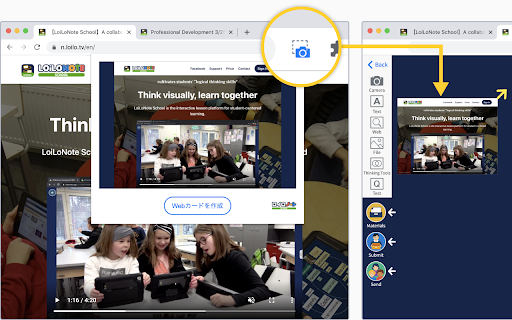
The store listing positions LoiLo Web Card as a quick helper utility to create visual URL links called Web Cards within LoiLoNote School. It outlines a simple, camera-click mechanism to capture webpage snapshots and save them to a specified note. Setup instructions prioritize pinning the extension to ensure visibility in the toolbar.

Inferred product pattern

Web clipper integration companion for a closed educational platform.

Review-backed pain points

The limited user feedback points to frustration with manual processes, with users noting that inputting data or configuring the card requires too much effort and expressing a desire for more automation.

Observed feature gaps

Users desire a fully automated or background execution mode that reduces manual steps when creating or sending a card to LoiLoNote.

Tags
Web ClipperEdTechLoiLoNote SchoolScreen CaptureBookmark Tool
Target users

- Students using LoiLoNote School

- Educators using LoiLoNote School

- Schools adopting the LoiLo educational ecosystem

Primary use cases

- Capturing website snapshots to insert as references inside LoiLoNote notes

- Bookmarking research sources for classroom assignments

Positive themes

- No positive review themes available in the provided sample

Negative themes

- Manual typing and setup effort feels cumbersome

- General interface dissatisfaction

Observed friction

- No pricing or monetization friction is mentioned in the available listing details or user feedback.

Evidence boundary: Analyzed public store listing text describing the core snapshot workflows alongside two Japanese review samples expressing workflow frustration. The review analysis is constrained by a very small sample size of only two 1-star reviews and an absence of positive feedback to balance user sentiment.
Complaint summaries
Review-backed complaint signals grouped by operational area.

Support

No customer support issues, billing disputes, or account-blocking complaints were observed in the review samples.

Reliability

While there are no reports of technical crashes or data loss, users complain that the manual effort required feels tedious and slow.

Privacy

No privacy or security concerns were raised in the listing data or review samples.

Access & pricing

- Free usage observed

- Account required for core usage

- Free plan or free usage claimed

Store listing facts

Listing assets

- Screenshots: 1

- Videos: 0

- Languages: 3

Trust signals

- Privacy policy

- Developer contact

- Official website

- Support link

Store metadata

- Version: 0.7.0

- Size: 129KiB

- Last updated:

Store description excerpt
Short excerpt from the public Chrome Web Store listing; full copy is available on the official store page.
About LoiLo Web Card LoiLo Web Card is a browser extension that makes it easy to create Web Cards—URL links with webpage snapshots. Simply click the camera icon to create a Web Card. Using the Web Card Extension 1. Pin the extension After installing the Web Card extension, it needs to be pinned on each device. ① Click the puzzle piece icon in the top-right corner of the browser. ② Click the pin icon next to LoiLo Web Card to add it to the toolbar. *When pinned, the icon turns blue. 2. Create a Web Card from a website Open the website you want to save, then click the camera icon in the extension. Choose a LoiLoNote note to save it to. Notes A destination note in LoiLoNote must be selected to save a Web Card. The captured image may differ depending on how the website is structured.

Listing SEO keywords

Search intent keywords
Keyword signals for evaluating how users may discover, compare, or search for this extension category.

Core discovery

LoiLoNote School web clippercreate Web Card LoiLoNoteLoiLo chrome extension

Comparison

LoiLo Web Card vs standard bookmarking

Problem

how to save webpage to LoiLoNoteLoiLoNote screenshot capture tool

Alternative

LoiLoNote school browser captureweb clipper for students

Similar extensions

Jump to related discovery paths:

FAQ

What is LoiLo Web Card mainly used for?
LoiLo Web Card is an browser helper tool designed to capture screenshots of active web pages alongside their source URLs. It works as an extension for the LoiLoNote School platform, allowing users to quickly send visual bookmarks directly to their educational workspace.
What market signals stand out?
Established adoption with limited review base. Last known update: 01/13/2026.
What should builders compare before entering this space?
Compare install concentration, rating quality, update recency, screenshots, developer portfolio, listing claims, and review-backed friction signals.
Is this page review-backed?
Backed by review samples. This page combines store metadata with selected review signals, while raw store metrics remain visible for comparison.

Screenshots

LoiLo Web Card screenshot

Links

Recommended Chrome extensions

Related listings from the same category, trending peers, and the same publisher portfolio.

Browse workflow