Instapaper icon

Instapaper Chrome Extension Analysis

Tab & Bookmark Productivity

Chrome extension ID: ldjkgaaoikpmhmkelcgkgacicjfbofhh

Instapaper is a digital reading platform that captures articles and web content for later consumption on mobile devices or computers. The extension functions primarily as a one-click saving mechanism to sync open tabs into a user's personal Instapaper account.

Developer:accounts
Version:3.1.2
Size:180KiB
Last updated:

Overview

Installs

300K+

Rating

3.8

560 reviews

Languages

1 locales

Includes English

Market analysis

Review-backed positioning, friction, and market signals for this Chrome extension.

Backed by review samples

Macro category

Tab & Bookmark Productivity

Pricing friction

Low review signal

Complaint intensity

High review signal

Listing & review signals
Observed signals from store listing text and review samples.

Listing positioning

Instapaper positions itself as a simple, streamlined tool for saving web pages to a central queue for offline reading across devices. It serves as a browser-based bridge to the broader Instapaper ecosystem, allowing users to move content from their browser into their reading library.

Inferred product pattern

Legacy bookmarking utility struggling with technical debt and maintenance compared to modern reading apps.

Review-backed pain points

Users report critical failures in saving functionality, UI sluggishness, difficulty navigating from the extension to the web dashboard, and lack of modern organizational features like tagging.

Observed feature gaps

Lack of intuitive login detection within the extension, missing advanced content organization (tagging), and unreliable browser-to-service communication.

Tags
Read It LaterArticle SavingOffline ReadingBookmark Manager
Target users

- Frequent readers

- Knowledge workers

- Mobile-first content consumers

Primary use cases

- Saving long-form articles

- Cross-device content syncing

- Offline reading preparation

Positive themes

- Historical reliability

- Useful for cross-platform workflows

- Helpful for maintaining an offline reading list

Negative themes

- Persistent 'Save Failed' errors

- Poor interface navigation

- Lack of tagging/organizational features

- High resource consumption

Observed friction

- Performance complaints detected

- Privacy complaints detected

- Users expressed frustration regarding the gap between paid support and actual issue resolution, but no specific complaints regarding the free-tier model itself were found.

Evidence boundary: The analysis is based on a collection of user reviews spanning several years, identifying consistent technical failures in the saving mechanism and UI concerns. Review data includes historical entries from 2017-2026, which may conflate current functionality with older versions of the extension.
Complaint summaries
Review-backed complaint signals grouped by operational area.

Support

Reports suggest that support is unresponsive or unable to replicate widely reported functional failures, leading to significant user dissatisfaction.

Reliability

High incidence of 'Save Failed' errors, slow performance, and reports of the extension incorrectly identifying the active tab to be saved.

Privacy

Occasional user allegations regarding unexpected browser behavior, though these are historical and unverified by official documentation.

Access & pricing

- Free entry with paid features

- Login needed for core features

- Limited free usage observed

Store listing facts

Listing assets

- Screenshots: 4

- Videos: 0

- Languages: 1

Trust signals

- Privacy policy

- Developer contact

- Official website

Store metadata

- Version: 3.1.2

- Size: 180KiB

- Last updated:

Store description excerpt
Short excerpt from the public Chrome Web Store listing; full copy is available on the official store page.
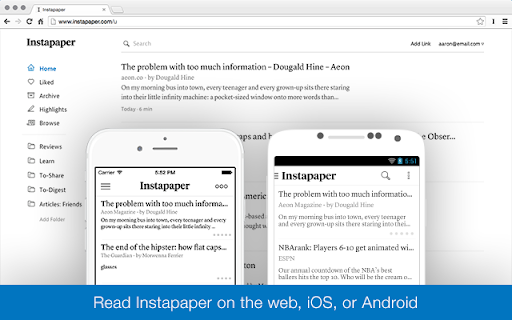
Instapaper is a simple tool for saving web pages to read later on your iPhone, iPad, Android, computer, or Kindle. This browser extension may be used in place of the bookmarklet to save articles directly into your Instapaper queue. It works by saving the current tab to your Instapaper account . Users who aren't logged in will be taken to a login or signup page, after completing the process they will be redirected back to the original page with the original page saved in their queue.

Listing SEO keywords

Search intent keywords
Keyword signals for evaluating how users may discover, compare, or search for this extension category.

Core discovery

save articles for laterread it later chrome extensioninstapaper save buttonoffline reading tool

Comparison

Instapaper vs Pocketbest article saving extensions

Problem

instapaper save failedinstapaper extension not working

Alternative

Pocket alternativeRaindrop.io alternativeWallabag

Similar extensions

Jump to related discovery paths:

FAQ

What is Instapaper mainly used for?
Instapaper is a digital reading platform that captures articles and web content for later consumption on mobile devices or computers. The extension functions primarily as a one-click saving mechanism to sync open tabs into a user's personal Instapaper account.
What market signals stand out?
Established adoption with moderate review base. Last known update: 11/06/2024.
What should builders compare before entering this space?
Compare install concentration, rating quality, update recency, screenshots, developer portfolio, listing claims, and review-backed friction signals.
Is this page review-backed?
Backed by review samples. This page combines store metadata with selected review signals, while raw store metrics remain visible for comparison.

Screenshots

Instapaper screenshot

Links

Recommended Chrome extensions

Related listings from the same category, trending peers, and the same publisher portfolio.

Browse workflow
Awesome Screen Recorder & Screenshot icon

Awesome Screen Recorder & Screenshot

Screen Recorder

The best screen recorder and screen capture & screenshot tool to record screen.

Installs

3.0M+

Rating

4.7

Free Download Manager icon

Free Download Manager

Free Download Manager.ORG

Free Download Manager integration with browser

Installs

3.0M+

Rating

4.2

夸克网盘-网页嗅探 icon

夸克网盘-网页嗅探

广州市动悦信息技术有限公司

识别到网页资源时,可一键存夸克网盘

Installs

3.0M+

Rating

1.7

Mendeley Web Importer icon

Mendeley Web Importer

Mendeley

Fast, convenient import of references and PDFs to your Mendeley Reference Manager library.

Installs

3.0M+

Rating

2.3

Enable local file links icon

Enable local file links

Takashi Sugimoto (tksugimoto)

Make it possible to open by click a link to a local file that is disabled by Chrome.

Installs

3.0M+

Rating

3.9

Pop up blocker for Chrome™ - Poper Blocker icon

Pop up blocker for Chrome™ - Poper Blocker

dingosolutions

Block popups, ads, cookie requests, trackers, notifications, ads on social media & more. A clean browsing experience starts today.

Installs

2.0M+

Rating

4.8

Momentum icon

Momentum

Momentum

Transform your browser into a beautifully designed tab that helps you feel calm, keep focus, and stay energized.

Installs

2.0M+

Rating

4.5

Google Scholar PDF Reader icon

Google Scholar PDF Reader

scholar-chrome-extensions

Supercharge your paper reading: follow references, skim outline, jump to figures, cite and save.

Installs

2.0M+

Rating

4.1

Keeper® Password Manager & Digital Vault icon

Keeper® Password Manager & Digital Vault

Keeper Security

Generate strong passwords, autofill and protect your confidential info with zero-knowledge encryption.

Installs

2.0M+

Rating

4.8

AI Grammar Checker & Paraphraser – LanguageTool icon

AI Grammar Checker & Paraphraser – LanguageTool

lt-extension-publisher

Instantly Enhance Your Texts with LanguageTool’s Grammar Checker and Paraphrasing Tool

Installs

2.0M+

Rating

4.7