Open in Foxit™ Reader icon

Open in Foxit™ Reader Chrome Extension Analysis

Automation & Workflow Efficiency

Chrome extension ID: lhplfipknbnglagbgbfogdaihdcekfga

This extension facilitates the opening of PDF files in the desktop Foxit Reader application instead of the browser's native PDF viewer. It requires a companion native client to establish communication between the browser and the desktop software, which handles the initial download of the PDF before triggering the application.

Developer:lunu.bounir
Version:0.2.4
Size:87.51KiB
Last updated:

Overview

Installs

40K+

Rating

2.8

6 reviews

Languages

1 locales

Includes English

Market analysis

Review-backed positioning, friction, and market signals for this Chrome extension.

Backed by review samples

Macro category

Automation & Workflow Efficiency

Pricing friction

Low review signal

Complaint intensity

Moderate review signal

Listing & review signals
Observed signals from store listing text and review samples.

Listing positioning

The extension positions itself as a utility tool designed to bridge the gap between web browsers and the desktop Foxit PDF Reader application. It emphasizes convenience by enabling users to trigger external PDF viewing via context menus or browser action buttons.

Inferred product pattern

Native-bridge utility extension requiring local client installation.

Review-backed pain points

Users have reported that the extension fails to open PDFs as intended, with specific mentions of error messages regarding data streams and general claims that the extension does not perform its primary function.

Observed feature gaps

Lack of support for ChromeOS and potential compatibility issues with specific browser forks or security settings that may block the native client execution.

Tags
PDF ReaderBrowser IntegrationFoxit ReaderFile HandlingAutomation
Target users

- Foxit Reader desktop application users

- Users who prefer native PDF readers over browser-based viewers

Primary use cases

- Opening web-based PDF links directly in desktop Foxit Reader

- Automating the transfer of PDF files from the browser to local reader software

Positive themes

- Direct utility for PDF workflows

- Functionality perceived as useful

Negative themes

- Failure to initiate file opening

- Incompatibility with certain browser environments

- Perceived as non-functional by some users

Observed friction

- Performance complaints detected

- No pricing friction reported; the extension is positioned as a free utility.

Evidence boundary: Analysis is based on public listing details and user reviews from the Chrome Web Store, reflecting a mix of operational success and functional failure. Review sample size is small, which may not represent the experience of the entire user base.
Complaint summaries
Review-backed complaint signals grouped by operational area.

Support

No specific support channel complaints, though users express frustration due to the tool's failure to function.

Reliability

High reliability concerns; users report that the extension 'does nothing' or returns stream errors.

Privacy

None reported.

Access & pricing

- Free usage observed

- No account requirement observed

- Free plan or free usage claimed

Store listing facts

Listing assets

- Screenshots: 1

- Videos: 0

- Languages: 1

Trust signals

- Privacy policy

- Developer contact

- Official website

Store metadata

- Version: 0.2.4

- Size: 87.51KiB

- Last updated:

Store description excerpt
Short excerpt from the public Chrome Web Store listing; full copy is available on the official store page.
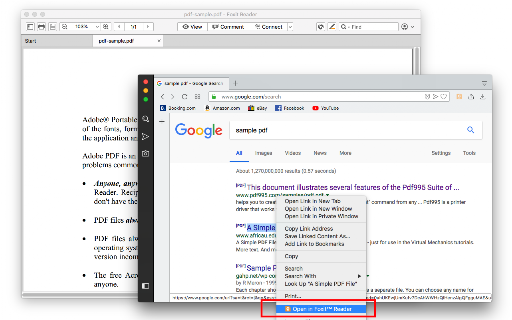
This extension simplifies the use of Foxit Reader to open PDF links. How to Use: 1. Use the right-click context menu item to direct PDF links to Foxit PDF Reader. 2. Click the action button on PDF pages to transfer the PDF file to Foxit PDF Reader. 3. On the options page, customize the extension settings to open PDF links with Foxit Reader. Notes: 1. Because Foxit Reader cannot directly open remote PDF links, this extension initially downloads the PDF file to your browser's default download directory and then activates the external PDF reader. 2. To establish communication with Foxit Reader, install a small native client specific to this extension. This client is compatible with Windows, Linux, and Mac operating systems. ChromeOS is not supported. 3. Ensure you have Foxit PDF Reader installed on your device. This extension only simplifies Foxit Reader integration with your browser and d…

Listing SEO keywords

Search intent keywords
Keyword signals for evaluating how users may discover, compare, or search for this extension category.

Core discovery

open pdf in foxitfoxit reader chrome extensionbrowser pdf integration

Comparison

foxit reader vs chrome pdf viewer

Problem

extension not opening pdffoxit integration error

Alternative

default pdf viewer settingschrome pdf handler

Similar extensions

Jump to related discovery paths:

FAQ

What is Open in Foxit™ Reader mainly used for?
This extension facilitates the opening of PDF files in the desktop Foxit Reader application instead of the browser's native PDF viewer. It requires a companion native client to establish communication between the browser and the desktop software, which handles the initial download of the PDF before triggering the application.
What market signals stand out?
Visible niche traction with limited review base. Last known update: 12/22/2025.
What should builders compare before entering this space?
Compare install concentration, rating quality, update recency, screenshots, developer portfolio, listing claims, and review-backed friction signals.
Is this page review-backed?
Backed by review samples. This page combines store metadata with selected review signals, while raw store metrics remain visible for comparison.

Screenshots

Open in Foxit™ Reader screenshot

Links

Recommended Chrome extensions

Related listings from the same category, trending peers, and the same publisher portfolio.

Browse workflow