Auto refresh page - reload page icon

Auto refresh page Chrome Extension Analysis

Automation & Workflow Efficiency

Store listing title: Auto refresh page - reload page

Chrome extension ID: lkhdihmnnmnmpibnadlgjfmalbaoenem

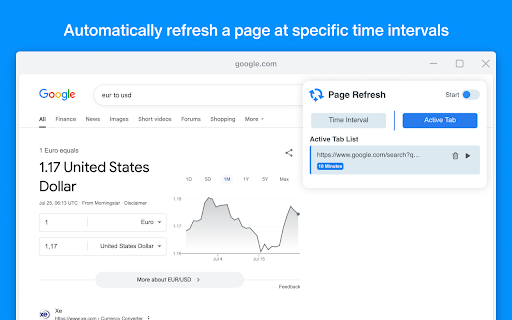
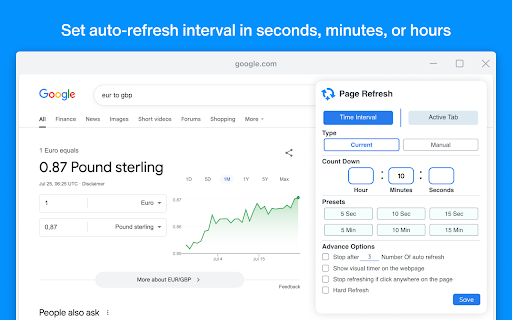
This tool allows users to set custom intervals for automatically reloading any webpage or tab. It includes functionality to monitor website changes and can be configured to refresh idle pages at selected intervals.

Developer:Page Refresher
Version:1.0.4
Size:135KiB
Last updated:

Overview

Installs

500K+

Rating

4.6

369 reviews

Languages

6 locales

Includes Deutsch, English, English (United States), español...

Market analysis

Review-backed positioning, friction, and market signals for this Chrome extension.

Backed by review samples

Macro category

Automation & Workflow Efficiency

Pricing friction

Low review signal

Complaint intensity

Moderate review signal

Listing & review signals
Observed signals from store listing text and review samples.

Listing positioning

The extension positions itself as a productivity tool that saves time by ensuring users stay updated with dynamic content without manual intervention. It emphasizes simplicity and ease of use, highlighting a 'Page Monitor' feature for tracking visual or source code changes.

Inferred product pattern

A high-reach utility extension providing core automation features that suffers from significant reliability and state-persistence bugs.

Review-backed pain points

Users report that the extension often shows a 'started' status but fails to actually reload the page. Other issues include timers stopping after one cycle, settings (like Hard Refresh) being forgotten, and the extension displaying incorrect tabs in the active list.

Observed feature gaps

Users have requested the ability to set staggered refresh intervals (e.g., alternating between different time settings) and a visual timer displayed directly on the webpage.

Tags
Auto RefreshPage MonitorTab ManagementWorkflow Automation
Target users

- Web power users

- Data monitors

- Content watchers

- Automation enthusiasts

Primary use cases

- Automatically refreshing dynamic web content

- Monitoring website changes in source code or visuals

- Keeping idle tabs active to prevent timeout

Positive themes

- Extra features compared to other refreshers

- Simple and easy to set up

Negative themes

- Core refresh functionality failing to trigger

- Settings and preferences not being saved

- Timers failing to restart after a reload

Observed friction

- Performance complaints detected

- No pricing friction mentioned in available reviews.

Evidence boundary: Analysis based on store listing description and a sample of high, medium, and low-rating reviews detailing functional failures and feature requests. Review data includes multiple languages; the high overall score suggests reliability issues may be intermittent or specific to certain browser environments.
Complaint summaries
Review-backed complaint signals grouped by operational area.

Support

No support or account-related complaints were observed.

Reliability

Significant reliability issues reported regarding the core promise: timers not resetting, settings not persisting, and the extension failing to perform the actual reload.

Privacy

No privacy or security complaints were observed.

Access & pricing

- No clear monetization signal

- No account requirement observed

- No clear pricing signal

Store listing facts

Listing assets

- Screenshots: 2

- Videos: 0

- Languages: 6

Trust signals

- Privacy policy

- Developer contact

- Official website

Store metadata

- Version: 1.0.4

- Size: 135KiB

- Last updated:

Store description excerpt
Short excerpt from the public Chrome Web Store listing; full copy is available on the official store page.
Auto Refresh Page Chrome Extension enables users to automatically refresh webpages at specified intervals. Extension saves time and ensures users are updated with dynamic content without manual intervention. Users have the ability to customize the extension according to their requirements by setting the refresh frequency. Tab Refresh boasts a user-friendly interface and is simple to use, contributing to improved productivity and efficiency while browsing the web. Page Reload provides a reliable solution for page refreshing. Users can easily reload any webpage with just a few clicks, and it is compatible with all websites. Furthermore, it offers the option to auto-refresh idle pages at selected intervals. Here's how it works: 1. Open the popup and specify the desired time interval for the page to refresh. 2. Start the auto refresh feature. 3. The page will refresh at the specified interv…

Listing SEO keywords

Search intent keywords
Keyword signals for evaluating how users may discover, compare, or search for this extension category.

Core discovery

auto refresh pagepage reloadertab refresherwebsite monitorauto reload extension

Comparison

page monitorauto reload

Problem

page not refreshingtimer not workingauto refresh fails

Alternative

automatic page reloaderwebpage monitor

Similar extensions

Jump to related discovery paths:

FAQ

What is Auto refresh page mainly used for?
This tool allows users to set custom intervals for automatically reloading any webpage or tab. It includes functionality to monitor website changes and can be configured to refresh idle pages at selected intervals.
What market signals stand out?
Established adoption with moderate review base. Last known update: 10/09/2025.
What should builders compare before entering this space?
Compare install concentration, rating quality, update recency, screenshots, developer portfolio, listing claims, and review-backed friction signals.
Is this page review-backed?
Backed by review samples. This page combines store metadata with selected review signals, while raw store metrics remain visible for comparison.

Screenshots

Auto refresh page - reload page screenshot

Links

Recommended Chrome extensions

Related listings from the same category, trending peers, and the same publisher portfolio.

Browse workflow