BLACKBOX.AI icon

BLACKBOX.AI Chrome Extension Analysis

Developer & Designer Tools

Chrome extension ID: mcgbeeipkmelnpldkobichboakdfaeon

BLACKBOX.AI is a browser extension designed to assist developers with coding queries and text extraction. It offers AI-driven chat, integrates directly into GitHub, and provides OCR capabilities to convert images or video content into editable text.

Developer:BLACKBOX AI
Version:3.1.92
Size:2.11MiB
Last updated:

Overview

Installs

400K+

Rating

2.7

1,196 reviews

Languages

2 locales

Includes English, 한국어

Market analysis

Review-backed positioning, friction, and market signals for this Chrome extension.

Backed by review samples

Macro category

Developer & Designer Tools

Pricing friction

High review signal

Complaint intensity

High review signal

Listing & review signals
Observed signals from store listing text and review samples.

Listing positioning

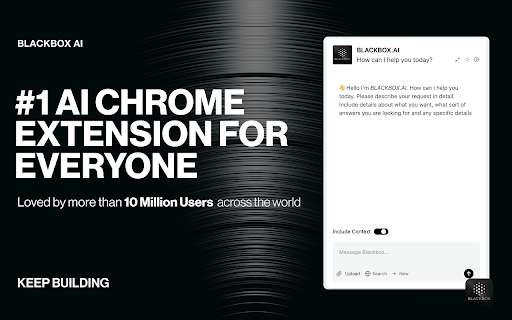
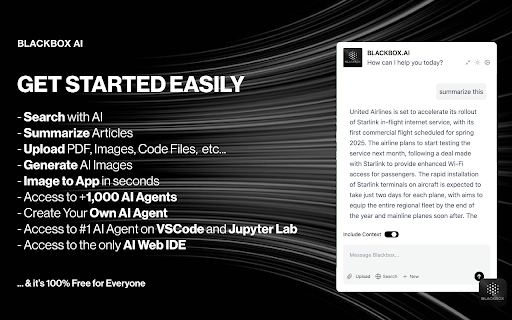
The product positions itself as a workflow enhancement tool featuring real-time AI code chat, GitHub integration, and contextual page analysis. It also emphasizes an Image-to-Text OCR feature for extracting text from visual elements.

Inferred product pattern

A utility-first extension that pivoted toward a subscription-based AI chat model, resulting in significant user backlash due to feature changes and pricing.

Review-backed pain points

Users report the sudden removal of free access, loss of key 'select-to-copy' OCR features, broken keyboard shortcuts, and unresponsiveness from customer support.

Observed feature gaps

Lack of support for local PDF files and perceived reduction in specialized OCR utility in favor of general AI chat.

Tags
AI Code AssistantOCR Text ExtractorDeveloper Productivity
Target users

- Software Developers

- Coding Students

- Data Entry Specialists

- Content Creators

Primary use cases

- Real-time coding assistance

- Extracting code from videos/images via OCR

- Analyzing webpage content with AI

- GitHub code interrogation

Positive themes

- No positive themes found in the provided review sample.

Negative themes

- Removal of free tier/sudden paywall

- Degradation of core OCR functionality

- Transition to an 'AI wrapper'

- Technical bugs in text extraction

Observed friction

- Payment required for meaningful usage

- Free-tier complaints detected

- Account blocking complaints detected

- Performance complaints detected

- Significant friction caused by the transition from a free service to a paid subscription model, with users expressing resentment over the cost and perceived loss of value.

Evidence boundary: Analysis based on user reviews detailing subscription changes, feature removal, and technical reliability issues. The provided evidence consists exclusively of low-rating reviews, which may disproportionately reflect negative sentiment.
Complaint summaries
Review-backed complaint signals grouped by operational area.

Support

Users report a lack of response from support regarding lost paid licenses and technical failures.

Reliability

Reports of the extension hijacking standard browser shortcuts (Command+B) and the OCR tool failing to actually copy text after selection.

Privacy

No privacy complaints were identified in the provided data.

Access & pricing

- Subscription model observed

- Login needed for core features

- Trial or limited free usage before paid plan

Store listing facts

Listing assets

- Screenshots: 2

- Videos: 1

- Languages: 2

Trust signals

- Privacy policy

- Developer contact

- Official website

Store metadata

- Version: 3.1.92

- Size: 2.11MiB

- Last updated:

Store description excerpt
Short excerpt from the public Chrome Web Store listing; full copy is available on the official store page.
Getting Started with BLACKBOX AI Extension Seamlessly integrate BLACKBOX AI into your existing workflow to supercharge your navigation experience. ### Code Chat: This is a walkthrough for using Code Chat to get answers to your coding questions: 1. Click on the Blackbox AI icon on the top right of your browser or click on "Manage Extension" then "Keyboard Shortcut" to assign a shortcut for opening the app. 2. Ask your coding question. 3. Get answers and suggestions in real-time. ### Add current page as context: To add the current page as context: 1. Click on the Blackbox AI icon on the top right of your browser or click on "Manage Extension" then "Keyboard Shortcut" to assign a shortcut for opening the app. 2. 1. Ensure "Include Context" option is activated. 3. Ask your question about page content. 4. Get answers and suggestions in real-time. ### Github Integration This is walkthrough fo…

Listing SEO keywords

Search intent keywords
Keyword signals for evaluating how users may discover, compare, or search for this extension category.

Core discovery

AI Code AssistantOCR Text ExtractorCode Chat ExtensionGitHub AI ToolImage to Text OCR

Comparison

CopyFish alternativeBlackbox AI vs alternatives

Problem

OCR not workingBlackbox AI paywallBroken OCR extension

Alternative

Free OCR extensionsAI coding assistants

Similar extensions

Jump to related discovery paths:

FAQ

What is BLACKBOX.AI mainly used for?
BLACKBOX.AI is a browser extension designed to assist developers with coding queries and text extraction. It offers AI-driven chat, integrates directly into GitHub, and provides OCR capabilities to convert images or video content into editable text.
What market signals stand out?
Established adoption with substantial review base. Last known update: 05/19/2025.
What should builders compare before entering this space?
Compare install concentration, rating quality, update recency, screenshots, developer portfolio, listing claims, and review-backed friction signals.
Is this page review-backed?
Backed by review samples. This page combines store metadata with selected review signals, while raw store metrics remain visible for comparison.

Screenshots

BLACKBOX.AI screenshot

Links

Website: blackbox.ai

Privacy policy: https://www.blackbox.ai/privacy

Videos: Watch

Recommended Chrome extensions

Related listings from the same category, trending peers, and the same publisher portfolio.

Browse workflow