Video Downloader VeeVee icon

Video Downloader VeeVee Chrome Extension Analysis

Video & Image Downloaders

Chrome extension ID: mncpkpjgigpklafbenkddfcgalikldde

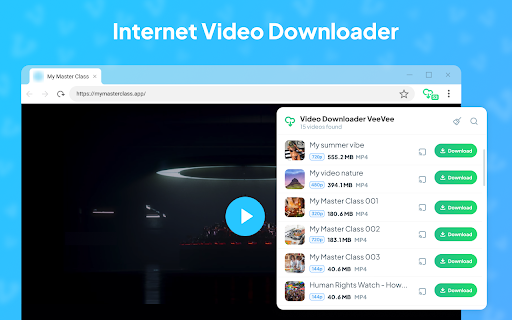
VeeVee is a browser extension that allows users to detect and download videos from the web, including support for HLS streams (M3U8). It features batch downloading, a built-in preview player, and options for multiple quality formats.

Developer:VeeVee
Version:3.0.1
Size:5.18MiB
Last updated:

Overview

Installs

100K+

Rating

4.0

399 reviews

Languages

54 locales

Includes Deutsch, English, English (United Kingdom), English (United States)...

Market analysis

Review-backed positioning, friction, and market signals for this Chrome extension.

Backed by review samples

Macro category

Video & Image Downloaders

Pricing friction

Low review signal

Complaint intensity

High review signal

Listing & review signals
Observed signals from store listing text and review samples.

Listing positioning

The product is positioned as a simple, fast, and safe tool for saving videos in various resolutions up to 4K. It emphasizes being completely free, requiring no registration, and supporting a wide range of popular video sites.

Inferred product pattern

A utility-based downloader that provides broad site support but struggles with platform-specific restrictions and system optimization.

Review-backed pain points

Users report severe CPU and RAM spikes that slow down their computers, downloads that freeze at 100%, and the inability to download from YouTube as per Chrome Store policies.

Observed feature gaps

Users have requested the ability to rename files or keep original titles before downloading, and some report missing video thumbnails.

Tags
Video DownloaderMedia SaverHLS Downloader4K Video Save
Target users

- General web users

- Content curators

- Offline media consumers

Primary use cases

- Saving high-resolution videos for offline viewing

- Converting HLS streams to MP4

- Batch downloading media from supported websites

Positive themes

- Basic functionality

- Desire for better file naming

Negative themes

- Extreme system resource consumption

- Failure to download from YouTube due to store restrictions

- Technical glitches like missing audio or segmented files

- Browser-specific instability

Observed friction

- Performance complaints detected

- Privacy complaints detected

- No pricing friction observed as the product is claimed to be free.

Evidence boundary: Analysis based on the official store listing and a sample of 10 helpful reviews reflecting both high and low ratings. The review sample is small relative to the total review count and may skew toward extreme sentiments.
Complaint summaries
Review-backed complaint signals grouped by operational area.

Support

No direct support interaction complaints, though users express frustration over non-functional features.

Reliability

High volume of complaints regarding downloads freezing, files lacking audio, and total failure to function on certain browsers or platforms (YouTube).

Privacy

One user review alleges malicious behavior, including the potential for stealing passwords and sensitive data.

Access & pricing

- Free usage observed

- No account requirement observed

- Free plan or free usage claimed

Store listing facts

Listing assets

- Screenshots: 4

- Videos: 0

- Languages: 54

Trust signals

- Privacy policy

- Developer contact

- Official website

Store metadata

- Version: 3.0.1

- Size: 5.18MiB

- Last updated:

Store description excerpt
Short excerpt from the public Chrome Web Store listing; full copy is available on the official store page.
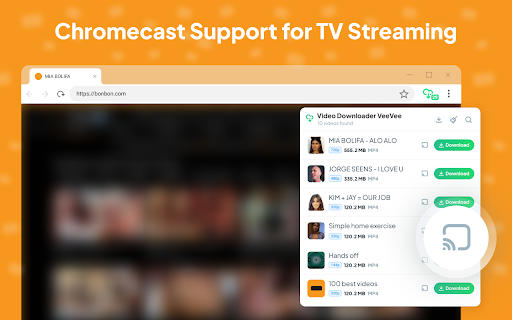
One of the most popular video saving tools for browsers. VeeVee allows you to save videos in SD, HD, Full HD, 2K, and 4K formats from many popular video sites. It is simple, fast, and safe to use. Add the extension to your browser in just one minute. Then click the extension icon on the target website and start saving your videos. --------- Features ⭐ Save videos from supported website ⭐ Retrieve HTML5 videos from almost any site ⭐ High-quality saving options: 720p, 1080p, 2K, and 4K ⭐ HLS stream support: detect M3U8 files, load TS segments, combine into MP4 ⭐ No registration required; completely free to use ⭐ Built-in video preview player ⭐ Copy media links to share with friends ⭐ Play MP4 files on Chromecast or Google Home ⭐ Scan QR codes to watch and save videos directly to your phone ⭐ Batch download — select videos or audios to process ⭐ Search by title, quality, type, and file siz…

Listing SEO keywords

Search intent keywords
Keyword signals for evaluating how users may discover, compare, or search for this extension category.

Core discovery

video downloader chrome extensiondownload 4k videos from webM3U8 to MP4 downloaderfree video saver

Comparison

best chrome video downloaderVeeVee vs video downloaders

Problem

cannot download videos from chromesave web videos offlinevideo downloader not working

Alternative

VeeVee alternativesfree HLS video downloader

Similar extensions

Jump to related discovery paths:

FAQ

What is Video Downloader VeeVee mainly used for?
VeeVee is a browser extension that allows users to detect and download videos from the web, including support for HLS streams (M3U8). It features batch downloading, a built-in preview player, and options for multiple quality formats.
What market signals stand out?
Established adoption with moderate review base. Last known update: 11/19/2025.
What should builders compare before entering this space?
Compare install concentration, rating quality, update recency, screenshots, developer portfolio, listing claims, and review-backed friction signals.
Is this page review-backed?
Backed by review samples. This page combines store metadata with selected review signals, while raw store metrics remain visible for comparison.

Screenshots

Video Downloader VeeVee screenshot

Links

Recommended Chrome extensions

Related listings from the same category, trending peers, and the same publisher portfolio.

Browse workflow