Lingopie: Learn Languages With TV Shows & Movies icon

Lingopie Chrome Extension Analysis

AI & Writing Assistants

Store listing title: Lingopie: Learn Languages With TV Shows & Movies

Chrome extension ID: okpndnhlmanejgfjlkpmgnebmeehakik

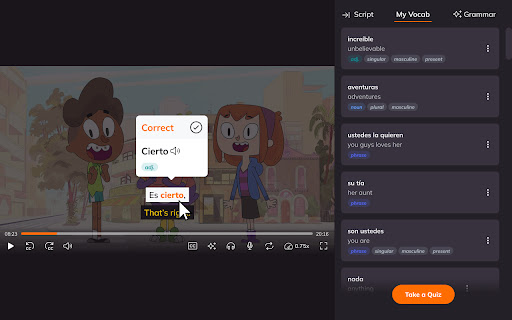
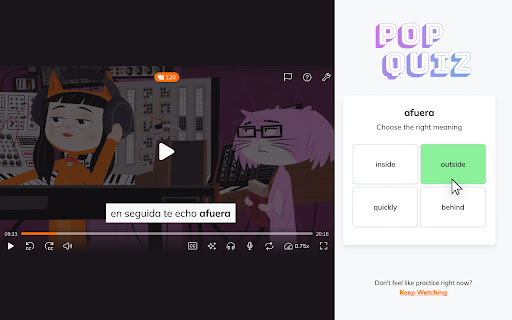
This Chrome extension enhances the experience of watching foreign-language content on streaming platforms. It provides interactive subtitles and saves vocabulary as flashcards, allowing users to learn languages naturally through entertainment.

Developer:Lingopie
Version:1.78.48
Size:367KiB
Last updated:

Overview

Installs

50K+

Rating

4.3

261 reviews

Languages

1 locales

Includes English

Market analysis

Review-backed positioning, friction, and market signals for this Chrome extension.

Backed by review samples

Macro category

AI & Writing Assistants

Pricing friction

Moderate review signal

Complaint intensity

High review signal

Listing & review signals
Observed signals from store listing text and review samples.

Listing positioning

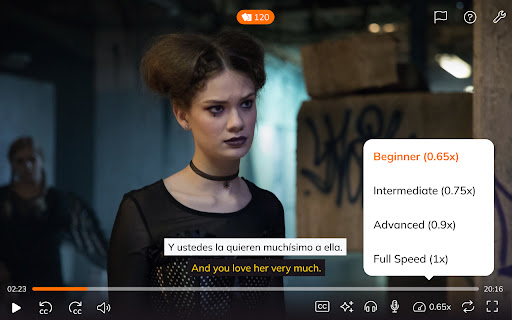
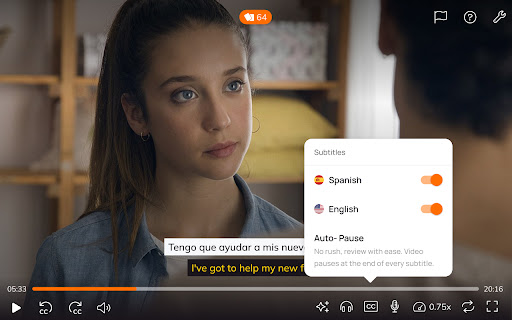
Lingopie positions itself as an immersive language learning tool that integrates directly with streaming services like Netflix. It emphasizes a seamless, 'no-pause' learning experience by providing dual subtitles, instant translations, and AI-driven grammar assistance.

Inferred product pattern

Over-the-top (OTT) educational overlay requiring an external paid content subscription.

Review-backed pain points

Users frequently report technical issues where the extension fails to connect to Netflix, persists as an unclickable overlay, or lacks translation functionality despite an active subscription.

Observed feature gaps

Reviewers note a lack of ability to granularly select specific words within a phrase for saving and limited library depth for certain target languages like Japanese.

Tags
Language LearningDual SubtitlesNetflix ToolsVocabulary BuilderEducation
Target users

- Language learners

- Netflix/Streaming subscribers

- Casual education seekers

Primary use cases

- Learning languages through TV shows and movies

- Building vocabulary from video content

- Practicing grammar in context

Positive themes

- Effective for vocabulary reinforcement

- Genius concept for immersive learning

- Helpful dual subtitle functionality

Negative themes

- Frequent technical conflicts with Netflix

- Poor customer service responsiveness

- Limited content variety for specific languages

- Integration glitches

Observed friction

- Payment required for meaningful usage

- Refund complaints detected

- Performance complaints detected

- Users express frustration that the service requires a separate subscription in addition to their existing Netflix subscription, leading to 'waste of money' complaints.

Evidence boundary: The evidence is derived from 11 user reviews covering a mix of technical functionality, UI/UX concerns, and value-proposition feedback. The sample size is limited to 11 reviews, which may not capture the total breadth of technical configurations for all browser users.
Complaint summaries
Review-backed complaint signals grouped by operational area.

Support

Multiple users describe slow or ineffective support, with some receiving 'auto-emails' or failing to get resolutions for technical connection errors over multi-week periods.

Reliability

High incidence of reports regarding the extension failing to load, breaking Netflix UI interactions, or displaying blocking windows that cannot be closed.

Privacy

No specific privacy or data security complaints observed.

Access & pricing

- Subscription model observed

- Account required for core usage

- Trial or limited free usage before paid plan

Store listing facts

Listing assets

- Screenshots: 4

- Videos: 0

- Languages: 1

Trust signals

- Developer contact

- Official website

- Support link

Store metadata

- Version: 1.78.48

- Size: 367KiB

- Last updated:

Store description excerpt
Short excerpt from the public Chrome Web Store listing; full copy is available on the official store page.
Lingopie's Chrome extension turns your next binge into a language lesson. No pausing, no tab-switching, no breaking immersion. Watch TV shows and movies with dual subtitles, click any word for an instant translation, and save vocabulary directly from scenes you'll actually remember. 💡 Why Lingopie? Unlike other language learning extensions, Lingopie combines dual subtitles, real-time translations, and structured vocabulary learning in a single experience. Shows are organized by difficulty level, and subtitles are interactive and designed for active learning. 🔑 Features Dual Subtitles Learn while watching with subtitles in both your native language and the language you’re learning. Click any word or phrase to see instant translations, definitions, and context-based grammar help. Interactive Vocabulary Builder Save words and phrases as you watch to build personalized, video-based flashc…

Listing SEO keywords

Search intent keywords
Keyword signals for evaluating how users may discover, compare, or search for this extension category.

Core discovery

learn language with netflixdual subtitles chrome extensionlingopie reviewlanguage learning video player

Comparison

Lingopie vs Dropslanguage learning extensions

Problem

Lingopie not workingNetflix extension errorLingopie customer service complaints

Alternative

Language Reactor alternativeNetflix language learning tool

Similar extensions

Jump to related discovery paths:

FAQ

What is Lingopie mainly used for?
This Chrome extension enhances the experience of watching foreign-language content on streaming platforms. It provides interactive subtitles and saves vocabulary as flashcards, allowing users to learn languages naturally through entertainment.
What market signals stand out?
Visible niche traction with moderate review base. Last known update: 05/28/2026.
What should builders compare before entering this space?
Compare install concentration, rating quality, update recency, screenshots, developer portfolio, listing claims, and review-backed friction signals.
Is this page review-backed?
Backed by review samples. This page combines store metadata with selected review signals, while raw store metrics remain visible for comparison.

Screenshots

Lingopie: Learn Languages With TV Shows & Movies screenshot

Links

Recommended Chrome extensions

Related listings from the same category, trending peers, and the same publisher portfolio.

Browse education
Rememberry - Translate and Memorize with Flashcards icon

Rememberry - Translate and Memorize with Flashcards

rememberry

Translate words while browsing and turn them into spaced repetition flashcards to build foreign language vocabulary.

Installs

100K+

Rating

4.6

Transcript - AI Homework Helper icon

Transcript - AI Homework Helper

Transcript

Streamline your study experience with AI: Instant answers, deep insights, and personalized learning across subjects.

Installs

100K+

Rating

3.4

Revision History: Writing Process Visibility for Google Docs & Slides icon

Revision History: Writing Process Visibility for Google Docs & Slides

Revision History

Built for teachers: See how students write, not just what they wrote. View the writing process in Google Docs & Slides.

Installs

100K+

Rating

3.7

Passei Direto – Ferramentas de Estudo icon

Passei Direto – Ferramentas de Estudo

pd.services

A extensão que te ajuda a achar as respostas para suas perguntas, utilizando a maior rede de estudantes do Brasil.

Installs

100K+

Rating

3.7

SolvelyAI - AI Homework Tutor &  Study Helper icon

SolvelyAI - AI Homework Tutor & Study Helper

cws-test-group-1

SolvelyAI is your AI Homework Helper—instant screenshot solving, step-by-step AI Answers, AI Summary, and Study Helper tools.

Installs

100K+

Rating

4.6

Readlang Web Reader icon

Readlang Web Reader

readlang

Read websites in the language you're learning, translate words you don't know, and we'll create flashcards to help you remember.

Installs

100K+

Rating

4.3

Talk & Comment - Voice notes anywhere icon

Talk & Comment - Voice notes anywhere

TalkandComment.com

Voice notes for classrooms and teams. Give feedback students actually hear.

Installs

100K+

Rating

4.1

You Shall Not Pass by TeacherMagic.org icon

You Shall Not Pass by TeacherMagic.org

JamesTyler

Blocks proxy sites, filter evasion exploits, tab spam, and Google Sites abuse on student Chromebooks. Free forever.

Installs

100K+

Rating

1.7

Dualsub - YouTube Subtitle Translator icon

Dualsub - YouTube Subtitle Translator

Dualsub Studio

Translate and display dual subtitles on YouTube and other video websites.

Installs

100K+

Rating

3.6

Education Pro Browser Extension MV3 icon

Education Pro Browser Extension MV3

Ativion

Education Pro Browser Extension MV3 for use on Windows and Mac with EdPro client installed

Installs

100K+

Rating

1.0