UniJump - Shortcut for ChatGPT icon

UniJump Chrome Extension Analysis

AI & Writing Assistants

Store listing title: UniJump - Shortcut for ChatGPT

Chrome extension ID: olikadnicfhhpkfleolncoligkdcmjai

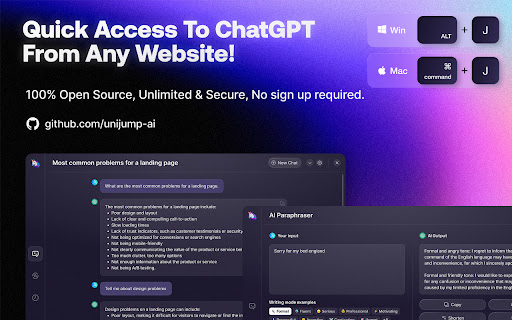
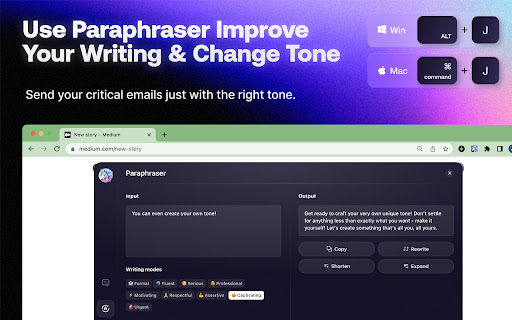
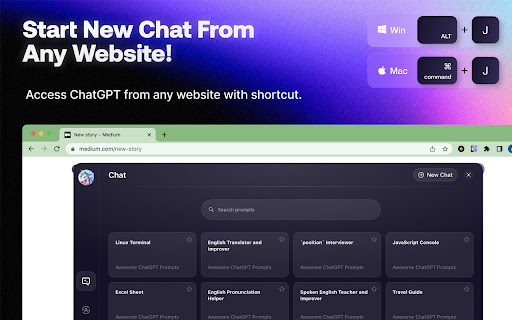
UniJump is a productivity extension that provides quick access to ChatGPT using keyboard shortcuts like CMD+J or ALT+J. It offers an on-page chat interface and text paraphrasing tools to streamline AI interaction while browsing.

Developer:Panda Network
Version:0.7.9
Size:1.37MiB
Last updated:

Overview

Installs

2K+

Rating

4.0

21 reviews

Languages

1 locales

Includes English (United States)

Market analysis

Review-backed positioning, friction, and market signals for this Chrome extension.

Backed by review samples

Macro category

AI & Writing Assistants

Pricing friction

Low review signal

Complaint intensity

Moderate review signal

Listing & review signals
Observed signals from store listing text and review samples.

Listing positioning

The product positions itself as a 100% free and open-source ChatGPT shortcut. It claims to provide a chat interface and paraphrasing capabilities on any website via keyboard shortcuts without requiring a sign-up.

Inferred product pattern

A shortcut-based AI overlay designed to provide immediate ChatGPT access across the web.

Review-backed pain points

Users report the extension failing to trigger, interfering with other website functionalities, and displaying an annoying UI bubble that obstructs page content.

Observed feature gaps

Users have suggested adding features to save or bookmark chat messages and the ability to preview previous AI answers.

Tags
ChatGPT ShortcutAI SidebarWriting AssistantOpen Source
Target users

- ChatGPT users

- Content writers

- Online researchers

- Productivity enthusiasts

Primary use cases

- Quickly accessing ChatGPT on any webpage

- Paraphrasing text within web interfaces

- Integrating AI text tweaking into chat applications

Positive themes

- Convenient keyboard shortcut integration

- Seamless workflow enhancement

- Useful text optimization features

Negative themes

- Software instability and bugs

- Interference with other browser extensions

- Intrusive UI elements

Observed friction

- Performance complaints detected

- No pricing friction observed as the product is claimed to be entirely free.

Evidence boundary: Analysis based on store listing descriptions and user reviews focusing on functionality, UI, and shortcut reliability. The evidence is limited by a small number of total reviews.
Complaint summaries
Review-backed complaint signals grouped by operational area.

Support

No explicit support complaints, though some users expressed concern regarding the lack of updates due to bugs.

Reliability

Users report the extension is buggy, sometimes does nothing when triggered, and can interfere with other extensions or websites.

Privacy

No privacy or security complaints were found in the provided reviews.

Access & pricing

- Free usage observed

- Login needed for core features

- Free plan or free usage claimed

Store listing facts

Listing assets

- Screenshots: 3

- Videos: 0

- Languages: 1

Trust signals

- Privacy policy

- Developer contact

- Official website

Store metadata

- Version: 0.7.9

- Size: 1.37MiB

- Last updated:

Store description excerpt
Short excerpt from the public Chrome Web Store listing; full copy is available on the official store page.
UniJump - Free ChatGPT Shortcut with Superpowers 🦄 100% Free ✨ 100% Open Source 🎉 No sign up required Use UniJump to easily access ChatGPT from any website by using just a keystroke! 👉 MAC Shortcut: CMD + J 👉 WIN Shortcut: ALT + J 🚨 SUPERPOWERS 🚨 - Chat Interface on any website - Paraphraser Our code is open source on GitHub! https://github.com/unijump-ai/unijump-extension

Listing SEO keywords

Search intent keywords
Keyword signals for evaluating how users may discover, compare, or search for this extension category.

Core discovery

ChatGPT shortcutAI sidebarChatGPT paraphraserOpen source AI extension

Comparison

ChatGPT extensionAI writing assistant

Problem

ChatGPT shortcut not workingAI extension bugsChatGPT overlay issues

Alternative

ChatGPT sidebarAI text enhancer

Similar extensions

Jump to related discovery paths:

FAQ

What is UniJump mainly used for?
UniJump is a productivity extension that provides quick access to ChatGPT using keyboard shortcuts like CMD+J or ALT+J. It offers an on-page chat interface and text paraphrasing tools to streamline AI interaction while browsing.
What market signals stand out?
Early or small audience with limited review base. Last known update: 07/27/2023.
What should builders compare before entering this space?
Compare install concentration, rating quality, update recency, screenshots, developer portfolio, listing claims, and review-backed friction signals.
Is this page review-backed?
Backed by review samples. This page combines store metadata with selected review signals, while raw store metrics remain visible for comparison.

Screenshots

UniJump - Shortcut for ChatGPT screenshot

Links

Recommended Chrome extensions

Related listings from the same category, trending peers, and the same publisher portfolio.

Browse workflow
Panda New Tab icon

Panda New Tab

Panda Network

New Tab Dashboard & Widgets

Installs

40K+

Rating

4.4

Designer Daily Report icon

Designer Daily Report

Panda Network

Everything about design in just 5 minutes.

Installs

30K+

Rating

4.8

Snow Web Application Metering icon

Snow Web Application Metering

snow_chrome_extensions

This extension tracks web application use for the purpose of license compliance and cost optimization. www.snowsoftware.com/browser

Installs

2.0M+

Rating

1.3

Sound Booster - increase volume up icon

Sound Booster - increase volume up

Sound-ultimate.com

Volume Booster helps boost sound video or music on any tab! Increase volume and bass booster, equalizer. Volume control.

Installs

2.0M+

Rating

4.5

Evernote Web Clipper icon

Evernote Web Clipper

Evernote

Use the Evernote extension to save things you see on the web into your Evernote account.

Installs

2.0M+

Rating

4.7

Clever icon

Clever

Clever

Allows students and staff to access apps in Clever Portal.

Installs

2.0M+

Rating

2.5

Microsoft Defender Browser Protection icon

Microsoft Defender Browser Protection

Microsoft Corporation

Protect yourself against online threats, like phishing and malicious websites, with real-time protection from Microsoft.

Installs

2.0M+

Rating

4.1

Визуальные закладки icon

Визуальные закладки

Yandex

Визуальные закладки – это страница, на которой собраны ваши любимые сайты

Installs

2.0M+

Rating

3.4

Web Signer icon

Web Signer

Softplan Websigner Developers

Extensão para assinatura digital no browser

Installs

2.0M+

Rating

2.9

Screen Recorder icon

Screen Recorder

Erich Behrens

Record a video from the camera or capture it from the screen (desktop, specific application window or browser tab)

Installs

2.0M+

Rating

3.8