

Clever Chrome Extension Analysis
Automation & Workflow EfficiencyChrome extension ID: nopfnnpnopgmcnkjchnlpomggcdjfepo
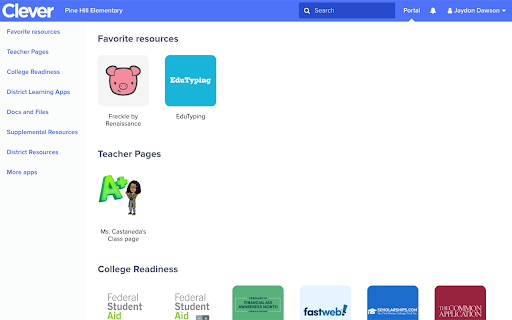
Clever is a Chrome extension designed as a portal for students and teachers to log into various educational applications. It aims to simplify access by providing a single sign-on platform, reducing the need for multiple usernames and passwords.
Overview
Installs
2.0M+
Rating
★ 2.5
293 reviews
Languages
1 locales
Includes English
Market analysis
Review-backed positioning, friction, and market signals for this Chrome extension.
Macro category
Automation & Workflow Efficiency
Pricing friction
Low review signal
Complaint intensity
High review signal
Listing positioning
The store listing positions Clever as an extension that allows students and staff to easily access educational applications. It emphasizes streamlining the login process for various digital tools, aiming to create a more cohesive learning experience.
Inferred product pattern
Single sign-on portal for educational institutions.
Review-backed pain points
Users express frustration that Clever is less convenient and slower than direct access via browser bookmarks or Google. There are significant concerns about data privacy, with claims of personal information being stolen and sold. Users also report technical issues such as login failures, slow page loading, and system glitches.
Observed feature gaps
While the listing suggests simplified access, reviews indicate that the added steps for login are not perceived as an improvement over traditional methods. Some reviews imply a lack of essential functionality beyond a basic bookmarking service.
- Students
- Teachers
- School Staff
- School Administrators
- Single sign-on for educational applications
- Accessing school-assigned digital tools
- Streamlining student and teacher logins
- Streamlines access to educational applications with a single sign-on platform.
- Simplifies the login process for students and teachers.
- Encourages engagement by integrating various digital tools.
- The extension is perceived as unnecessary, with core functionality available via bookmarks.
- Concerns about privacy and the potential misuse/selling of student personal data.
- Issues with the extension not working correctly, including login failures and slow loading times.
- Reports of the extension negatively impacting computer performance and causing visual glitches.
- Performance complaints detected
- Privacy complaints detected
- No specific pricing friction was mentioned in the provided reviews, as the extension appears to be provided to educational institutions.
Support
No specific support complaints were identified in the provided reviews.
Reliability
Users reported instances of the extension failing to log in, loading pages slowly, and causing general computer glitches, leading to frustration and impacting their ability to complete schoolwork.
Privacy
Multiple reviews express severe concerns about privacy, alleging that the extension collects and potentially sells student personal data to third parties, including malware developers. Some users reported the extension appearing to hack their systems.
- No clear monetization signal
- No clear access signal
- Free plan or free usage claimed
Store listing facts
- Screenshots: 1
- Videos: 0
- Languages: 1
- Privacy policy
- Developer contact
- Support link
- Version: 1.18.4
- Size: 1.32MiB
- Last updated:
Listing SEO keywords
Core discovery
Comparison
Problem
Alternative
Similar extensions
Jump to related discovery paths:
FAQ
Screenshots
Links
Privacy policy: https://clever.com/about/privacy-policy
Support links: https://support.clever.com/hc/en-us/categories/200154606-Instant-Login








