enhanced-h264ify icon

enhanced-h264ify Chrome Extension Analysis

Automation & Workflow Efficiency

Chrome extension ID: omkfmpieigblcllmkgbflkikinpkodlk

This utility enables users to control which video and audio codecs YouTube uses for playback. It is designed to reduce CPU load and resolve playback issues on older hardware by disabling resource-intensive codecs.

Developer:alex
Version:2.2.1
Size:22.37KiB
Last updated:

Overview

Installs

100K+

Rating

4.8

211 reviews

Languages

4 locales

Includes English, čeština, русский, українська

Market analysis

Review-backed positioning, friction, and market signals for this Chrome extension.

Backed by review samples

Macro category

Automation & Workflow Efficiency

Pricing friction

Low review signal

Complaint intensity

Moderate review signal

Listing & review signals
Observed signals from store listing text and review samples.

Listing positioning

The extension is positioned as a tool to manage YouTube video and audio codecs. It allows users to manually block specific formats like VP8, VP9, and AV1 to force H264 playback, optimizing for hardware-accelerated decoding.

Inferred product pattern

A performance-oriented browser utility for optimizing YouTube media delivery via codec control.

Review-backed pain points

Users report losing access to high-resolution video (2K/4K) when blocking certain codecs and some experienced increased CPU load instead of a reduction.

Observed feature gaps

Users have suggested an option to force-enable AV1 rather than only offering blocking capabilities.

Tags
Video Codec ControllerYouTube OptimizationPerformance Tool
Target users

- Users with older hardware

- Low-spec computer users

- Gamers seeking higher performance

Primary use cases

- Reducing YouTube CPU usage

- Fixing video stuttering and buffering

- Enabling hardware acceleration on older devices

Positive themes

- Reduced CPU/system load

- Fixed video stuttering and buffering

- Improved stability on older hardware

- Resolution of audio crackling issues

Negative themes

- Loss of 2K/4K resolution options

- Unexpected CPU usage spikes

- Suspicion of resource hijacking

Observed friction

- Performance complaints detected

- No pricing friction observed; the tool is free with an optional donation link via Ko-fi.

Evidence boundary: Extracted from the Chrome Web Store description and user reviews regarding codec control and hardware performance. The review sample is relatively small and contains contradictory reports regarding CPU performance impacts.
Complaint summaries
Review-backed complaint signals grouped by operational area.

Support

No support or account-related complaints were observed.

Reliability

Reliability reports are polarized; most users report fixed performance, while a minority report extreme CPU spikes and resolution loss.

Privacy

No direct privacy complaints, though one user expressed suspicion regarding high CPU usage.

Access & pricing

- Free usage observed

- No account requirement observed

- Free plan or free usage claimed

Store listing facts

Listing assets

- Screenshots: 1

- Videos: 0

- Languages: 4

Trust signals

- Privacy policy

- Developer contact

- Official website

Store metadata

- Version: 2.2.1

- Size: 22.37KiB

- Last updated:

Store description excerpt
Short excerpt from the public Chrome Web Store listing; full copy is available on the official store page.
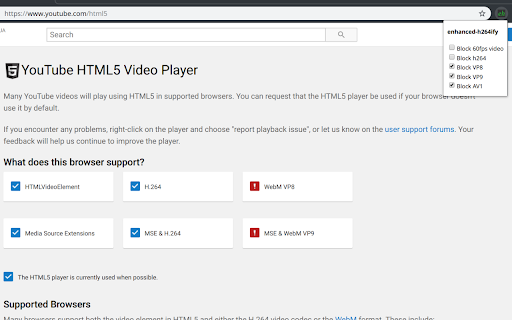
enhanced-h264ify is a fork of well-known h264ify extension for Firefox/Chrome which blocks VP8/VP9 codecs on YouTube, so that you can use H264 only. This may be useful because there are lots of devices on the market which support H264 hardware decoding and do not support VP8/VP9. This extension has new features such as manual blocking of H264, VP8, VP9, AV1, Opus, AAC codecs and 60fps video. By default it blocks everything but H264 and 60fps video. It works only on YouTube. GitHub: https://github.com/alextrv/enhanced-h264ify If you like this extension and want to support the developer, you can do it here: https://ko-fi.com/alextrv

Listing SEO keywords

Search intent keywords
Keyword signals for evaluating how users may discover, compare, or search for this extension category.

Core discovery

YouTube codec controllerforce H264 YouTubeblock AV1 YouTubereduce YouTube CPU usage

Comparison

h264ifyVP9 blockerAV1 blocker

Problem

YouTube stutteringYouTube CPU spikeYouTube 4K missingYouTube audio crackling

Alternative

h264ifyvideo codec switcher

Similar extensions

Jump to related discovery paths:

FAQ

What is enhanced-h264ify mainly used for?
This utility enables users to control which video and audio codecs YouTube uses for playback. It is designed to reduce CPU load and resolve playback issues on older hardware by disabling resource-intensive codecs.
What market signals stand out?
Established adoption with moderate review base. Last known update: 03/25/2026.
What should builders compare before entering this space?
Compare install concentration, rating quality, update recency, screenshots, developer portfolio, listing claims, and review-backed friction signals.
Is this page review-backed?
Backed by review samples. This page combines store metadata with selected review signals, while raw store metrics remain visible for comparison.

Screenshots

enhanced-h264ify screenshot

Links

Recommended Chrome extensions

Related listings from the same category, trending peers, and the same publisher portfolio.

Browse workflow