

OneClick Cleaner for Chrome Chrome Extension Analysis
Automation & Workflow EfficiencyChrome extension ID: oncckmaelaecccmaniihojgeopkcajfh
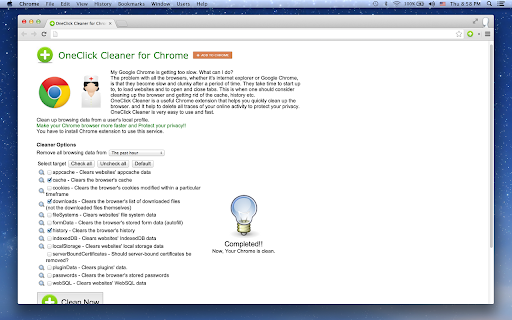
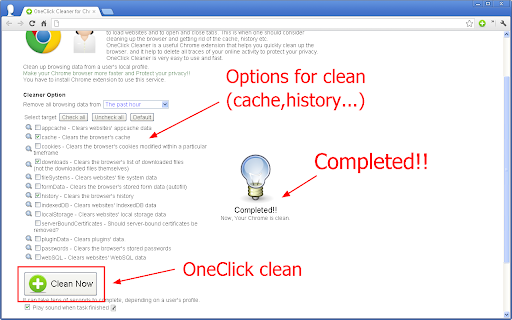
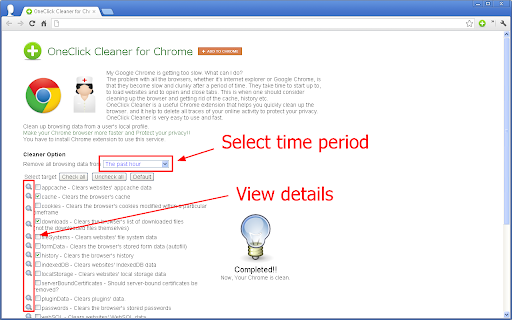
OneClick Cleaner is a Chrome extension designed to improve browser performance and user privacy by cleaning various types of browsing data, including cache, downloads, form data, history, and passwords. It aims to simplify the process of maintaining a fast and secure browsing experience.
Overview
Installs
90K+
Rating
★ 4.3
1,438 reviews
Languages
21 locales
Includes Deutsch, English, Nederlands, dansk...
Market analysis
Review-backed positioning, friction, and market signals for this Chrome extension.
Macro category
Automation & Workflow Efficiency
Pricing friction
Moderate review signal
Complaint intensity
High review signal
Listing positioning
OneClick Cleaner positions itself as an easy-to-use solution to combat a slow Chrome browser by quickly cleaning browsing data like cache and history. It emphasizes making Chrome faster and protecting user privacy by deleting traces of online activity. The listing highlights its minimal permissions and update to Manifest V3.
Inferred product pattern
A browser utility offering to clean browsing data for performance and privacy, which has evolved from a simple one-click solution into a potentially ad-supported model that creates significant access and functionality friction through aggressive ad-blocker detection.
Review-backed pain points
Reviews indicate significant pain points around the extension's core functionality, with users struggling to get it to work due to persistent demands to disable ad-blockers. The product is also criticized for no longer being a 'one-click' solution, making the name misleading, and for degraded performance and effectiveness after updates.
Observed feature gaps
Observed feature gaps include the lack of a true 'one-click' cleaning function, the absence of an option to save preferred cleaning settings for quick execution, and the removal of the automatic cleaning feature upon browser shutdown, which was present in older versions. There's also a gap in clearly communicating ad-blocker requirements or providing a functional workaround.
- Chrome users experiencing slow browser performance
- Individuals concerned about online privacy and data traces
- Users seeking a quick way to clear browsing data
- Speeding up a slow Google Chrome browser
- Deleting accumulated browsing data (cache, history, etc.)
- Enhancing privacy by removing traces of online activity
No positive theme data.
- The extension no longer works as a 'one-click' solution, requiring multiple steps.
- Users are repeatedly prompted to disable ad-blockers, even when none are active or have been disabled, preventing the extension from functioning.
- Recent updates have reportedly degraded functionality, removing automatic cleaning and making manual cleaning slower.
- The extension is perceived as ineffective in cleaning significant amounts of browsing data.
- Frustration with the developer's insistence on disabling ad-blockers, seen as an unreasonable and privacy-compromising demand.
- Free-tier complaints detected
- Performance complaints detected
- Privacy complaints detected
- Users face significant friction as the extension frequently demands ad-blockers be disabled for 'free use,' often failing to work even after doing so. This requirement is a major deterrent and source of user frustration, essentially creating a barrier to accessing the advertised free functionality.
Support
While there are no explicit complaints about support responsiveness, user reviews express strong dissatisfaction with the developer's stance on disabling ad-blockers as a prerequisite for using the extension, indicating a lack of effective resolution for this widespread issue.
Reliability
Reliability is a major concern, with multiple complaints about the extension failing to run due to ad-blocker detection issues that persist even when ad-blockers are disabled or uninstalled. Users also report the extension performing slower after updates and failing to effectively clean browsing data.
Privacy
Users have expressed privacy concerns due to the requirement to disable ad-blockers, perceiving it as a move to expose them to more ads or data collection, thus undermining the extension's stated goal of protecting privacy.
- Ad-supported model observed
- No account requirement observed
- Limited free usage observed
Store listing facts
- Screenshots: 3
- Videos: 0
- Languages: 21
- Privacy policy
- Developer contact
- Version: 0.9.1.6
- Size: 41.84KiB
- Last updated:
Listing SEO keywords
Core discovery
Problem
Alternative
Similar extensions
Jump to related discovery paths:
FAQ
Screenshots
Links
Privacy policy: http://iblogbox.com/chrome/tos.php








