Display #Anchors icon

Display #Anchors Chrome Extension Analysis

Automation & Workflow Efficiency

Chrome extension ID: poahndpaaanbpbeafbkploiobpiiieko

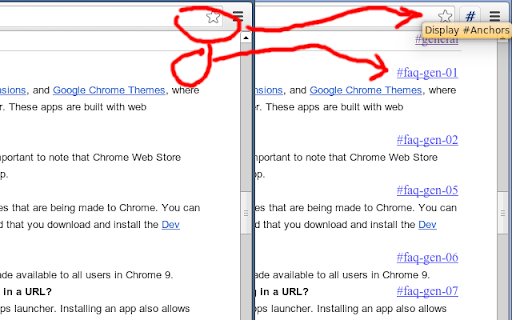
Display #Anchors is a Chrome extension that identifies and marks all HTML anchors on a webpage. It allows users to quickly find section IDs and create direct links to specific parts of a page without using developer tools.

Developer:Rob W
Version:1.5
Size:32.65KiB
Last updated:

Overview

Installs

10K+

Rating

4.9

60 reviews

Languages

1 locales

Includes English

Market analysis

Review-backed positioning, friction, and market signals for this Chrome extension.

Backed by review samples

Macro category

Automation & Workflow Efficiency

Pricing friction

Low review signal

Complaint intensity

Low review signal

Listing & review signals
Observed signals from store listing text and review samples.

Listing positioning

The product is positioned as a lightweight, high-performance alternative to existing tools that cause layout shifts or high memory usage. It emphasizes visualising invisible HTML anchors to facilitate easy deep-linking to specific webpage sections.

Inferred product pattern

A single-purpose, lightweight utility designed to optimize web navigation and link creation workflows.

Review-backed pain points

Users reported that on certain complex websites, toggling the markers can cause the page layout to shift or indent, and sometimes the markers overlap with existing text.

Observed feature gaps

Users suggested adding a Table of Contents (TOC) sidebar, support for DOM element IDs, and more unobtrusive display options like tooltips.

Tags
Anchor FinderLink ToolWeb NavigationDeveloper Utility
Target users

- Web Developers

- Technical Writers

- Content Researchers

- Power Users

Primary use cases

- Identifying HTML anchor points for deep-linking

- Navigating long, dense web documents

- Quickly finding section IDs without using Inspect Element

Positive themes

- Lightweight and low memory consumption

- Ease of finding anchor points

- Eliminates the need for browser developer tools

Negative themes

- Occasional layout shifting on specific websites

- Markers overlapping text

- Visual clutter

Observed friction

- No pricing friction observed; no mention of cost in the listing or reviews.

Evidence boundary: Data extracted from the Chrome Web Store listing and 10 user reviews highlighting functionality and minor UI issues. The review sample size is small (60 total reviews) and focuses on specific use cases.
Complaint summaries
Review-backed complaint signals grouped by operational area.

Support

No support-related complaints were found.

Reliability

Some users noted minor reliability issues where markers caused layout shifts on specific web platforms.

Privacy

No privacy or security complaints were identified.

Access & pricing

- No clear monetization signal

- No account requirement observed

- No clear pricing signal

Store listing facts

Listing assets

- Screenshots: 1

- Videos: 0

- Languages: 1

Trust signals

- Privacy policy

- Developer contact

- Support link

Store metadata

- Version: 1.5

- Size: 32.65KiB

- Last updated:

Store description excerpt
Short excerpt from the public Chrome Web Store listing; full copy is available on the official store page.
Display #Anchors offers an easy way to see all (invisible) anchors in a page, to make it easier to link to a specific part of a webpage. 【 FEATURES 】 - Finds all anchors in a page and shows a marker next to it. - Does not alter the layout; so no jumpy pages or expensive repaints. - The anchored content is highlighted on Hover over the marker. - The marker is highlighted on hover over the anchored content. - Click on the toolbar button to remove all markers. - The extension consumes no memory until it's actually used. - Optional option to display anchors in cross-origin frames. 【 Customization 】 - You can set a custom shortcut to toggle the extension (Alt + Shift + A by default). - You can customize the label of the displayed anchor. - You can optionally grant access to all sites, to display anchors in cross-origin frames. Detailed instructions are available at https://github.com/Rob--W/…

Listing SEO keywords

Search intent keywords
Keyword signals for evaluating how users may discover, compare, or search for this extension category.

Core discovery

display anchorsfind html anchorwebpage anchor findervisualize anchorshtml id finder

Comparison

Web Developer extensionChris Pederick Web Developer

Problem

find section idget anchor linklocate page anchorhow to find html id

Alternative

browser developer toolsinspect element

Similar extensions

Jump to related discovery paths:

FAQ

What is Display #Anchors mainly used for?
Display #Anchors is a Chrome extension that identifies and marks all HTML anchors on a webpage. It allows users to quickly find section IDs and create direct links to specific parts of a page without using developer tools.
What market signals stand out?
Visible niche traction with limited review base. Last known update: 06/03/2024.
What should builders compare before entering this space?
Compare install concentration, rating quality, update recency, screenshots, developer portfolio, listing claims, and review-backed friction signals.
Is this page review-backed?
Backed by review samples. This page combines store metadata with selected review signals, while raw store metrics remain visible for comparison.

Screenshots

Display #Anchors screenshot

Links

Recommended Chrome extensions

Related listings from the same category, trending peers, and the same publisher portfolio.

Browse workflow