Reelia Record - Screen Recorder & Editor icon

Reelia Record Chrome Extension Analysis

Automation & Workflow Efficiency

Store listing title: Reelia Record - Screen Recorder & Editor

Chrome extension ID: ajhidbbpmnhjjffefekncbdbeopghnnn

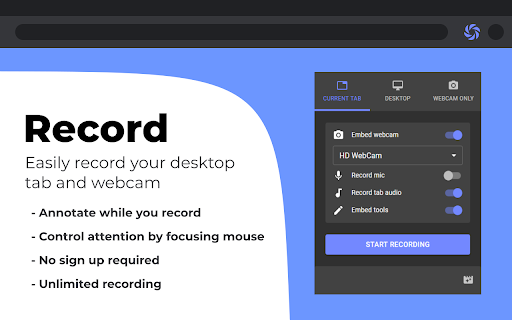
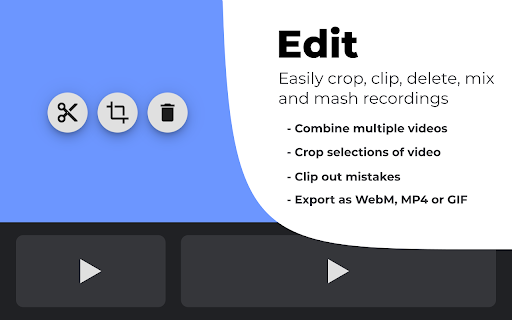
This Chrome extension enables users to capture screen activity, browser tabs, or webcam footage. It includes a built-in library for managing clips and basic editing tools like trimming and merging, with exports available in various formats including MP4 and GIF.

Developer:Leolime
Version:0.1.16
Size:1.51MiB
Last updated:

Overview

Installs

7K+

Rating

4.7

192 reviews

Languages

51 locales

Includes Deutsch, English, English (United Kingdom), Indonesia...

Market analysis

Review-backed positioning, friction, and market signals for this Chrome extension.

Backed by review samples

Macro category

Automation & Workflow Efficiency

Pricing friction

Low review signal

Complaint intensity

Moderate review signal

Listing & review signals
Observed signals from store listing text and review samples.

Listing positioning

Reelia Record positions itself as a privacy-focused, accessible, and completely free screen recording tool that requires no account creation. It emphasizes a 'local-first' approach where recordings are stored on the user's machine, aiming to provide a high-quality, watermark-free experience for content creators and professionals.

Inferred product pattern

Local-first browser-based utility relying on browser storage APIs for file management.

Review-backed pain points

The most severe pain point is the occasional, catastrophic failure of the save process, resulting in the total loss of long recording sessions. Secondary issues include significant UI lag when the local library accumulates many large files and complaints regarding the lack of desktop audio recording capabilities.

Observed feature gaps

The extension lacks a robust, high-performance editor (users often use external tools for MP4 conversion), advanced video settings to handle black bars on streaming sites, and the ability to record system/desktop sound.

Tags
Screen RecorderVideo EditorNo Sign-UpWebcam Recorder
Target users

- Content Creators

- Remote Workers

- Students

- Developers

Primary use cases

- Recording screencasts

- Creating video tutorials

- Capturing browser-based tasks

- Basic video trimming and exporting

Positive themes

- No sign-up or registration required

- Zero watermarks

- High utility for long recordings

- Ease of use for basic tasks

Negative themes

- Critical failure in saving long recordings

- Performance degradation as library grows

- Limited editing functionality

- Occasional audio syncing or input glitches

Observed friction

- Performance complaints detected

- None; the product is marketed as completely free and does not appear to have a paywall.

Evidence boundary: The analysis is based on 190 user reviews, highlighting a dichotomy between high praise for its free, no-account model and significant concerns regarding data loss during long recordings. The sample data is limited by user-reported experiences which may be influenced by specific browser versions or hardware limitations not detailed in reviews.
Complaint summaries
Review-backed complaint signals grouped by operational area.

Support

Users expressed significant frustration with the lack of recovery for failed saves, but there are no specific claims regarding non-responsive support staff.

Reliability

Users report critical failures where recordings disappear after completion, particularly for long sessions, and significant system slowdowns caused by large local file storage.

Privacy

None; the privacy-focused, local-storage approach is generally well-received by users.

Access & pricing

- Free usage observed

- No account requirement observed

- Free plan or free usage claimed

Store listing facts

Listing assets

- Screenshots: 2

- Videos: 0

- Languages: 51

Trust signals

- Privacy policy

- Developer contact

- Official website

Store metadata

- Version: 0.1.16

- Size: 1.51MiB

- Last updated:

Store description excerpt
Short excerpt from the public Chrome Web Store listing; full copy is available on the official store page.
Reelia Record – Free, Fast & Easy Screen Recorder & Editor Effortlessly capture and share your screen, website, or webcam in one click! • No Sign-Up Required • No Watermarks • Completely Free 🎥 Record Your Way: • Versatile: Record your screen, specific app, browser tab, or just your webcam. • Engaging: Embed webcam & mic for screencasts. • Clearly Communicate: Annotate live while recording. • Focus Viewers: Highlight mouse clicks & movements. 🖊️ Edit Effortlessly: • Organized: Local library for your recordings. • Powerful Editor: Trim, cut, crop & merge clips. • Flexible: Easy undo/redo for any edit. 🌎 Share Instantly: • Quick Start: Record & share in seconds, no sign-up. • Formats: Export as WEBM, MP4, or GIF. • Coming Soon! Direct sharing to Slack, YouTube, Google Drive & more. 🔥 Why Reelia? ✔️ Unlimited Recording: No limits. ✔️ No Watermarks: Your content, your brand. ✔️ HD Quali…

Listing SEO keywords

Search intent keywords
Keyword signals for evaluating how users may discover, compare, or search for this extension category.

Core discovery

Chrome screen recorderfree screen captureno watermark recorderbrowser tab recorder

Comparison

alternative to Nimbusfree screen recorder vs Loom

Problem

recording not savingvideo lostchrome extension lag

Alternative

LosslessCutNimbus screen recorder

Similar extensions

Jump to related discovery paths:

FAQ

What is Reelia Record mainly used for?
This Chrome extension enables users to capture screen activity, browser tabs, or webcam footage. It includes a built-in library for managing clips and basic editing tools like trimming and merging, with exports available in various formats including MP4 and GIF.
What market signals stand out?
Early or small audience with moderate review base. Last known update: 05/19/2025.
What should builders compare before entering this space?
Compare install concentration, rating quality, update recency, screenshots, developer portfolio, listing claims, and review-backed friction signals.
Is this page review-backed?
Backed by review samples. This page combines store metadata with selected review signals, while raw store metrics remain visible for comparison.

Screenshots

Reelia Record - Screen Recorder & Editor screenshot

Links

Recommended Chrome extensions

Related listings from the same category, trending peers, and the same publisher portfolio.

Browse workflow
Chrome Capture - Screenshot & GIF icon

Chrome Capture - Screenshot & GIF

Leolime

All-in-one screenshot + GIF capture! Take screenshots (area, full page), record screen & edit instantly.

Installs

300K+

Rating

4.7

Momentum icon

Momentum

Momentum

Transform your browser into a beautifully designed tab that helps you feel calm, keep focus, and stay energized.

Installs

2.0M+

Rating

4.5

Google Scholar PDF Reader icon

Google Scholar PDF Reader

scholar-chrome-extensions

Supercharge your paper reading: follow references, skim outline, jump to figures, cite and save.

Installs

2.0M+

Rating

4.1

Keeper® Password Manager & Digital Vault icon

Keeper® Password Manager & Digital Vault

Keeper Security

Generate strong passwords, autofill and protect your confidential info with zero-knowledge encryption.

Installs

2.0M+

Rating

4.8

AI Grammar Checker & Paraphraser – LanguageTool icon

AI Grammar Checker & Paraphraser – LanguageTool

lt-extension-publisher

Instantly Enhance Your Texts with LanguageTool’s Grammar Checker and Paraphrasing Tool

Installs

2.0M+

Rating

4.7

Snow Web Application Metering icon

Snow Web Application Metering

snow_chrome_extensions

This extension tracks web application use for the purpose of license compliance and cost optimization. www.snowsoftware.com/browser

Installs

2.0M+

Rating

1.3

Sound Booster - increase volume up icon

Sound Booster - increase volume up

Sound-ultimate.com

Volume Booster helps boost sound video or music on any tab! Increase volume and bass booster, equalizer. Volume control.

Installs

2.0M+

Rating

4.5

Evernote Web Clipper icon

Evernote Web Clipper

Evernote

Use the Evernote extension to save things you see on the web into your Evernote account.

Installs

2.0M+

Rating

4.7

Microsoft Defender Browser Protection icon

Microsoft Defender Browser Protection

Microsoft Corporation

Protect yourself against online threats, like phishing and malicious websites, with real-time protection from Microsoft.

Installs

2.0M+

Rating

4.1

Визуальные закладки icon

Визуальные закладки

Yandex

Визуальные закладки – это страница, на которой собраны ваши любимые сайты

Installs

2.0M+

Rating

3.4