h264ify icon

h264ify Chrome Extension Analysis

Niche Lifestyle & Gaming Hacks

Chrome extension ID: aleakchihdccplidncghkekgioiakgal

h264ify is a utility that instructs YouTube to serve video content in H.264 format rather than VP8/VP9. This is intended to offload video decoding from the CPU to the GPU, potentially lowering temperatures and battery drain on older hardware.

Developer:erkserkserks
Version:2.0.1
Size:31.7KiB
Last updated:

Overview

Installs

1.0M+

Rating

4.6

1,192 reviews

Languages

2 locales

Includes English, čeština

Market analysis

Review-backed positioning, friction, and market signals for this Chrome extension.

Backed by review samples

Macro category

Niche Lifestyle & Gaming Hacks

Pricing friction

Low review signal

Complaint intensity

Moderate review signal

Listing & review signals
Observed signals from store listing text and review samples.

Listing positioning

The extension positions itself as a performance utility for users experiencing stuttering or high CPU usage on YouTube. It forces the browser to prioritize H.264 video streams, which benefit from GPU hardware acceleration.

Inferred product pattern

Single-purpose browser utility designed to intercept and modify request headers or player configurations for specific media sites.

Review-backed pain points

The primary pain point is the hard limitation on video quality, as YouTube no longer encodes high-resolution streams in H.264, preventing users from watching 1440p/4K content while the extension is active.

Observed feature gaps

Lack of granular control (e.g., toggling per device or per resolution), and no UI indicator to warn users when the extension is causing resolution downgrades.

Tags
YouTubeVideo OptimizationHardware AccelerationPerformanceCodec
Target users

- Users with older/low-end hardware

- Users with high CPU usage during video playback

- Raspberry Pi users

Primary use cases

- Optimizing YouTube playback

- Reducing CPU load during streaming

- Improving battery life on laptops

Positive themes

- Reduced CPU usage

- Smoother playback on older machines

- Effective for specific legacy hardware environments

Negative themes

- Inability to play 1440p or 4K resolution

- Resolution capped at 720p or 1080p

- Issues with cross-device sync settings

- Degraded performance on modern hardware

Observed friction

- Performance complaints detected

- None; the extension is free and open-source.

Evidence boundary: Based on public reviews, the extension reliably forces codec changes but creates significant conflicts with high-resolution streaming, leading to user confusion regarding quality caps. Reviews represent a mix of older and newer hardware contexts; users on modern hardware may find the extension counterproductive.
Complaint summaries
Review-backed complaint signals grouped by operational area.

Support

No formal support complaints; users express frustration primarily with the functional side-effect of resolution limitations.

Reliability

Users report that on modern hardware, the extension provides no benefit or may cause stuttering due to the browser struggling with older codec prioritization.

Privacy

None observed.

Access & pricing

- Free usage observed

- No account requirement observed

- Free plan or free usage claimed

Store listing facts

Listing assets

- Screenshots: 1

- Videos: 0

- Languages: 2

Trust signals

- Developer contact

- Official website

Store metadata

- Version: 2.0.1

- Size: 31.7KiB

- Last updated:

Store description excerpt
Short excerpt from the public Chrome Web Store listing; full copy is available on the official store page.
Try h264ify if YouTube videos stutter, take up too much CPU, eat battery life, or make your laptop hot. By default, YouTube streams VP8/VP9 encoded video. However, this can cause problems with less powerful machines because VP8/VP9 is not typically hardware accelerated. In contrast, H.264 is commonly hardware accelerated by GPUs, which usually means smoother video playback and reduced CPU usage. h264ify makes YouTube stream H.264 videos instead of VP8/VP9 videos. Note: 4K and 1440p videos will not be available because YouTube no longer encodes those videos in H.264 Github: https://github.com/erkserkserks/h264ify

Listing SEO keywords

Search intent keywords
Keyword signals for evaluating how users may discover, compare, or search for this extension category.

Core discovery

h264ify chrome extensionstop youtube stutteringforce h264 youtubereduce cpu usage youtube

Comparison

h264ify vs enhanced-h264ifyyoutube codec switcher

Problem

youtube high cpu usageyoutube video stutteringlaptop overheating watching youtube

Alternative

enhanced-h264ifyyoutube high definition settings

Similar extensions

Jump to related discovery paths:

FAQ

What is h264ify mainly used for?
h264ify is a utility that instructs YouTube to serve video content in H.264 format rather than VP8/VP9. This is intended to offload video decoding from the CPU to the GPU, potentially lowering temperatures and battery drain on older hardware.
What market signals stand out?
Large installed base with substantial review base. Last known update: 03/05/2025.
What should builders compare before entering this space?
Compare install concentration, rating quality, update recency, screenshots, developer portfolio, listing claims, and review-backed friction signals.
Is this page review-backed?
Backed by review samples. This page combines store metadata with selected review signals, while raw store metrics remain visible for comparison.

Screenshots

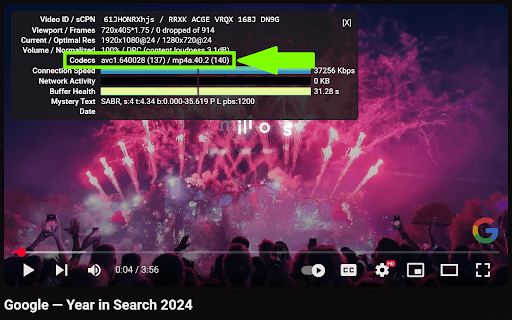
h264ify screenshot

Links

Website: github.com

Recommended Chrome extensions

Related listings from the same category, trending peers, and the same publisher portfolio.

Browse workflow