Salesforce Page Optimizer icon

Salesforce Page Optimizer Chrome Extension Analysis

Developer & Designer Tools

Chrome extension ID: alkcnclapbnefkodhbkpifdkceldogka

This extension provides performance analysis and debugging features specifically for Salesforce Lightning applications. It serves as a developer preview tool designed to help technical teams audit and refine the design of their Salesforce environments.

Developer:Salesforce
Version:2.6.1
Size:2.86MiB
Last updated:

Overview

Installs

8K+

Rating

4.3

17 reviews

Languages

1 locales

Includes English (United States)

Market analysis

Review-backed positioning, friction, and market signals for this Chrome extension.

Backed by review samples

Macro category

Developer & Designer Tools

Pricing friction

Low review signal

Complaint intensity

Moderate review signal

Listing & review signals
Observed signals from store listing text and review samples.

Listing positioning

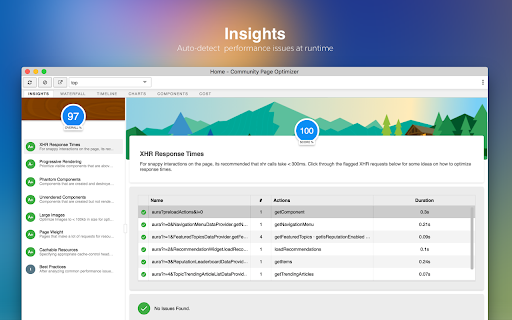
Salesforce Page Optimizer is positioned as a diagnostic tool for developers working within the Lightning platform. It aims to provide insights into performance bottlenecks, allowing users to identify optimization opportunities for their communities and applications.

Inferred product pattern

Platform-specific developer diagnostic extension.

Review-backed pain points

Users struggle with feature parity regarding newer Salesforce architectures (LWC), technical conflicts with existing Salesforce tools like DevOps Center, and occasional loading errors preventing core visualization features.

Observed feature gaps

The tool appears to lack visibility into Lightning Web Components (LWC) and has persistent issues with certain object types like FormData, which interferes with browser operations.

Tags
SalesforcePerformance DebuggingDeveloper ToolLightning Platform
Target users

- Salesforce Developers

- Lightning Platform Administrators

Primary use cases

- Performance monitoring of Lightning applications

- Debugging page load issues

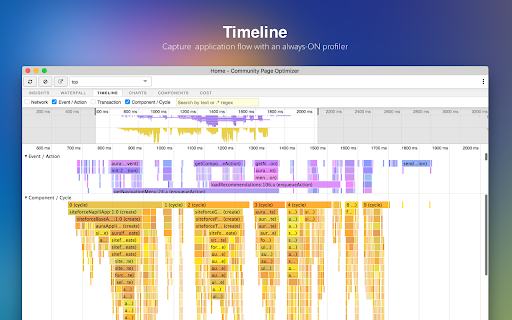
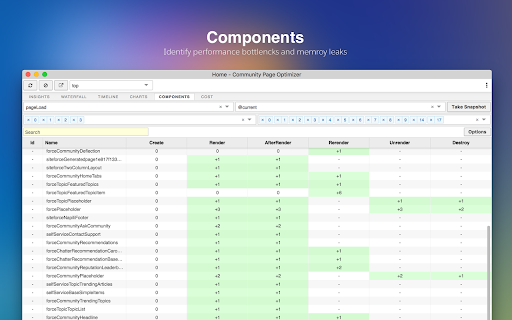
- Analyzing Lightning component efficiency

Positive themes

- Utility for Salesforce community development

- General performance improvements

- Serves intended purpose

Negative themes

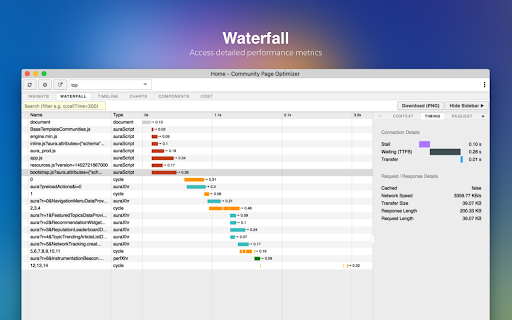
- Broken functionality (waterfall model errors)

- Conflicts with other tools (DevOps Center)

- Missing feature support (LWC components, Progressive Rendering)

- Compatibility issues with file uploads

Observed friction

- Performance complaints detected

- No pricing friction identified; product is presented as a free developer preview from Salesforce.

Evidence boundary: Data gathered from Chrome Web Store listing and a set of 9 user reviews covering technical performance, feature gaps, and integration conflicts. Review data spans several years, which may mean some mentioned bugs have been addressed in recent internal updates despite the negative feedback.
Complaint summaries
Review-backed complaint signals grouped by operational area.

Support

No specific support or refund complaints found, though users report functional conflicts with other Salesforce tools.

Reliability

Reliability issues identified, specifically regarding the loading of diagnostic waterfall models and technical conflicts with the Salesforce DevOps Center.

Privacy

No privacy complaints identified.

Access & pricing

- Free usage observed

- No account requirement observed

- Free plan or free usage claimed

Store listing facts

Listing assets

- Screenshots: 4

- Videos: 0

- Languages: 1

Trust signals

- Privacy policy

- Developer contact

Store metadata

- Version: 2.6.1

- Size: 2.86MiB

- Last updated:

Store description excerpt
Short excerpt from the public Chrome Web Store listing; full copy is available on the official store page.
The Salesforce Page Optimizer (Developer Preview) analyzes your lightning based community/apps and identifies performance optimization opportunites. Use the information to refine your design and improve performance for your members. Installation and usage of this extension is covered by the EULA: https://secure2.sfdcstatic.com/assets/pdf/misc/salesforce-community-eula-ofs-page-optimizer.pdf Check out the Settings > Privacy page for more information on what data is gathered/used by this extension.

Listing SEO keywords

Search intent keywords
Keyword signals for evaluating how users may discover, compare, or search for this extension category.

Core discovery

Salesforce performance auditLightning application debuggerSalesforce page optimizationLightning platform development

Comparison

Salesforce developer toolsLightning component debugger

Problem

Salesforce slow loadingLightning app debuggingperformance bottlenecks

Alternative

Chrome dev tools for SalesforceSalesforce inspector

Similar extensions

Jump to related discovery paths:

FAQ

What is Salesforce Page Optimizer mainly used for?
This extension provides performance analysis and debugging features specifically for Salesforce Lightning applications. It serves as a developer preview tool designed to help technical teams audit and refine the design of their Salesforce environments.
What market signals stand out?
Early or small audience with limited review base. Last known update: 09/23/2025.
What should builders compare before entering this space?
Compare install concentration, rating quality, update recency, screenshots, developer portfolio, listing claims, and review-backed friction signals.
Is this page review-backed?
Backed by review samples. This page combines store metadata with selected review signals, while raw store metrics remain visible for comparison.

Screenshots

Salesforce Page Optimizer screenshot

Links

Recommended Chrome extensions

Related listings from the same category, trending peers, and the same publisher portfolio.

Browse developer
Salesforce icon

Salesforce

Salesforce

Work with Salesforce records directly in your browser.

Installs

400K+

Rating

4.2

Lightning Extension icon

Lightning Extension

Salesforce

Enhance productivity with new add-on features

Installs

300K+

Rating

2.6

TikTok Pixel Helper icon

TikTok Pixel Helper

TikTok For Business

The TikTok Pixel Helper is a plug-in that monitors whether your TikTok Pixel is functioning properly.

Installs

600K+

Rating

2.6

Assinatura Digital no Navegador icon

Assinatura Digital no Navegador

bry-suporte-apps

Esta extensão é projetada para ser utilizada em conjunto com outras soluções e não funciona de forma isolada para a assinatura.

Installs

600K+

Rating

2.4

Google Analytics Debugger icon

Google Analytics Debugger

Google Analytics

Prints useful information to the JavaScript console by enabling the debug version of the Google Analytics Javascript.

Installs

600K+

Rating

4.2

Detailed SEO Extension icon

Detailed SEO Extension

ahrefsseotoolbar

Get SEO insights at the click of a button to any website you're currently on. Built by full-time SEO's for daily analysis.

Installs

500K+

Rating

4.9

CSS Peeper icon

CSS Peeper

CSS Peeper

Inspect website styles in seconds. Supercharge your workflow, and save hours of work.

Installs

500K+

Rating

4.1

Salesforce Inspector Reloaded icon

Salesforce Inspector Reloaded

Thomas Prouvot

Productivity tools for Salesforce administrators and developers to inspect data and metadata directly from the Salesforce UI.

Installs

500K+

Rating

4.8

Axure RP Extension for Chrome icon

Axure RP Extension for Chrome

Axure Software Solutions, Inc.

An extension that allows viewing of locally published Axure RP prototypes (HTML files) from Google Chrome.

Installs

500K+

Rating

3.3

SelectorsHub icon

SelectorsHub

Sanjay Kumar | SelectorsHub Founder

Locators Plugin to Auto Generate and Verify Playwright Locators, XPath & CSS Selectors.

Installs

400K+

Rating

4.8