LibreOffice Editor icon

LibreOffice Editor Chrome Extension Analysis

Automation & Workflow Efficiency

Chrome extension ID: bdomjcpneblellajjhgfdlnmjfofflop

An online document, spreadsheet, and presentation editor integrated with the OffiDocs platform. It enables users to handle DOC, XLS, and PPT files within Chrome, featuring auto-save and PDF export capabilities.

Version:3.1.7
Size:396KiB
Last updated:

Overview

Installs

50K+

Rating

3.4

125 reviews

Languages

18 locales

Includes Deutsch, English, Nederlands, Türkçe...

Market analysis

Review-backed positioning, friction, and market signals for this Chrome extension.

Backed by review samples

Macro category

Automation & Workflow Efficiency

Pricing friction

Low review signal

Complaint intensity

High review signal

Listing & review signals
Observed signals from store listing text and review samples.

Listing positioning

The extension positions itself as a seamless browser integration for creating, editing, and viewing Microsoft Office formats using LibreOffice Online. It emphasizes a built-in file manager for managing 'Office' file types directly in the cloud.

Inferred product pattern

A cloud-integrated browser extension that serves as a lightweight interface for online office suite functionality.

Review-backed pain points

Users report significant slowness, difficulty finding menus, issues with full-screen mode, and the extension interfering with other browser functions like the back button or ad blockers.

Observed feature gaps

Reviewers noted a lack of essential features such as headers and page numbers, and described the tool as a 'stripped down' version compared to desktop suites.

Tags
Document EditorOffice SuiteCloud File ManagementBrowser Extension
Target users

- Students

- Office Workers

- Chrome Users

Primary use cases

- Editing Microsoft Word documents online

- Managing cloud-based spreadsheets

- Creating presentations in the browser

Positive themes

- No positive review themes found in the provided samples.

Negative themes

- Slow performance and high loading times

- Poor user interface and difficult navigation

- Technical instability and crashes

- Conflicts with browser extensions like Adblock

Observed friction

- Performance complaints detected

- No specific pricing friction mentioned in reviews, though the listing distinguishes between free and premium users.

Evidence boundary: Evidence is derived from the product description and a sample of low-rating user reviews. The review data provided consists exclusively of low-rating samples.
Complaint summaries
Review-backed complaint signals grouped by operational area.

Support

No specific support complaints found in the provided samples.

Reliability

Users report frequent crashes, slow function execution, and issues with file visibility in folders.

Privacy

No privacy complaints found in reviews, despite the listing's disclosure of URL scanning.

Access & pricing

- Free entry with paid features

- Login needed for core features

- Limited free usage observed

Store listing facts

Listing assets

- Screenshots: 3

- Videos: 1

- Languages: 18

Trust signals

- Privacy policy

- Developer contact

- Official website

Store metadata

- Version: 3.1.7

- Size: 396KiB

- Last updated:

Store description excerpt
Short excerpt from the public Chrome Web Store listing; full copy is available on the official store page.
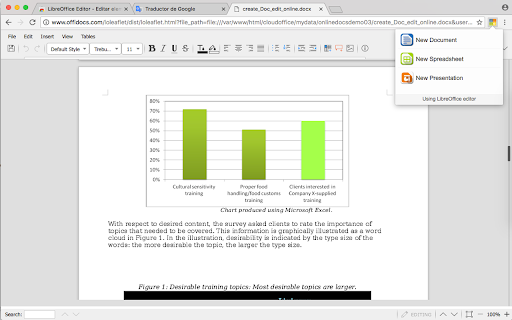
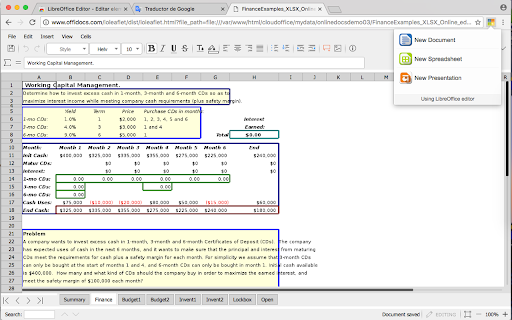
LibreOffice Editor is a Chrome extension that allows to create, edit and view any Microsoft Word document, Excel spreadsheet and Powerpoint slide. It is an integration with LibreOffice Online and a file manager in order to handle all your documents when online. It is a document, spreadsheet and presentation editor integrated with our file manager to manage only "Office" file types with this online app. Its main features are: 1) It provides direct access to create a doc, xls or ppt document from scratch with this LibreOffice Editor. 2) It detects when you access to an "Office" document, and it opens it directly using this LibreOffice Editor. Its architecture are split in three modules. A) LibreOffice Editor Online, which contains the following features: - Create, edit and view XLS spreadsheets written using OpenOffice Calc, LibreOffice Calc or Microsoft Excel. - Create, edit and view DOC…

Listing SEO keywords

Search intent keywords
Keyword signals for evaluating how users may discover, compare, or search for this extension category.

Core discovery

LibreOffice Online EditorEdit Word documents onlineOnline Excel spreadsheet editorCloud office file manager

Comparison

Google DriveMicrosoft OfficeLibreOffice Desktop

Problem

slow online editoroffice extension crashingedit doc files in chrome

Alternative

Online Office SuiteBrowser Document Editor

Similar extensions

Jump to related discovery paths:

FAQ

What is LibreOffice Editor mainly used for?
An online document, spreadsheet, and presentation editor integrated with the OffiDocs platform. It enables users to handle DOC, XLS, and PPT files within Chrome, featuring auto-save and PDF export capabilities.
What market signals stand out?
Visible niche traction with moderate review base. Last known update: 03/20/2026.
What should builders compare before entering this space?
Compare install concentration, rating quality, update recency, screenshots, developer portfolio, listing claims, and review-backed friction signals.
Is this page review-backed?
Backed by review samples. This page combines store metadata with selected review signals, while raw store metrics remain visible for comparison.

Screenshots

LibreOffice Editor screenshot

Links

Recommended Chrome extensions

Related listings from the same category, trending peers, and the same publisher portfolio.

Browse workflow
Audio editor online X-Audacity icon

Audio editor online X-Audacity

officeonlinesystems

Audio editor online to edit your audios, remove noise, cut and combine clips, and apply special audio effects

Installs

400K+

Rating

2.8

Gimp online - image editor and paint tool icon

Gimp online - image editor and paint tool

officeonlinesystems

Create and edit images and photos with Gimp Online

Installs

300K+

Rating

2.6

Awesome Screen Recorder & Screenshot icon

Awesome Screen Recorder & Screenshot

Screen Recorder

The best screen recorder and screen capture & screenshot tool to record screen.

Installs

3.0M+

Rating

4.7

Free Download Manager icon

Free Download Manager

Free Download Manager.ORG

Free Download Manager integration with browser

Installs

3.0M+

Rating

4.2

夸克网盘-网页嗅探 icon

夸克网盘-网页嗅探

广州市动悦信息技术有限公司

识别到网页资源时,可一键存夸克网盘

Installs

3.0M+

Rating

1.7

Mendeley Web Importer icon

Mendeley Web Importer

Mendeley

Fast, convenient import of references and PDFs to your Mendeley Reference Manager library.

Installs

3.0M+

Rating

2.3

Enable local file links icon

Enable local file links

Takashi Sugimoto (tksugimoto)

Make it possible to open by click a link to a local file that is disabled by Chrome.

Installs

3.0M+

Rating

3.9

Pop up blocker for Chrome™ - Poper Blocker icon

Pop up blocker for Chrome™ - Poper Blocker

dingosolutions

Block popups, ads, cookie requests, trackers, notifications, ads on social media & more. A clean browsing experience starts today.

Installs

2.0M+

Rating

4.8

Momentum icon

Momentum

Momentum

Transform your browser into a beautifully designed tab that helps you feel calm, keep focus, and stay energized.

Installs

2.0M+

Rating

4.5

Google Scholar PDF Reader icon

Google Scholar PDF Reader

scholar-chrome-extensions

Supercharge your paper reading: follow references, skim outline, jump to figures, cite and save.

Installs

2.0M+

Rating

4.1