Keep Awake icon

Keep Awake Chrome Extension Analysis

Automation & Workflow Efficiency

Chrome extension ID: bijihlabcfdnabacffofojgmehjdielb

This extension provides granular control over system sleep and display settings on Chrome OS. It enables users to prevent their devices from entering sleep mode or dimming the screen via a simple icon-based toggle system in the browser interface.

Version:1.9
Size:30.73KiB
Last updated:

Overview

Installs

500K+

Rating

4.0

506 reviews

Languages

1 locales

Includes English

Market analysis

Review-backed positioning, friction, and market signals for this Chrome extension.

Backed by review samples

Macro category

Automation & Workflow Efficiency

Pricing friction

Low review signal

Complaint intensity

High review signal

Listing & review signals
Observed signals from store listing text and review samples.

Listing positioning

Keep Awake is positioned as a utility to override Chrome OS power-saving settings. It offers three distinct modes: screen-on, system-awake, and default power-management behavior.

Inferred product pattern

Single-purpose utility tool that leverages low-level Chrome APIs, historically susceptible to OS-level permission and API changes.

Review-backed pain points

Users report that the extension frequently fails to function after system reboots, requires manual toggling to re-engage, and in some cases, appears to interfere with native power settings permanently even after uninstallation.

Observed feature gaps

Lack of reliable lid-closed support for all devices, inconsistent performance across different ChromeOS hardware builds, and lack of automatic state restoration after system power cycles.

Tags
Power ManagementChromeOS UtilitySystem ControlProductivity
Target users

- ChromeOS users

- Chromebook owners

- Long-term file uploaders

- Multimedia users

Primary use cases

- Preventing system sleep during large file transfers

- Keeping the screen active for presentations or media

- Managing background tasks that require active network connections

Positive themes

- Simple utility concept

- Effective for basic keep-awake tasks on older hardware

Negative themes

- Intermittent functionality

- Persistence issues after reboot

- Potential system conflicts causing boot loops or sleep issues

- Failure to wake on specific Chromebook models

Observed friction

- Performance complaints detected

- The extension is free to use; no pricing friction reported.

Evidence boundary: Analysis based on 506 reviews including 14 specific samples across varying ChromeOS versions and hardware models. Review samples span a wide timeframe (2012–2023), reflecting legacy ChromeOS issues that may not apply to current OS versions.
Complaint summaries
Review-backed complaint signals grouped by operational area.

Support

No official support channels identified; users express frustration over lack of updates and unresolved bugs.

Reliability

High incidence of reliability complaints regarding sleep-mode failure, post-uninstallation system behavior, and inconsistency across hardware generations.

Privacy

No privacy complaints reported.

Access & pricing

- Free usage observed

- No account requirement observed

- Free plan or free usage claimed

Store listing facts

Listing assets

- Screenshots: 1

- Videos: 0

- Languages: 1

Trust signals

- Developer contact

- Official website

Store metadata

- Version: 1.9

- Size: 30.73KiB

- Last updated:

Store description excerpt
Short excerpt from the public Chrome Web Store listing; full copy is available on the official store page.
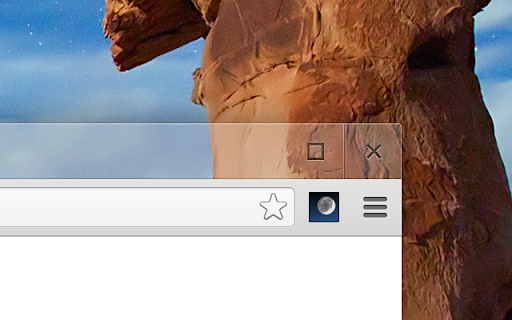
This extension makes it easy to temporarily disable power management on Chrome OS. It adds an icon in the upper-right corner of the browser that can be clicked to switch between modes where the screen is kept on (sun icon), the system is prevented from sleeping (sunset), or power-saving settings are left unchanged (moon). ---- Frequently-asked questions: * Will this extension prevent a Chromebook from suspending when its lid is closed? No, but if an external display is connected, recent versions of Chrome OS will remain awake when the lid is closed. * What's the difference between the "screen is kept on" and "system is prevented from sleeping" modes? When the system is prevented from sleeping (sunset icon), network connections will remain active; this may be useful if using e.g. the Secure Shell app. The screen will still dim and turn off eventually, though. In the "screen is kept on" m…

Listing SEO keywords

Search intent keywords
Keyword signals for evaluating how users may discover, compare, or search for this extension category.

Core discovery

ChromeOS keep awakeprevent chromebook from sleepingdisable chromebook sleep modekeep screen on extension

Comparison

keep awake alternativeprevent sleep extension chrome

Problem

chromebook won't stop sleepingchromebook sleep settings fix

Alternative

Caffeine for Chromestay awake chrome extension

Similar extensions

Jump to related discovery paths:

FAQ

What is Keep Awake mainly used for?
This extension provides granular control over system sleep and display settings on Chrome OS. It enables users to prevent their devices from entering sleep mode or dimming the screen via a simple icon-based toggle system in the browser interface.
What market signals stand out?
Established adoption with moderate review base. Last known update: 08/04/2023.
What should builders compare before entering this space?
Compare install concentration, rating quality, update recency, screenshots, developer portfolio, listing claims, and review-backed friction signals.
Is this page review-backed?
Backed by review samples. This page combines store metadata with selected review signals, while raw store metrics remain visible for comparison.

Screenshots

Keep Awake screenshot

Links

Website: google.com

Recommended Chrome extensions

Related listings from the same category, trending peers, and the same publisher portfolio.

Browse workflow