LeechBlock NG icon

LeechBlock NG Chrome Extension Analysis

Automation & Workflow Efficiency

Chrome extension ID: blaaajhemilngeeffpbfkdjjoefldkok

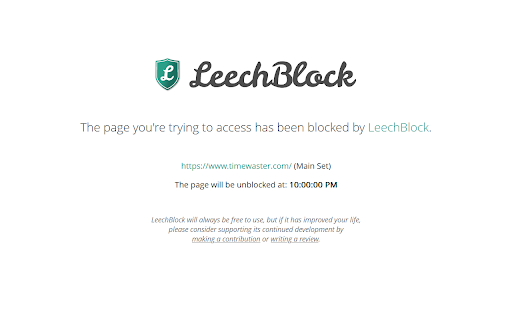
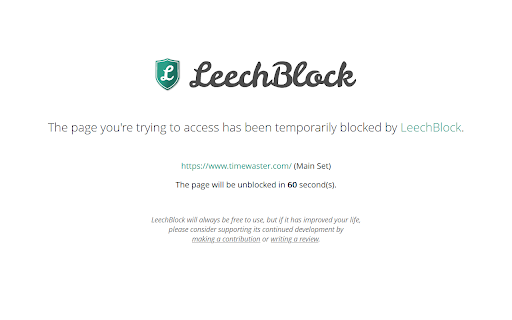
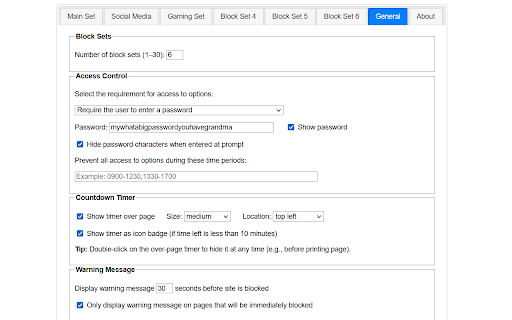
This extension allows users to block specific websites or subdomains based on flexible criteria, including fixed time periods, elapsed usage time, or lockdown modes. It is a utility focused on behavioral change through enforced constraints, offering features like password protection for settings and whitelist exceptions.

Developer:James Anderson
Version:1.7.2
Size:424KiB
Last updated:

Overview

Installs

100K+

Rating

4.9

1,447 reviews

Languages

7 locales

Includes Deutsch, English, Tiếng Việt, español...

Market analysis

Review-backed positioning, friction, and market signals for this Chrome extension.

Backed by review samples

Macro category

Automation & Workflow Efficiency

Pricing friction

Low review signal

Complaint intensity

Moderate review signal

Listing & review signals
Observed signals from store listing text and review samples.

Listing positioning

LeechBlock NG is positioned as a free, highly customizable productivity tool designed to help users eliminate digital distractions. It emphasizes granular control over blocking schedules, time limits, and specific URL patterns to improve focus during the workday.

Inferred product pattern

Free, open-source, community-driven productivity utility with complex rule-based configuration.

Review-backed pain points

Users struggle with the perceived complexity of the settings UI and occasional reliability issues where the blocking logic fails to trigger or triggers when not intended.

Observed feature gaps

Users have requested more detailed analytics/statistics pages to track time spent per day, and some find the dated or minimalist UI difficult to navigate for complex rules.

Tags
ProductivityWebsite BlockerFocus ToolTime ManagementDeep Work
Target users

- Students

- Remote workers

- Professionals struggling with procrastination

- Users seeking free distraction-blocking tools

Primary use cases

- Blocking time-wasting websites

- Enforcing work-session focus

- Setting daily time limits for specific sites

- Implementing lockdown modes for deep work

Positive themes

- High customizability of blocking rules

- Truly free with no ads or hidden paywalls

- Effectiveness in building self-control and focus

- Developer transparency and community-focused approach

Negative themes

- Inconsistent blocking behavior or failure to trigger

- Complexity of the user interface for configuration

- Potential conflicts with other browser processes or specific platforms like Spotify

- Lack of functionality in incognito mode (by default)

Observed friction

- Performance complaints detected

- None; the product is consistently praised for being entirely free with no paywalls.

Evidence boundary: Evidence is derived from over 1,400 user reviews, highlighting strong satisfaction with its free, no-nonsense model, tempered by reports of UI complexity and technical reliability issues. Review samples represent a subset of the total user base; individual technical issues may be specific to user environment configurations.
Complaint summaries
Review-backed complaint signals grouped by operational area.

Support

No significant complaints regarding support; negative reviews focus on technical glitches or usability rather than support quality.

Reliability

Some users report intermittent failures in site blocking or timing logic, with specific mentions of issues when using certain apps like Spotify or on specific Chrome/OS versions.

Privacy

None identified in the sample set.

Access & pricing

- Free usage observed

- No account requirement observed

- Free plan or free usage claimed

Store listing facts

Listing assets

- Screenshots: 4

- Videos: 0

- Languages: 7

Trust signals

- Developer contact

- Official website

- Support link

Store metadata

- Version: 1.7.2

- Size: 424KiB

- Last updated:

Store description excerpt
Short excerpt from the public Chrome Web Store listing; full copy is available on the official store page.
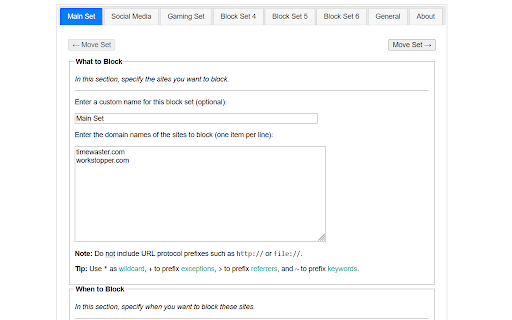
LeechBlock NG (Next Generation) is a simple free productivity tool designed to block those time-wasting sites that can suck the life out of your working day. (You know: the ones that rhyme with 'Blue Cube', 'Space Hook', 'Sticky Media', 'Quitter', and the like.) All you need to do is specify which sites to block and when to block them. You can specify up to 30 sets of sites to block, with different times and days for each set. You can block sites within fixed time periods (e.g., between 9am and 5pm), after a time limit (e.g., allow up to 10 minutes in every hour), or with a combination of time periods and time limit (e.g., allow up to 10 minutes in every hour between 9am and 5pm). Additional features include: • Lockdown: Block sites immediately for a specified duration. • Access control: Set a password or random access code for the options page, to slow you down in moments of weakness!…

Listing SEO keywords

Search intent keywords
Keyword signals for evaluating how users may discover, compare, or search for this extension category.

Core discovery

website blocker extensionblock distracting sites chrometime management toolfocus browser extension

Comparison

LeechBlock vs Cold Turkeyfree website blocker for chrome

Problem

stop procrastinatinghow to block websites on chromechrome extension not blocking

Alternative

best free site blockerdistraction free chrome

Similar extensions

Jump to related discovery paths:

FAQ

What is LeechBlock NG mainly used for?
This extension allows users to block specific websites or subdomains based on flexible criteria, including fixed time periods, elapsed usage time, or lockdown modes. It is a utility focused on behavioral change through enforced constraints, offering features like password protection for settings and whitelist exceptions.
What market signals stand out?
Established adoption with substantial review base. Last known update: 04/27/2026.
What should builders compare before entering this space?
Compare install concentration, rating quality, update recency, screenshots, developer portfolio, listing claims, and review-backed friction signals.
Is this page review-backed?
Backed by review samples. This page combines store metadata with selected review signals, while raw store metrics remain visible for comparison.

Screenshots

LeechBlock NG screenshot

Links

Recommended Chrome extensions

Related listings from the same category, trending peers, and the same publisher portfolio.

Browse workflow