Otter.ai: Record & Transcribe Meetings - Google Meet & Web Audio icon

Otter.ai Chrome Extension Analysis

AI & Writing Assistants

Store listing title: Otter.ai: Record & Transcribe Meetings - Google Meet & Web Audio

Chrome extension ID: bnmojkbbkkonlmlfgejehefjldooiedp

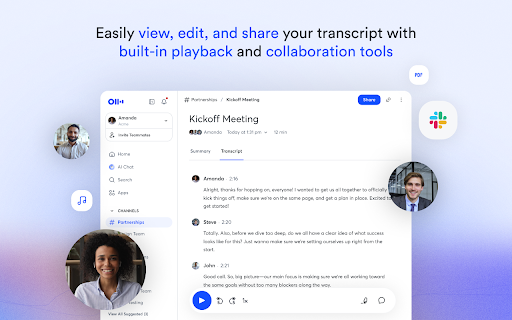
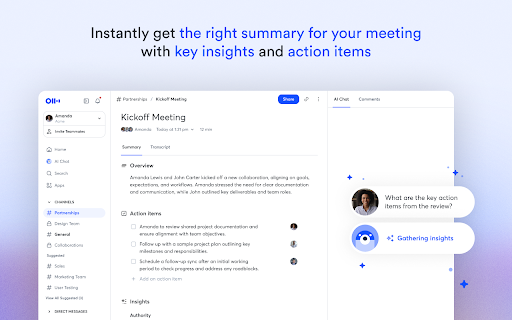
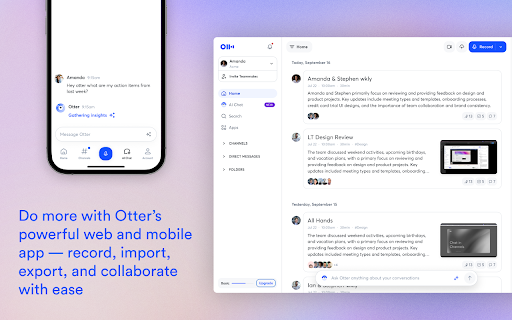
Otter.ai is a Chrome extension that provides live transcription, bulleted meeting summaries, and an AI chat interface for querying meeting content. It allows users to capture audio from various web sources and export the resulting text to tools like Google Docs and Slack.

Developer:Otter.ai
Version:3.9.2
Size:1.56MiB
Last updated:

Overview

Installs

300K+

Rating

4.1

143 reviews

Languages

1 locales

Includes English

Market analysis

Review-backed positioning, friction, and market signals for this Chrome extension.

Backed by review samples

Macro category

AI & Writing Assistants

Pricing friction

Moderate review signal

Complaint intensity

High review signal

Listing & review signals
Observed signals from store listing text and review samples.

Listing positioning

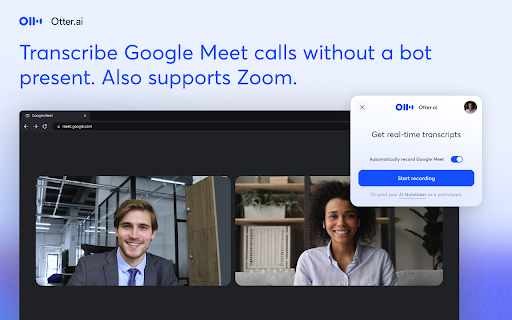
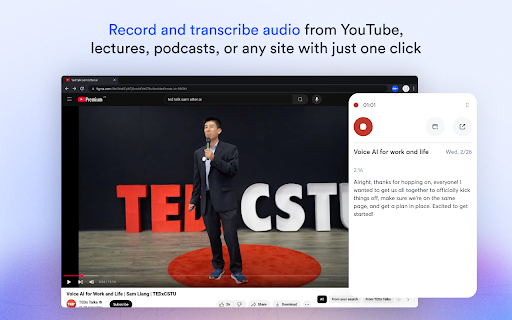
The product is positioned as a comprehensive real-time transcription and AI summary tool that integrates with major meeting platforms like Zoom, Google Meet, and Microsoft Teams. It emphasizes a 'no-bot' experience for Google Meet and the ability to transcribe any browser tab with audio, including YouTube and online lectures.

Inferred product pattern

AI-driven transcription layer that converts web-based audio into structured notes and searchable text.

Review-backed pain points

Users report significant frustration with the AI Notetaker bot joining meetings late or not at all, as well as strict refusals for refunds and a limited 300-minute monthly free tier.

Observed feature gaps

Lack of native support for non-mainstream meeting platforms (e.g., Zoho, Apple tools) and a missing universal 'one-click' record button that works independently of platform integration.

Tags
AI TranscriptionMeeting AssistantLive CaptionsAI SummaryProductivity Tool
Target users

- Remote professionals

- Students

- Meeting organizers

- Content creators

- Language learners

Primary use cases

- Automating meeting notes

- Transcribing online lectures

- Creating captions for YouTube videos

- Analyzing meeting insights via AI chat

Positive themes

- Strong core web application functionality

- General utility of automated transcription

Negative themes

- Intrusive or unreliable AI bot behavior

- Poor customer support and refund policies

- Restrictive free tier limits

- Redundant UI steps compared to the web app

- Transcription inaccuracies in non-English languages

Observed friction

- Free-tier complaints detected

- Refund complaints detected

- Performance complaints detected

- Privacy complaints detected

- Complaints regarding the limited 300-minute monthly free allowance and reported difficulty obtaining refunds for paid subscriptions.

Evidence boundary: Data extracted from the store listing and a sample of low-rating, helpful reviews. The provided review sample consists exclusively of 1-star ratings, which may skew sentiment analysis despite the product's 4.07 average rating.
Complaint summaries
Review-backed complaint signals grouped by operational area.

Support

Users described customer service as unhelpful, citing a lack of resolution for technical issues and rigid refund denials.

Reliability

Reports of the AI Notetaker bot joining meetings very late (up to 10 minutes), failing to join automatically, or disconnecting prematurely.

Privacy

Some users expressed discomfort with the bot's presence in meetings, citing a lack of control over what is recorded and a general sense of intrusion.

Access & pricing

- Free entry with paid features

- Account required for core usage

- Limited free usage observed

Store listing facts

Listing assets

- Screenshots: 5

- Videos: 0

- Languages: 1

Trust signals

- Privacy policy

- Developer contact

- Official website

- Support link

Store metadata

- Version: 3.9.2

- Size: 1.56MiB

- Last updated:

Store description excerpt
Short excerpt from the public Chrome Web Store listing; full copy is available on the official store page.
Otter.ai Chrome Extension offers real-time transcription, AI-powered summaries, and ChatGPT-style Chat to online meetings and any tab with audio—all inside Chrome. Compatible with Zoom, Microsoft Teams, and Google Meet. No-bot in Teams or Google Meet. Also compatible with YouTube, Coursera, online lectures, podcasts, and any website on Chrome browser. KEY FEATURES - Live transcription & captions – High accuracy so you never miss a word - Smart meeting summaries – bullet points, action items, and insights after the call. - AI chat with your meeting – Ask “What’s the deadline?” or “Summarize next steps” and get instant answers. - No-bot in Google Meet – no extra participant joins your call. - YouTube captions – Great for high-quality transcripts and language learning. - Works everywhere – from webinars and online classes to Twitter/X Spaces and LinkedIn Live - Search & share – locate any…

Listing SEO keywords

Search intent keywords
Keyword signals for evaluating how users may discover, compare, or search for this extension category.

Core discovery

live transcription chrome extensionAI meeting summariesGoogle Meet transcriberYouTube audio to text

Comparison

Otter.ai vs ActionPoint.aibest AI meeting assistant

Problem

how to transcribe google meetautomatic meeting notesrecord web audio

Alternative

Otter.ai alternativesAI notetaker for zoom

Similar extensions

Jump to related discovery paths:

FAQ

What is Otter.ai mainly used for?
Otter.ai is a Chrome extension that provides live transcription, bulleted meeting summaries, and an AI chat interface for querying meeting content. It allows users to capture audio from various web sources and export the resulting text to tools like Google Docs and Slack.
What market signals stand out?
Established adoption with moderate review base. Last known update: 04/15/2026.
What should builders compare before entering this space?
Compare install concentration, rating quality, update recency, screenshots, developer portfolio, listing claims, and review-backed friction signals.
Is this page review-backed?
Backed by review samples. This page combines store metadata with selected review signals, while raw store metrics remain visible for comparison.

Screenshots

Otter.ai: Record & Transcribe Meetings - Google Meet & Web Audio screenshot

Links

Website: otter.ai

Privacy policy: https://otter.ai/privacy

Support links: https://help.otter.ai

Recommended Chrome extensions

Related listings from the same category, trending peers, and the same publisher portfolio.

Browse workflow