JunkFill icon

JunkFill Chrome Extension Analysis

Automation & Workflow Efficiency

Chrome extension ID: cajejbcjfkhgmfbapmhopccephhjedeb

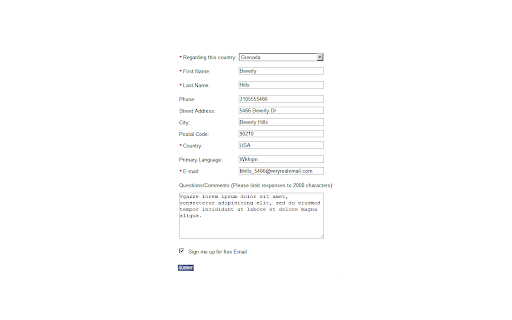
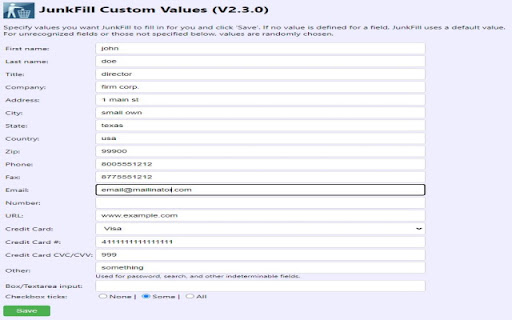
This extension allows users to automatically fill out various HTML form elements, including text boxes, radio buttons, checkboxes, and dropdown lists. It features custom data support and is designed to operate locally within the browser for privacy.

Developer:rhashemian
Version:2.3.1
Size:71.28KiB
Last updated:

Overview

Installs

1.0M+

Rating

4.0

98 reviews

Languages

1 locales

Includes English

Market analysis

Review-backed positioning, friction, and market signals for this Chrome extension.

Backed by review samples

Macro category

Automation & Workflow Efficiency

Pricing friction

Low review signal

Complaint intensity

Moderate review signal

Listing & review signals
Observed signals from store listing text and review samples.

Listing positioning

JunkFill is positioned as a utility to expedite form-filling tasks by auto-populating fields with random or custom data. It serves both as a time-saving tool for end-users and a diagnostic helper for developers testing web forms.

Inferred product pattern

Utility-focused, legacy-style browser extension for DOM manipulation.

Review-backed pain points

Users frequently request the ability to leave fields blank, support for complex HTML5 fields, and more robust configuration options for handling different form scenarios.

Observed feature gaps

Missing advanced features such as triggerable form events (onChange, onBlur), multiple user profiles, and granular controls for specific field types.

Tags
Form FillerData AutomationWeb TestingProductivity
Target users

- Web Developers

- QA Testers

- General Power Users

Primary use cases

- Automated form testing

- Rapid web form population

- Bypassing repetitive data entry

Positive themes

- Saves significant time for repetitive tasks

- Highly useful for development and testing environments

- Simple and effective automation

Negative themes

- Lack of support for modern HTML5 input types and contenteditable elements

- Difficulty with specific field types like checkboxes or hidden inputs

- Lack of multiple profile/custom configuration support

Observed friction

- Performance complaints detected

- No pricing friction observed; the extension is free and does not present payment gates.

Evidence boundary: Evidence is derived from a mix of user reviews dating from 2013 to 2018 and the provided listing metadata. Review data is dated and may not reflect current performance following the transition to Manifest V3.
Complaint summaries
Review-backed complaint signals grouped by operational area.

Support

Limited evidence of active support, with users expressing frustration over lack of requested features.

Reliability

Some reports of intermittent functionality or failure to interact correctly with specific web elements like checkboxes or date fields.

Privacy

None reported; the listing emphasizes local-only data handling.

Access & pricing

- Free usage observed

- No account requirement observed

- Free plan or free usage claimed

Store listing facts

Listing assets

- Screenshots: 2

- Videos: 0

- Languages: 1

Trust signals

- Developer contact

- Official website

- Support link

Store metadata

- Version: 2.3.1

- Size: 71.28KiB

- Last updated:

Store description excerpt
Short excerpt from the public Chrome Web Store listing; full copy is available on the official store page.
Use JunkFill to auto-populate/auto-fill all form elements on any web page with custom or random data and get to your target page quick. JunkFill fills text boxes, selects, radio buttons and checkboxes, populates text areas, and handles dropdown lists. It's even semi-judicious with the responses. Privacy Policy This extension is completely private. All data saved using this extension are kept locally on the browser and available only to the user. This extension does not collect nor transmit any data to any parties. V 2.3.1 - Suggested keypress shortcut Ctrl+Shift+Period (Thanks Daniel M. for feedback) - Small bug fixes V 2.3.0: - Upgraded to manifest V3 - Bug fixes - Enhancements for more precise form filling V 2.2.1: - Bug fixes V 2.2: - Credit card support - Enhancements and bug fixes V 2.1: - Support for some HTML5 input field types such as tel, email, and url. V 2.0: - Compatible wit…

Listing SEO keywords

Search intent keywords
Keyword signals for evaluating how users may discover, compare, or search for this extension category.

Core discovery

auto fill web formschrome form filler extensionfill form with junk dataweb testing automation tool

Comparison

form filler alternativesautomated data entry plugin

Problem

long web formsrepetitive form entry

Alternative

autofill extensiondata entry automation

Similar extensions

Jump to related discovery paths:

FAQ

What is JunkFill mainly used for?
This extension allows users to automatically fill out various HTML form elements, including text boxes, radio buttons, checkboxes, and dropdown lists. It features custom data support and is designed to operate locally within the browser for privacy.
What market signals stand out?
Large installed base with limited review base. Last known update: 12/30/2021.
What should builders compare before entering this space?
Compare install concentration, rating quality, update recency, screenshots, developer portfolio, listing claims, and review-backed friction signals.
Is this page review-backed?
Backed by review samples. This page combines store metadata with selected review signals, while raw store metrics remain visible for comparison.

Screenshots

JunkFill screenshot
JunkFill screenshot

Links

Recommended Chrome extensions

Related listings from the same category, trending peers, and the same publisher portfolio.

Browse workflow