MultiPassword — Password manager icon

MultiPassword Chrome Extension Analysis

Privacy, Security & Ad Blockers

Store listing title: MultiPassword — Password manager

Chrome extension ID: cnlhokffphohmfcddnibpohmkdfafdli

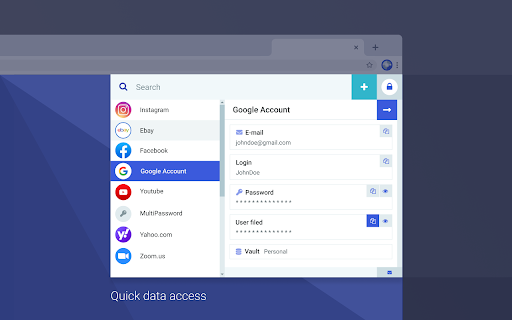
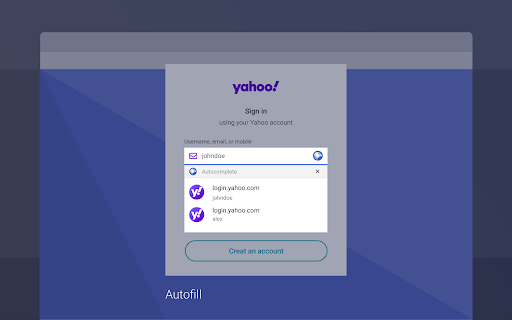
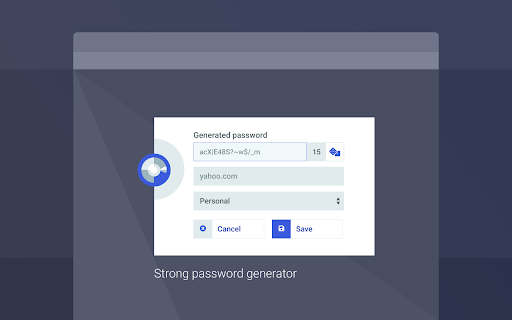
An encrypted password vault that stores logins and sensitive data, syncing them across multiple devices and browsers. It provides tools for generating strong passwords and automating the filling of web forms to improve user efficiency and security.

Developer:MultiPassword
Version:0.99.32
Size:2.73MiB
Last updated:

Overview

Installs

1.0M+

Rating

4.8

515 reviews

Languages

7 locales

Includes Deutsch, English, español, français...

Market analysis

Review-backed positioning, friction, and market signals for this Chrome extension.

Backed by review samples

Macro category

Privacy, Security & Ad Blockers

Pricing friction

Moderate review signal

Complaint intensity

Moderate review signal

Listing & review signals
Observed signals from store listing text and review samples.

Listing positioning

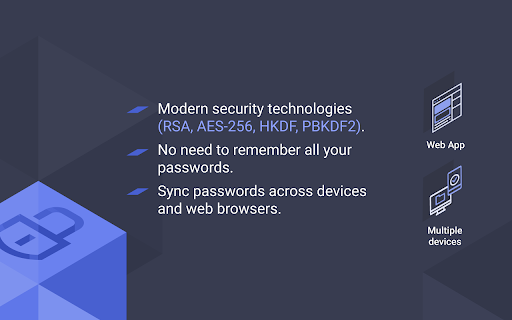
MultiPassword positions itself as a secure, reliable password and login manager designed to mitigate cybersecurity risks. It emphasizes the use of high-grade end-to-end encryption (AES-256, RSA) and the necessity of unique passwords for every account.

Inferred product pattern

Cross-platform encrypted vault with automated web-form injection and synchronization.

Review-backed pain points

Users expressed frustration over perceived pricing tiers that link security levels to paid plans, as well as occasional synchronization failures between different browser ecosystems.

Observed feature gaps

Lack of an export function for IDs and passwords into Excel or PDF formats, and lack of visibility regarding two-factor authentication (2FA) settings.

Tags
Password ManagerCybersecurityData EncryptionCross-Device SyncAuto-Fill
Target users

- Security-conscious individuals

- Users managing multiple online accounts

- Business teams

- Frequent online shoppers

Primary use cases

- Securely storing and organizing passwords

- Synchronizing login credentials across devices

- Generating strong random passwords

- Automating the filling of complex web forms

Positive themes

- Efficient automatic form filling

- Reliable cross-device synchronization

- Simple installation and setup process

- Peace of mind regarding data security

Negative themes

- Perceived lack of security in the free tier

- Steeper learning curve for non-technical users

- Dated or 'geeky' user interface

- Occasional errors in form field recognition

Observed friction

- Free-tier complaints detected

- One user strongly criticized the monetization strategy, claiming that high-level security is reserved for paid plans, which they perceived as making the free version intentionally insecure.

Evidence boundary: Analysis based on the Chrome Web Store listing and 10 representative user reviews in multiple languages. Small sample size of reviews may not represent the entire user base; some feedback is generic.
Complaint summaries
Review-backed complaint signals grouped by operational area.

Support

No specific support or account-related complaints were observed in the review samples.

Reliability

Some reports of issues regarding the ability of the app to update and sync passwords consistently across different platforms, such as Microsoft and Google.

Privacy

No direct privacy breaches reported, though one user expressed general anxiety about the potential for the service to be hacked.

Access & pricing

- Free entry with paid features

- Account required for core usage

- Limited free usage observed

Store listing facts

Listing assets

- Screenshots: 4

- Videos: 0

- Languages: 7

Trust signals

- Privacy policy

- Developer contact

- Official website

Store metadata

- Version: 0.99.32

- Size: 2.73MiB

- Last updated:

Store description excerpt
Short excerpt from the public Chrome Web Store listing; full copy is available on the official store page.
MultiPassword is a secure, reliable password and login manager. All data is stored in encrypted form and synced across devices. Cybersecurity is an important, relevant issue because websites, apps, and web browsers are often attacked. This sometimes results in user passwords being stolen. The problem worsens if a user uses the same logins and passwords for different websites. Doing so allows attackers to gain access to e-mail addresses, social media accounts, banking apps, and more. Cybersecurity experts advise using strong and — extremely important — different passwords for each account. The best option is to create random passwords using dedicated password generators. MultiPassword stores all your logins and passwords in an encrypted vault synced across all your devices. We use the latest end-to-end encryption technologies AES-256, RSA, HKDF, PBKDF2, etc., to protect your personal dat…

Listing SEO keywords

Search intent keywords
Keyword signals for evaluating how users may discover, compare, or search for this extension category.

Core discovery

secure password managerencrypted login vaultcross device password syncAES-256 password storage

Comparison

MultiPassword vs 1PasswordMultiPassword vs LastPassbest encrypted password managers

Problem

stolen passwordsmanaging multiple loginspassword security risksforgetting passwords

Alternative

MultiPassword alternativesecure password storage alternative

Similar extensions

Jump to related discovery paths:

FAQ

What is MultiPassword mainly used for?
An encrypted password vault that stores logins and sensitive data, syncing them across multiple devices and browsers. It provides tools for generating strong passwords and automating the filling of web forms to improve user efficiency and security.
What market signals stand out?
Large installed base with moderate review base. Last known update: 06/25/2026.
What should builders compare before entering this space?
Compare install concentration, rating quality, update recency, screenshots, developer portfolio, listing claims, and review-backed friction signals.
Is this page review-backed?
Backed by review samples. This page combines store metadata with selected review signals, while raw store metrics remain visible for comparison.

Screenshots

MultiPassword — Password manager screenshot

Links

Recommended Chrome extensions

Related listings from the same category, trending peers, and the same publisher portfolio.

Browse workflow